
oiaflgidamnacconnnjgdljpdmdfilli
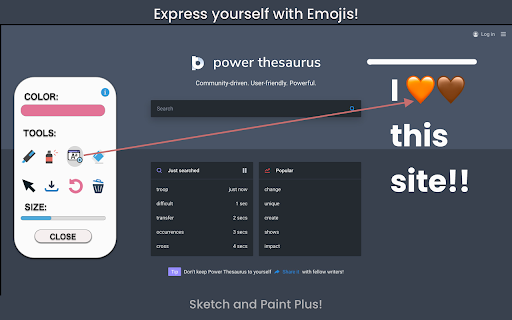


Draw, paint, doodle, add text and emojis on browser tabs. Then save your creative art and decorations to share later. Sketch and Paint Plus is a writing, sketching and painting extension for your Chrome™ browser tab. Explore your creativity and customize any website tab by adding text, emojis, lines, or add a dash of color with the marker or highlighter tools to get the picture perfect tab. When you’re done, download your artistic creations as screenshots with the download tool. Features: * Color Picker: Select a color for the text and line. * Marker/Pencil tool: Draw or paint anything with the selected color and point size. * Spray paint tool: Spray your tabs with any color you desire. * Text and Emoji tool: Add text and fun emojis to your tabs to enhance your creativity. * Eraser: Erase some or all of your drawings or text. * Screenshot/Download: Save your sketch, shapes, or creations to your computer. * Lines (hold Shift): Create adjoining lines for your shapes. * Undo tool: Either click the buttons, or use the keyboard shortcut (CTRL+Z or CMD+Z) to undo as many times as you like to make it picture perfect). —————————— According to the rules of the Chrome™ Web Store, this extension will not work on the store pages, new tab and home page. Please open any other website (for example, google.com) after installing this extension to start having fun!

Paint Online - Drawing Tool
Sketch fun drawings directly on web pages using the paint tool. Capture your art with a quick screenshot. Classic MS Paint in the browser, with extra features. The paint on tab tool has a simple and easy-to-use design. It is not confusing, and easily recognizable icons are used in the app, which makes it easy for everyone to use. Paint Tool is a fun extension on Google Chrome which lets you annotate any page you want and share it with your friends. Paint enables you to draw on any webpage with various tools to express your thoughts, make a point or edit. The plus points of Paint extension are: - Draw on any webpage in your browser. - Make shapes with the magic marker. - Write with the text tool. - Take screenshot to share your creativity. Using this Paint Online, you can share your feelings about a webpage and then share it with your friends.

Draw on Page
Easily draw on any website with simple drawing tools, then print the result. Draw on Page is a browser extension that lets you draw on any website. Please first navigate to a website, then press on the toolbar button to activate the add-on. Once the interface appears on the page, please choose the desired mode. Currently, there are two modes available, Drawing Mode and Brushing Mode. Brushing mode is for drawing with mouse or pen (touch-enabled devices) on the page. You can choose a pencil, circle, or spray brush in this mode. There is also an option to change the color and width of the brushing tool from the UI. The other mode is for drawing shapes (Drawing Mode). When you select this mode, five different primitive shapes are available to choose from the UI. Once you click on a shape, it will be added to the screen. You can drag and drop, remove, resize, or rotate and zoom objects on the screen. To print the page with your drawings on it, please press on the print button at the top left corner of the screen. Once you are done with the drawing, please close the interface by pressing on the close button at the top left corner or pressing on the toolbar button once. Before closing, you can save your drawings by pressing on the - Save - button at the bottom of the UI. Note: this extension uses fabric.js (https://github.com/fabricjs/fabric.js) open-source JavaScript project for drawing on the HTML5 canvas element. If you have a feature request or found a bug to report, please fill the bug report form on the addon's homepage (https://mybrowseraddon.com/draw-on-page.html).

Paint Tool for Chrome
Paint tool to draw anything and anywhere in real-time, paint online. Take a screenshot of your drawing use screenshot tool. Paint Tool - draw on any website, add text, add lines, and highlight! With Web Paint, you can use your mouse or touchscreen to draw on the web or on PDF and save it to your computer. Paint, draw, and mark on any webpage or website. Whether you're a student, a professional, or just someone who loves browsing the web is a must-have extension. You'll have access to an array of advanced annotation tools, including a pencil, highlighter, color picker, arrow, polygon, text, emoji, and more. Easy to set up extension: 1. Install the Web Paint extension, and reload the page to let the extension work. 2. Click on the extension whenever you need to draw or highlight something. 3. Drawings are automatically saved. 4. Take Screenshot. 5. Reload the page to exit the draw mode from the browser. Accustomed to reading books and highlighting important texts or just wanted to draw on any website in real time in the comfort of your browser or want to share your screen for cases like reporting technical issues, making product demos or how-to tutorials? Here are reasons to choose our extension: 1. Has all the features of MS Paint. 2. Adjustable thickness, transparency, and preset color. 3. Take a screenshot of the page. Paint Online is lite weight and a free extension for Chrome that can be used for educational purposes and introduce anyone to drawing right from your browser. In addition, it can practice the alphabet, numbers, and paintings while educating. The creation of a screen capture is easy as it ever could be. Choose from the full-screen or partial area and take it in a click. Then you can fully customize screenshot like add text, drawing lines, arrows, and shapes. You can share your images on Pinterest board. It also contains the functions you need: - Hot-keys to each tool - Save drawing with a screenshot option - Save image to your PC or Print - Crop the necessary area of an image and save it Important Notice After installation/update, please reload the active tabs in your browser for the extensio to work. Rate us! We work hard to provide you with the best experience for Chrome. If you like our extension, please provide us with a 5 star rating!

Web Paint
Web Paint can draw shapes and add texts to any website. Take screenshot using Web Paint! Web Paint app includes drawing tools and add texts to any websites. Then you can take screenshot and save to your hard drive. Paint tools: Line tool can draw a line. Insert text into website with selected color and transparency. Eyedropper can choose color from the web. Pencil is for draw line with selected line width and color. Eraser tool erase part of drawings. App contains more paint tools. Web Paint includes screenshot tool. Take a screenshot of current website with your drawings and save to your hard drive. Just click on the app icon and your painting can begin!!
