
oiaaacjagllkcoookaphpkghhiopejco
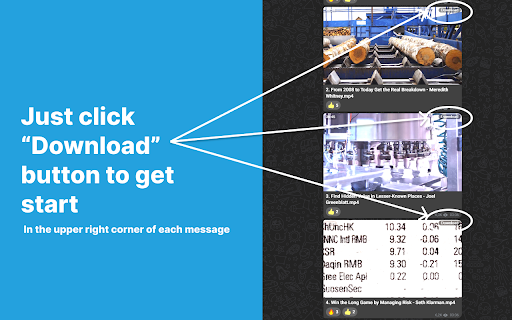


A restricted content downloader for telegram or TG, use it to download image, video, sticker, audio, voice message With this extension, you can easily download restricted content in web.telegram.org with just one click. 🚀 Features: 1. Text, image, video, audio, voice and stickers are supported. 📄📷🎥🎵 2. Tiny size (less than 1 MB) & High performance & No data collecting. ⚡ 3. Both Telegram A version and Telegram K version are supported. ✅ 4. Download messages in both public and private channels. 🔓🔒 5. Human support. 👩💻👨💻 More features are on the way. 🚧

TG Downloader | Photos, Videos, Audios
Export Telegram photos, videos, and audio files in bulk with one click. 👨🏻💻 Features ✓ One-click download of videos or movies ✓ One-click download of music or audiobooks ✓ Save audio/videos from restricted channels/groups to your local computer ✓ Save private videos or images ✓ Save private music or audiobooks ✓ Supports downloading of videos/images/photos/GIFs ✓ No need for password, API login, or permissions ✓ Simple and easy to use ⚙️ Get Started 1. Find the message you want to save 2. Click the download button below the message 🔒 Data Privacy Your data privacy is paramount. All data processing occurs on your local machine; it never transits through our servers, ensuring no one else has access to your collected data.

Telegram Video Downloader - TVDownloader
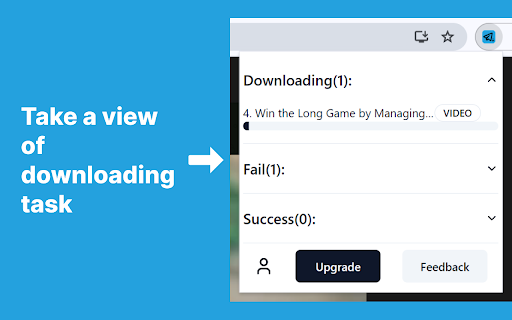
Telegram Content downloader: Restricted videos/images with a single click. (Telegram Movie Downloader) Telegram Video Downloader fully supports one-click downloads of Telegram videos (movies, audio) and more. You can watch saved Telegram videos (movies) offline anytime, anywhere on your PC or mobile device. 🚀 Key Features: 1. One-Click Download: With just one step, TG Video Downloader automatically downloads Telegram videos, images, or audio 2. High-Speed Download: Supports high-speed, unlimited downloads of content from Telegram public channels and private groups 3. Original File Titles: Preserves original file titles, making it easy for you to identify downloaded media content 4. Multi-Format Support: Compatible with various media formats supported by web.telegram.org/a and web.telegram.org/k, including MP4, MKV, FLV, and more 5. Restricted Content: Suitable for downloading restricted videos, series, , audio, photos, etc. on Telegram 6. Privacy Protection: No data collection, no password required, ensuring your privacy and security 7. Cross-Platform Support: Supports all operating systems 8. Instant Download: No need to search or input video links, or download bot, supports instant downloading 9. Free to Use: Free to use after installing the TG Video Downloader plugin 10.Batch Download: Upcoming feature for easy downloading of multiple files (Stay tuned!) 📥User Guide: How to Download Telegram Videos/Images/Audio? 1. Activate: For first-time use, please activate the plugin's download function. You can turn it off when not in use 2. Download: Simply click the download icon at the bottom right of the video/image message to complete the automatic download 3. View: Click on the download history in the upper right corner of the browser to view the downloaded video content 🔒Disclaimer: All features are developed and maintained by independent third-party developers. We strongly recommend that you comply with legal requirements and use the tool responsibly. Use TVD Telegram Video Downloader to make downloading Telegram videos easier and more efficient than ever. Download now and experience it for yourself!

Telegram Video Downloader
Use Telegram Video Downloader chrome extension to download telegram video pc and mac. Save any media with telegram video saver Are you tired of searching for ways to copy videos from channels and groups to your PC? Are you not happy with solutions that don’t work in restricted channels or chats? Look no further! Telegram video downloader has 3 core features that make it your go-to tool: 😌 Easy to install: 1. compatible with your Chrome Browser 2. compatible with Telegram web version 3. additional software not required 🛟 Safe and private: 1. saves media files to your PC 2. chat, channel or group owner doesn’t know that you loaded their media content 3. saved content accessible only from your computer ⚒️ Easy to use: 1. you can utilize right after installation 2. no setup or additional training required 3. instantly provides the only button you need FAQs about the extension with more details: 🙋 Is this telegram video saver for non-tech savvy persons? 💬 Yes. Telegram video downloader is designed for effortless downloading. With just a one click, you can download video from telegram without any hassle. Say goodbye to complicated processes and enjoy seamless downloading. 🙋 Can it be used in any channels / chats and groups? 💬 Versatility is the core feature of telegram video downloader. Whether you want to download private or public media files, this extension has got you covered. Enjoy the flexibility of downloading from Telegram. 🙋 How much time does it take to learn how to use this extension? 💬 You can start using it in seconds. It has a user-friendly Interface and is designed with simplicity in mind. Our extension offers an intuitive interface that makes telegram video download a breeze. You don't need to be tech-savvy to use it! 🙋 How fast does a downloader video telegram work? 💬 It’s fast and reliable. Experience lightning-fast download speeds and reliable performance every time you download telegram videos. Say hello to quick downloads without compromising on quality. 🙋 What software should be installed? 💬 It’s a Chrome Extension and seamlessly integrates with your Chrome browser, providing you with easy access whenever you need to download from telegram. Enjoy the convenience of downloading media right from your browser window. 🙋 How to download media files? 💬 After installation you’ll see a “download” button attached to all media files. Click to copy. Telegram video saver doesn’t require links and any other info. 🙋 Do I need to go through registration process? 💬 No, you can use telegram video downloader pc right after installation. It doesn't require: your email, credit card or telegram nickname or password. As a summary: telegram video downloader pc has got you covered and acts as: ⚒️ the ultimate solution to download telegram video. 🗣 public / 🥷 private telegram video downloader. It's ideal for multiple use-cases: 📚 for learners: save educational content on your PC and recap it when you need to/want to. 💃 for SMM specialists: find and download content for inspiration. 🕵️♀️ for content curators: collect videos and create curated playlists. 👨👩👦👦 for anyone: save media and have fun. How to use telegram downloader: 1. Install the extension: simply add to your Chrome browser. 2. Navigate to TG: go to the web version and find the video you want to download. 3. Click download: when you find the file, click on the download button provided by our extension. 4. Enjoy your downloads: sit back and relax as your media file is quickly downloaded to your computer. It's that easy! What benefits does it provide: 😌 Convenience – no more searching for unreliable file saving methods or third-party software. Telegram video downloader brings convenience to your fingertips, allowing you to copy media content from Telegram. 💪 Flexibility – chats, channels, groups - no matter where you find content you’d like to save. Telegram video downloader can be used as: private video downloader or public video downloader ⌛️ Save time – why waste time with complex copy methods if: • you can download media files in seconds with this downloader • spend less time copying files and more time enjoying your favorite content. 1️⃣ Say goodbye to complicated content loading methods and tools. 2️⃣ Feel the ultimate ease. 3️⃣ Enjoy seamless, fast, reliable downloading right from your browser. 4️⃣ Spend no time on the installation and setup process. 5️⃣ Get the benefits of staying private. ️6️⃣ Download media files from Telegram with the telegram video downloader.

Telegram Downloader - Batch download Telegram images, videos, and audio
Bulk download photos, videos, files from Telegram. Works with private channels. Original quality, fast speeds. For Telegram Web. Download Telegram photos, videos, music, voice and files effortlessly with one click. Perfect for content creators, group admins, and everyday users who want to save and archive Telegram files. 📥 One-Click Downloads - Download Telegram photos, videos, GIFs, audio files, and documents instantly - Support for both bulk downloads and selective single-file exports - Works seamlessly with Telegram Web (web.telegram.org/k) 🔐 Access Restricted Content - Download media from private channels and restricted groups - No API keys, passwords, or special permissions required - Bypass download restrictions while respecting content policies 🎯 High-Quality Media Export - Preserve original quality for all downloaded files - Support for large files (1GB+ videos download smoothly) - Multiple format support: MP4, JPG, PNG, GIF, MP3, OGG, and more ⚡ Lightning-Fast Downloads - 6x speed acceleration for faster downloads - Optimized download engine for maximum efficiency - Parallel downloading for bulk operations 🛡️ Privacy & Security First - 100% local processing - your data never leaves your device - No server uploads or cloud storage involved - Complete privacy protection for your downloads 1. Install the Extension - Add TG Downloader to your Chrome browser 2. Open Telegram Web - Navigate to web.telegram.org/k 3. Browse Content - Go to any chat, channel, or group with media 4. Start downloading - Click on the extension icon and select "Go to Batch Download" to perform batch downloads, or use the individual download button on images/videos/audio. ✨ Perfect For - Content Creators - Archive reference materials and inspiration - Group Administrators - Backup important shared media - Personal Users - Save memories, photos, and important files - Researchers - Collect and organize media for projects - Archivists - Preserve content from channels and groups Bulk Download Mode: - Browse any channel or group chat - Extension automatically detects available media - Click the button on the right to download in bulk Individual Download Mode: - Click button on each image/video to download - Choose exactly what you want to save - Perfect for selective archiving Your privacy is our priority. This extension operates entirely on your local device with no data transmission to external servers. All downloads are processed locally, ensuring your media and personal information remain completely private and secure. This is an independent browser extension developed by a third-party developer and is not officially affiliated with Telegram Inc. Please respect copyright laws and content creators' rights when downloading media. Only download content you have permission to access and use.
