
ohjphldpkknbnekcopajlhdbcndgldji
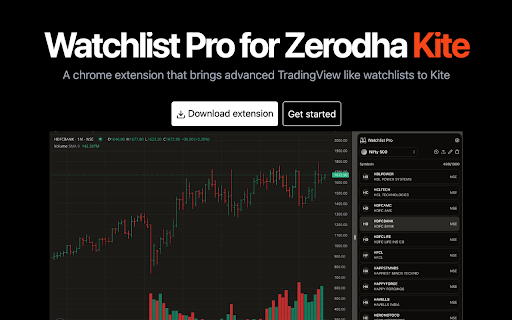


Advanced Watchlists for Zerodha Kite Watchlist Pro for Zerodha Kite – Advanced TradingView-like Watchlists Note: When installing this extension, you might see a popup saying "This extension is not trusted by Enhanced Safe Browsing." This shown when an extension is published from a recently created developer account. Click on "Continue to install" to install Watchlist Pro. Visit below mentioned website for information about this popup. Take your stock trading to the next level with Watchlist Pro for Zerodha Kite! This Chrome extension offers advanced, customizable watchlists, enabling seamless tracking of stocks just like TradingView. Boost your Zerodha Kite experience with powerful features designed for traders. Key Features: ✅ Unlimited Watchlists: Create as many watchlists as you want without limitations. 📊 Track 1000 Stocks: Effortlessly import and track up to 1000 stocks in a single watchlist. ⌨️ Easy Navigation: Navigate your stock lists using the arrow keys for a quick and efficient workflow. 📈 Open Stock Charts in Kite: Open any stock's chart directly in Zerodha Kite with a single click. 🔀 Seamless Stock Management: Move stocks between watchlists with ease. 🎨 Custom Themes: Enjoy both Light and Dark modes to suit your preferences. 🔄 Backup & Restore: Backup and restore watchlists to avoid data loss and sync across instances. 🔒 100% Privacy & Security: No access to your Zerodha Kite account information. All data stays securely on your computer. Maximize your trading efficiency with Watchlist Pro and gain full control of your stock watchlists with an intuitive, secure, and feature-packed extension. Disclaimer: All trademarks, logos, and brand names are the property of their respective owners. All company, product and service names used in this website are for identification purposes only. Use of these names, trademarks and brands does not imply endorsement.

Chartink Bridge
Extension that copies Chartink scanner widget output to clipboard and TradingView. 🧩 Chartink Bridge – Chrome Extension Description Chartink Bridge is a productivity-enhancing Chrome extension designed for stock market traders who use Chartink.com and TradingView. It seamlessly connects Chartink scanner widgets with TradingView by enabling smart ticker symbol redirection, one-click copying, and customizable ticker grouping. ⚙️ Key Features 🔁 Chart Redirection Toggle Automatically redirects stock chart links from Chartink to TradingView with NSE symbols, enabling smoother technical analysis workflows. 📦 Bulk Copy Functionality - Use the "Bridge" button to copy all tickers across scanner pages. Tickers are formatted and saved with a date stamp for efficient tracking. 🧠 Intelligent Clipboard Control - Optionally limit copied tickers to the top 30 when grouping is enabled. - Automatically groups saved tickers in the popup window for review and reuse. - Displayed groups come with dedicated Copy Group buttons. 🧩 Widget Copy Enhancement - Overrides default copy buttons in Chartink widgets to: - Format tickers properly (NSE: prefix) - Control copy size using toggle - Store full group in local storage for popup access 🛠️ User Controls (in Popup Interface) ✅ Redirect to TradingView: Toggle URL redirection on/off. ✅ Show Copy Emoji Button: Enable/disable emoji-style copy buttons. ✅ Group Tickers in Popup: Toggle grouping behavior and clipboard truncation. 📌 Target Audience This extension is ideal for technical traders, investors, and analysts who: - Use Chartink screeners to filter stocks, - Prefer TradingView for in-depth chart analysis, - Want a cleaner, faster way to copy and manage tickers.

Screener to TradingView
Effortlessly copy your screen result and analyse it in TradingView Features: ✨ Multi-Page Scraping: Automatically collects stock symbols from all pages containing your results. 🔄 Token to Symbol Conversion: Replaces exchange tokens with actual stock symbols using a powerful API. 🏷️ Exchange Differentiation: Distinguishes between symbols listed on NSE and BSE exchanges. 📋 Clipboard Copy: Instantly copies the final list of stock symbols to your clipboard in CSV format. 🔔 User Notifications: Get real-time popup messages about scraping progress and completion. How to Use: 1. Navigate to Screener.in 🌐 - Open your screen. 2. Start Copying 🖱️ - Click the extension icon in the Chrome toolbar (pro tip: pin it to your tool bar). - Hit the "Start Scraping" button in the popup. 3. Monitor Progress 👀 - Watch popup messages for real-time updates on the scraping process. 4. Copy Symbols 📋 - Once done, the extension replaces exchange tokens with symbols and copies the CSV list to your clipboard. This can be pasted directly into your TradingView watchlist. Why You'll Love It ❤️ - Save Time: Automate the tedious process of collecting stock symbols from multiple pages. - Easy to Use: Simple interface and seamless integration with your browsing experience. Transform the way you power your trading. Perfect for traders, analysts, and finance enthusiasts! Download and try it today! 🌟 Did this extension save you time? If your answer is yes, feel free to buy me a ☕️ cutting chai below. For questions or feedback, please contact me at me@devagam.com

Zerodha Kite Enhancements
This Chrome extension add new features to the Zerodha Kite platform. Here is a list of unique features. Check screenshots for the demo for them. 1. Auto-fill order quantity by clicking on the amount you want for the order. i.e. 50K worth of share. 2. Hide squared-off position in Positions tab and Holdings tab. Also, hide rejected orders. 4. Add a shortcut to GTT page in the top bar. 6. 5 different zoom levels for Quickwatch in case you have lot of items in the list. 7. Full page-width on large screens. For support or ideas, please visit https://github.com/VarunAgw/ZerodhaKiteEnhancements/discussions?discussions_q=

KitePlus For Zerodha (Unofficial Third Party Tool For Kite Web)
Enhance the Kite web platform experience with KitePlus! KitePlus is a Chrome extension designed for the Zerodha Kite web trading platform. It enhances the already exceptional Kite web experience by adding a range of smart, productivity-focused features that make trading faster and more efficient. All the additional features run locally on user’s browser. Nothing runs on the server. KitePlus is an independent third-party tool and is not affiliated with Zerodha. 🔷 Side-by-Side Order Window ▪ A tiled order window shows all open and executed orders in one place. ▪ Perfect for active traders monitoring multiple executions. 🔷 Group View of Positions ▪ Group positions by underlying instrument or expiry date. ▪ Fold and unfold groups for clutter-free navigation. ▪ Track P&L, margin usage, strike IV, strike delta, and more. 🔷 KitePlus Express Basket ▪ Prepare baskets for any F&O symbol with quick add/remove controls. ▪ Create and manage up to 8 baskets simultaneously. ▪ “Extra Margin” shows the additional margin required or released after execution. ▪ “Remaining Margin” shows how much will be left post-execution. 🔷 Quick Position Adjust ▪ Move strike legs using the edit button in the position row. ▪ KitePlus Basket auto-opens with required orders—just pick the new strike and execute. ▪ Add quantities instantly using the (+) button. 🔷 Status Bar at the Bottom ▪ Track available, used, and total margin without opening the Funds page. ▪ See Day’s History and Total P&L directly in the status bar. ▪ Toggle between Day's History, Net Projected, Net P&L, Day's trade value as per need. 🔷 Real-time Charges ▪ Track brokerage and all statutory charges as soon as any order is executed. ▪ Updated continuously throughout the day. 🔷 Premium Receivable (Sell Orders) ▪ For sell orders, see the premium receivable displayed alongside margin requirements. 🔷 Option Chain Inside the Watchlist ▪ Generate a full option chain directly inside your watchlist. ▪ One-click import of Calls & Puts for any stock or index. ▪ Auto-organized into Call–Put pairs or separate groups with sorting. ▪ Update the watchlist instantly, no need to delete existing items. 🔷 Quick Payoff Chart ▪ View maximum profit, maximum loss, and projected profit. ▪ Dynamic payoff graph updates instantly after each trade. 🔷 MTM Chart ▪ Real-time MTM chart with adjustable timeframe. ▪ Optional Nifty/Sensex overlays. ▪ Candle and line chart support. ▪ Shows MTM high and low of the day. ▪ Full-screen view. ▪ Export as JPG or CSV. 🔷 ATM Straddle–IV Chart ▪ Track ATM Straddle and IV for major indices. ▪ Fully customizable timeframes. ▪ Optional spot price overlay. v2.66 • Support for new watchlist update. v2.37 • ATM Straddle and IV chart. v2.22 • ATM Straddle Price, ATM IV, and Synthetic Future Price for any stock or indices. v2.15 • Quick buttons for adding quantities and exit position in row without having to open the dropdown menu. v2.0 • Added a fully customizable basket to quickly adjust positions, like moving strike leg to different strike. • Fast loading of instruments in the watchlist. • Reduced the amount of memory used by the extension drastically to improve overall performance. v1.58 • Track maximum profit and maximum loss for grouped positions. • Quick payoff graph to see profit and loss at different levels for grouped positions. v1.55 • Added MTM Chart Feature • Track MTM of the day by visualizing chart and option to download it as image or csv file. v1.51 • Added Group View Option. • Make Group of positions with same underlying instrument to track P&L individually.
