
ohijafngmjmncnjfpaacdmbdbiakngjj
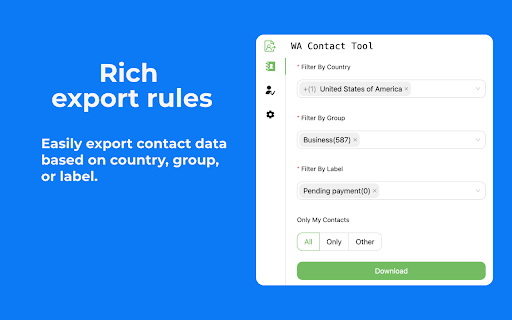
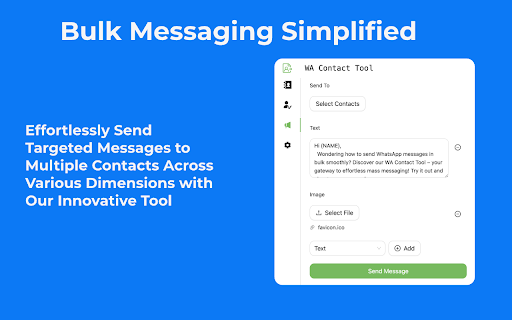
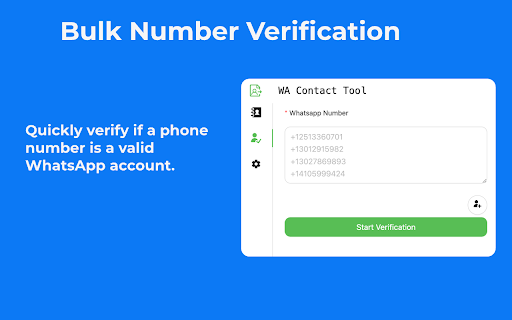


🚀 Introducing Whatsapp Contact Tool: Your All-in-One Solution for WhatsApp Contact Management and Outreach! 📱💼 Say goodbye to the hassle of managing your WhatsApp contacts and hello to streamlined efficiency with Whatsapp Contact Tool. This powerful Chrome extension combines the best features of WhatsApp contact extraction, bulk messaging, and number validation, making it the ultimate tool for businesses and individuals alike. ✅ WhatsApp Contact Extractor: Effortlessly extract and export WhatsApp contacts from groups, chats, and labels in popular formats like CSV, Excel, JSON, or VCard. Ideal for WhatsApp contact backup and seamless integration with other applications. ✅ WhatsApp Bulk Sender: Send personalized bulk messages to your contacts without the need to save numbers manually. Perfect for WhatsApp marketing campaigns and expanding your business reach. ✅ WhatsApp Number Validator: Validate and filter WhatsApp numbers to ensure your messages reach active users. No more wasted time on invalid or inactive numbers. ✅ WhatsApp Group Contact Export: Easily export contacts from your WhatsApp groups, making it simple to manage and organize your group contacts. ✅ WhatsApp Chat Contact Export: Export contacts from individual WhatsApp chats, allowing you to backup and migrate your contacts with ease. ✅ Supports various message types, including text, images, voice notes, videos, audio, and document files. Engage your audience with rich, diverse content. ✅ Use placeholders and syntax templates to create custom messages tailored to each recipient. Deliver a personalized experience to your WhatsApp contacts. ✅ WhatsApp Chat Data Export and Backup ⏰ Save time and effort by automating WhatsApp contact management and outreach tasks. Focus on growing your business while Whatsapp Contact Tool handles the rest. 🔒 Keep your data secure with multiple export formats and reliable validation processes. Your WhatsApp contacts are in safe hands. 🎯 Improve communication efficiency by focusing on active WhatsApp users. Get your messages delivered to the right people at the right time. 📈 Boost your WhatsApp marketing efforts and expand your business reach with targeted bulk messaging. Reach a wider audience and drive conversions. 🧩 Streamline your workflow by integrating WhatsApp contact extraction, bulk messaging, and number validation in one powerful Chrome extension. Whether you're a marketer looking to elevate your WhatsApp marketing game, a recruiter connecting with potential candidates, or simply someone who wants to keep their WhatsApp group contacts organized and up-to-date, Whatsapp Contact Tool is the perfect solution. 🌈 🚀 Upgrade your WhatsApp experience today and unlock the power of efficient contact management and outreach with Whatsapp Contact Tool! 🌟

WhatsContact - WA Contacts Extractor & Exporter
Easily Extract & Export WhatsApp Contacts and download into multiple formats WhatsContact - Whatsap Contacts Extractor & Exporter is a powerful and easy-to-use extension that helps you backup and manage your whatsapp contacts quickly. Why Choose Our Extension? 🔒 Privacy-First: We don't collect any personal data. We only extract and export contacts already stored on your device. ⚡ Fast & Free Support: Get quick and reliable help whenever you need it. 🚀 Save Time and Effort: Extract, filter, and export contacts in bulk in just a few clicks. 🎨 Beautiful UI: A clean, easy-to-use interface that ensures a smooth experience. 📂 Extract Contacts: Extract from chats, groups, countries, labels 💾 Export Data: Export to CSV, XLSX, JSON, HTML, or Markdown formats for secure backup. 🔍 Advanced Filters: Filter by contact type, message type, and account type to streamline your data. 🌙 Auto Dark Mode: Automatically adjusts to dark mode based on your WhatsApp Web settings. 📱 Personal Users: Easily back up and organize both saved and unsaved contacts, including direct downloads of unknown numbers. 💼 Business Users: Export contacts in bulk for professional use and manage client data more efficiently. 🌍 International Users: Extract contacts based on countries for regional communication. 👥 Group Admins: Manage and download contacts of group members, both saved and unsaved, for better organization. WhatsApp is a trademark of WhatsApp Inc., registered in the U.S. and other countries. This extension has no relationship with WhatsApp or WhatsApp Inc.

Contact Extractor for wa
Enhance WhatsApp contact management with WA Contacts Extractor. Easy contact extraction, versatile export formats. Transform your WhatsApp contact extraction experience with the Contacts Extractor for wa browser extension is a sophisticated tool that simplifies the process of extracting and handling your WA contacts. Contacts Extractor for wa is a highly efficient browser extension that is designed to extract your WA contacts and group contacts effortlessly. This user-friendly tool offers the added convenience of exporting your contacts in CSV, JSON, or Excel (XLSX) formats, making it an excellent choice for downloading WhatsApp contacts. WhatsApp Contacts Extractor is specifically designed to make the extraction and export of your WA contacts and group contacts a cinch. Simply choose the contacts or groups you want to export, and with a click of the button "Export Contacts", your contacts list is ready for download. Once you've extracted your desired contacts, the extension allows you to download your contact list in several formats including CSV, JSON, and XLSX(Excel) format. This versatility enables you to use your lists in a variety of applications or for various purposes, depending entirely on your needs. The exported contacts list provides you with essential details about each contact including Display Name, Public Name, Formatted Name, Phone, Formatted Phone, Country Code, Country Name, whether the contact belongs to you or it is blocked or a business contact, Labels, Last Message, Last Message Date, Last Message Status, Last Message From Me, and when it was scraped. This wealth of information makes the extension an invaluable tool for managing your contacts effectively. How to Use Contacts Extractor for wa. 1. Launch https://web.whatsapp.com/ You’ll find the export button above the chat window on the left. Click this button to open a dialog box where you can select the contacts or groups you want to export. 2. Click "Export Contacts" to begin the extraction of your WhatsApp contacts list. 3. Click the "Download Items" button to save your contacts as a local file, available in your chosen format. Data Privacy Your data stays on your device and is not stored or transmitted to our servers. We prioritize keeping your information secure and confidential. In-App Purchases Our Extension is a freemium product with a nominal subscription fee. With a paid subscription, you can export up to 5000 contacts at a time and receive premium support. The exact cost is displayed in the extension's interface, ensuring transparency and ease of understanding. Disclaimer This extension is an independently developed product by ExtensionsBox and has no association with WhatsApp LLC.

WA Contacts Export
An all-in-one whatsapp contacts Export tool,Support for multiple file formats 🚀 Effortlessly Manage Your WhatsApp Contacts for Streamlined Communication! 🌟 Have you ever found yourself struggling to organize your WhatsApp contacts? Our WhatsApp contact exporter tool allows you to easily extract and export contacts from groups, chats, and labels in popular formats like CSV, Excel, JSON, and VCard. 👥📇 💡 Our WhatsApp contact export software offers you: ✅ Bulk export of WhatsApp group contacts with a single click, simplifying the management process. ✅ Quick backup of WhatsApp chat contacts, ensuring data security and easy migration. ✅ Support for multiple export formats, catering to different user needs and seamlessly integrating with other applications. 🚀 Try our WhatsApp contact extractor tool today and experience more efficient and convenient contact management! You'll be amazed at how much valuable time and effort this handy WhatsApp contact organizer can save you. 💫

Group Contact Extractor for WA
Easily export WhatsApp group contacts and chats contacts to CSV, Excel files. 🏷 What is Group Contact Extractor for WA? Group Contact Extractor for WA is a Chrome extension that allow people export and save all WhatsApp contacts, includes unknown phone numbers of group contacts. 🏷 Who is the WhatsApp group contact extractor designed for? We developed this extension to make it easier for marketers, salespeople or e-com sellers to better use WhatsApp for marketing and sales. 🏷 What can it do for you? Whether you're looking to boost your brand's visibility or drive product sales, whether you operate offline or sell on platforms like Amazon, Shopify, Shopee, or MercadoLibre, as long as your potential audience utilizes WhatsApp, this Chrome extension is your key to initiating communication with them. Group Contact Extractor for WA enables you to export contact details of members from the groups you've joined, as well as the phone numbers of individuals you chat with. Additionally, the extension can save your extracted WA numbers locally as a file, allowing you to review them at your convenience. You can download phone numbers of group member in various formats such as csv, xlsx, json, and more. 🏷 Feature: Export contacts Export the phone numbers you have chatted with. Export the phone numbers of WA group members (optional whether to include administrator) Save contact information to csv, xlsx, json and other file formats Easy to use Constantly updated. Respecting your privacy and security, the chrome extension will not record any of your information. 🏷 Disclaimer: This Chrome extension is an unofficial enhancement tool, not endorsed or certified by WhatsApp Inc., and must not be used in violation of its policies.
