
ohgndokldibnndfnjnagojmheejlengn
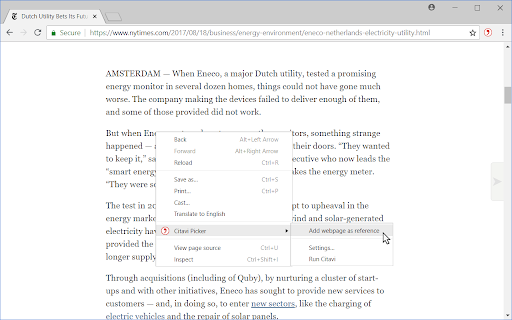
Citavi Picker for Google Chrome Citavi is a program for reference management and knowledge organization published by Swiss Academic Software (Switzerland). The Citavi Browser Picker help you easily transfer information from your browser to your Citavi project. The Picker uses three different methods to import bibliographic information into your Citavi project: * Importing with the Hunter * Finding Bibliographic Information by ISBN or DOI * Adding Webpage Metadata

Web Collector for MAXQDA
Quickly and easily collect entire web pages to import and analyze in the qualitative data analysis software MAXQDA. (For older MAXQDA versions, use "Web Collector for MAXQDA 2018 and 12" instead). Features of the Web Collector for MAXQDA: - Collect web pages in their original format or as simplified web pages - The original web source and the collection date are automatically stored in a memo - Add your own notes to the web pages during the collection - Web pages are imported into MAXQDA as PDFs or images - Simplified web pages are imported into MAXQDA as PDFs or text documents - Choose to include or ignore images in simplified web pages - For best results, consider using an ad blocker to remove ads from the webpages before collecting them MAXQDA is a world-leading software package for qualitative and mixed methods research. Analyze all kinds of data – from texts to images and audio/video files, websites, tweets, focus group discussions, survey responses, and much more. Developed by and for researchers, MAXQDA is at once powerful and easy-to-use, innovative and user-friendly, as well as the only leading QDA software that is 100% identical on Windows and Mac.

Google Scholar PDF Reader
Supercharge your paper reading: follow references, skim outline, jump to figures, cite and save. When you install Scholar Reader, PDFs on all sites will have a new look in Chrome. To make this happen, Chrome will ask for permissions to read and change data on all sites. Scholar Reader makes no changes other than the presentation of PDFs. • Preview references as you read. Click the in-text citation to see a summary and find the PDF. • Read faster with the AI outline. Get a quick overview and click on interesting bullets to jump within the paper. • Highlight and comment on PDFs. Highlights are saved to your Scholar library. • Make it right for your eyes with light, dark, and night modes. • Copy and paste common citation formats without leaving the paper. • Save articles to your Scholar Library to read or cite later. • Click in-text figure mentions to see the figure and the back button to keep reading. By installing this extension, you agree to the Google Terms of Service and Privacy Policy at https://www.google.com/intl/en/policies/.

Lumaly - Gutscheine & Cashback
Jetzt mit Lumaly Geld sparen. Mit Lumaly erhalten Sie beim Online-Einkauf immer die besten Gutscheine & Cashback. Jetzt mit Lumaly Geld sparen. Mit Lumaly erhältst Sie beim Online-Einkauf immer die besten Gutscheine & Bitcoin Cashback. Nie wieder zu viel bezahlen! Jetzt mit Lumaly Geld sparen. Lumaly findet automatisch die besten Gutscheine für deine Lieblingsshops, sodass du immer den besten Preis bekommst. So funktioniert Lumaly… 1) Gratis installieren – Lumaly ist und bleibt für immer kostenfrei! In nur 2 Klicks ist die Erweiterung bereits installiert. 2) Wie üblich Shoppen – beim Einkaufen in deinen Lieblings-Shops sagt dir Lumaly im Warenkorb bescheid, ob es Gutscheine gibt und probiert diese automatisch für dich aus. 3) Geld sparen – Lumaly wendet den Gutschein mit der größten Ersparnis automatisch für dich an. Du hast bares Geld gespart! ------------------- - Kostet die Erweiterung was? Nein! Die Erweiterung ist komplett kostenlos und wird auch immer kostenlos bleiben! Wir ersparen dir nur die lästige Coupon Sucherei im Internet und geben dir den besten Preis auf deinen Einkauf. Wir schenken dir im Endeffekt also Zeit und Geld. Was gibt es besseres? - Woher weiß ich, dass die Erweiterung funktioniert? Nachdem du Lumaly mit 2 Klicks installiert hast, siehst du das Lumaly Logo oben in deiner Browserleiste. Ist das Logo lila, ist Lumaly aktiv und funktioniert auf der besuchten Seite. Lumaly gibt dir dann im Warenkorb Bescheid, ob du Geld sparen kannst. - Welche Daten sammelt Lumaly? Um Lumaly zu nutzen benötigst du keinen Account und musst auch keine persönlichen Daten von dir preisgeben! Wir sind ein deutsches Unternehmen und halten uns an die strengen Vorgaben der DSGVO. Außerdem ist Lumaly Mitglied in der Gesellschaft für Datenschutz und Datensicherheit e.V. und unterstellt sich regelmäßig Prüfungen um die Sicherheit deiner Daten zu gewährleisten. - Wie verdient Lumaly Geld? Wenn du Lumaly bei unseren Partnershops benutzt, erhalten wir eine Provision. ------------------- 📧 Fragen? Dann kontaktiere unser Support-Team unter support@lumaly.de ⚖️ Unsere Datenschutz findest du auf folgender Seite: https://lumaly.de/datenschutz/ Mit 💜 in Berlin entwickelt.

I don't care about cookies
The EU regulations require that any website using tracking cookies must get… The EU regulations require that any website using tracking cookies must get user's permission before installing them. Imagine how irritating that becomes when you surf anonymously or if you delete cookies automatically every time you close the browser. In most cases, it just blocks or hides cookie related pop-ups. When it's needed for the website to work properly, it will automatically accept the cookie policy for you (sometimes it will accept all and sometimes only necessary cookie categories, depending on what's easier to do). It doesn't delete cookies.
