
ohcinjncimepibaooaagifjafbmnneoa


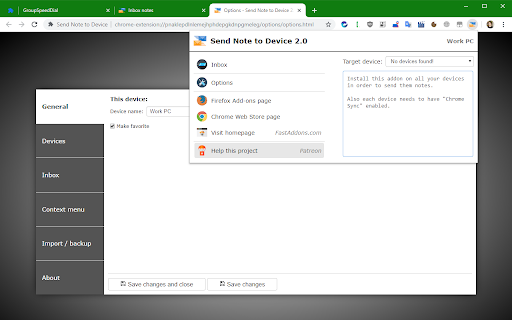
Send Note to Device allows you to send current URL with a note (message) to different devices. 💬 Send Note to Device can send text / file between your Chrome browsers. 💡 Installation help: 1. make sure you are logged in your Chrome account on all devices you want to send notes to 2. once Chrome synchronizes this extension to your other devices, rename each device through Options page More info: https://github.com/fastaddons/SendNoteToDevice/wiki ⭐ Top features: - easy sending messages (notes) with currently opened URL to your devices - sending small files (~8KB) is also possible - no need to create additional account - Chrome Sync will handle everything ℹ️ Tip: - press "Alt + M" to open message window - in message window, press "Alt + up/down" to switch between target devices - in message window, press "Ctrl + Enter" to send the message 🛑 Limitations of Chrome Sync engine: - Chrome Sync can handle only 100KB of data and each message can be up to 8KB - if you try to send long note or too many notes at once, it may run out of space and fail. ☕ I'm extension developer since 2016 and my goal is to build powerful extensions for your web-browser to make you more productive. If you think I'm doing a good job, please donate :) - Ko-Fi.com: https://ko-fi.com/fastaddons - PayPal.Me: https://paypal.me/fastaddons/ - Patreon.com: https://www.patreon.com/fastaddons 💥 Thank you for supporting my work! 🔒 Privacy Policy: This extension is NOT using own cloud servers, all data synchronization is using "Chrome Sync" engine.

Send To My Device
Send message to your device from desktop/laptop This extension allows you to send messages to Telegram directly from Chrome, without having to switch to a separate app or tab. It's a quick and easy way to send message to your device. You can also send message to chrome from telegram

GimmeThat - Universal Wishlist for Shopping
Simplify shopping with a universal wishlist. Save anything you want to buy from any store globally. See your favorites with a click! Tired of forgetting things you want to buy? Too many open tabs and bookmarked product pages? Give GimmeThat a try! It's a universal wishlist that lives right in your browser. You can save anything you want to buy from any store worldwide. All your favorites in one handy wishlist: see them with one click. Save time and stay organized while shopping. GimmeThat puts a handy button next to your browser's address bar. Seen something you like - but aren't quite ready to buy? Those cool shoes? That new phone? Click the GimmeThat button to add it to your universal wishlist. You can save from any store. Want to see your wishlist? Click the GimmeThat button again. You’ll see all your saved products right away. Ready to buy something? Click on the product, and you'll go straight to its store page. Get started with GimmeThat today. Click 'Add to Chrome' at the top of this page. It's easy, and there's a quick guide to get you started. ➤➤ Your Questions Answered Yes. You can save products from stores worldwide. Just click the GimmeThat button on the product's store page to add it to your wishlist. GimmeThat works its magic and grabs all the product's details from the store page. You can fix things easily if needed. Yes. GimmeThat is free to use. And no annoying ads - we make money from affiliate links. We can earn a commission when you click on product links in your wishlist. There may be paid accounts in future for extra features. ➤ Why does GimmeThat need to "Read and change all your data on all websites"? We need some permissions to work, and only ask for what's needed. When you save a product to your wishlist, this permission lets us fetch the product's image from the website. That's it! Yes. Keeping your data safe and private is top priority. We only store the data needed to work, like your email and products you save. All data is securely stored on our cloud servers. GimmeThat only works for desktop and laptop browsers right now. But we do work to make things better, so watch out for updates. If you have any questions, suggestions or problems, email us at support@gimmethat.me. We're here to help!

Extension Update Monitor
Notify users when extensions are updated and log extension installs, uninstalls, and updates. This extension was created as an alternative to 'Extensions Update Notifier' (last updated June 2016) and 'Extension log' (last updated July 2019). It is quite possible one or both of these will not be updated to Manifest V3 and will disappear from the Web Store forever. An alternative that is currently available in the Web Store is 'Extensions Update Tracker'. Options are available to choose which extensions will trigger an update notification. A button badge counter may be used instead of a notification. Audio files may optionally be played on extension updates. Clicking on the extensions toolbar button will open a popup that will show the most recent extension updates. A log page may also be opened to view install, uninstall, and update data for extensions. Other options are available that may be viewed in the extensions Options page. Right click the toolbar button to access the Options page or to view the log page.

News Storyline
Know Thy History and Be Notified About Future A Chrome sidebar extension and companion newsletter that gives you an unbiased, context-rich timeline of any news story and quietly watches for what happens next—so you never miss a beat (or waste time scrolling). 📖 On-Demand Timelines in Your Sidebar • One-click access while you’re reading any article: hit the extension icon to slide open a concise, chronological view of past reports on that story. • Facts, not opinions: we aggregate across dozens of reputable outlets, stripping out commentary bias so you see the unvarnished sequence of events. • Top highlights only: instead of drowning you in every mention, we surface a handful of the most relevant milestones—headlines, timestamps, and sources—so you instantly understand “what led here.” 🤖 Background Story Scanning & Positive Alerts • Hands-free monitoring: once you’ve opened a timeline, our service continues scanning in the background for new developments on that very story. • Positive-only notifications: you decide what matters—receive alerts only when something significant (and positive) happens, so your inbox isn’t full of noise. • Peace of mind: no more endless manual refreshes or fear of overlooking a breaking update. 📰 Daily Newsletter & “New Developments” Bulletin • Daily digest delivered each morning: a simple roll-up of every event we tracked across your subscribed stories in the past 24 hours—no grouping, no spin. • On-demand “New Developments” email: when fresh updates arrive mid-day (for critical beats), we’ll ping you separately so you stay in the loop around the clock. 🔔 Story Subscriptions & Future Tracking • Subscribe in one click: any timeline can be turned into a “watched” story. From that moment on, we’ll keep you posted on each follow-up report. • Tailored alerts: choose your stories—finance, politics, tech, climate—and we do the rest, surfacing only the most impactful next chapters. 🔧 Platform & Integration • Chrome-based browsers supported (Chrome, Edge, Brave, Opera). • Privacy-first: minimal permissions, no tracking beyond the stories you opt in to follow. • Lightweight: sits quietly in your toolbar, loading only when you ask. Who It’s For • Journalists & analysts who need quick, neutral context before filing next headlines. • Researchers & students chasing down backstory and evolution of key events. • Curious readers who want more than a single outlet’s perspective—and zero surprises when the story moves on. Why Know Thy History? • Context at your fingertips—instantly see what happened before. • Stop missing updates—positive alerts mean you’ll always catch the next big development. • Save time & mental bandwidth—no more endless feeds or biased roundups. Install now and start each story with the past in view—and the future on your radar.
