
ohahgffiacljhimidmfeeecpoogppllc
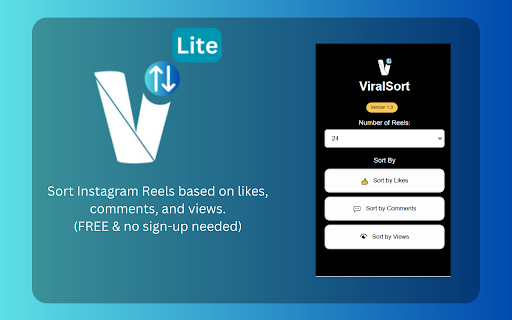


Sort Instagram Reels by likes, comments, and views for free ViralSort Lite is a free Chrome extension that allows you to sort Instagram Reels by likes, comments, and views with no sign-up required. It is perfect for creators, marketers, founders, and social media managers who want to discover trending Instagram content faster and plan high-performing Reels with confidence. Instead of scrolling endlessly, ViralSort Lite helps you instantly sort feed Reels from any Instagram profile to identify what is actually working. Use real engagement data to validate content ideas, improve your posting strategy, and manage your content journey from idea to upload using one simple, powerful dashboard. Key Features 🔍 Sort Instagram Reels by likes, comments, and views 👤 Sort feed Reels from any public Instagram profile 📈 Identify trending Instagram content effortlessly ⚡ Sort up to 50 Reels at a time 📊 Download sorted data in CSV format for analysis 🎯 100% free to use with no sign-up required ViralSort Lite is perfect for anyone serious about growing on Instagram using data-backed content decisions rather than guesswork.

ViralSort - Sort Instagram Reels & Manage in One Dashboard.
Sort Instagram Reels & manage your content creation flow from idea to publish. ViralSort is a Chrome extension that helps you Sort Instagram Reels, find top viral content from any Instagram profile, and manage your entire creation process from idea to upload. 🔍 Sort Instagram Reels from Any Profile Instantly Sort Instagram profiles by Reel performance. Our Instagram Sort feature shows you what is going viral without endless scrolling or guesswork. 📂 Explore and Save Content Inspiration Use Instagram Reels Sort to view the best performing Reels from one or multiple accounts. Manage them directly to your ViralSort dashboard for future creation. 🎥 Manage Your Reel Creation Flow Organise scripts, shoot links, and edit files in one place. Track your content stages such as Scripted, Shot, Editing, or Ready so nothing gets lost. 🚀 Publish and Track Performance After publishing, link your Reel in ViralSort to track engagement and reach. 💡 Perfect For: Content creators Social media managers Marketing agencies Anyone aiming for strategic Instagram growth 🔄 From Research to Reel Made Effortless ViralSort is your all-in-one command centre for finding, creating, and tracking Instagram Reels.

Sort Feed - TikTok & Instagram Sorter
Sort feed for TikTok & Instagram. Reorder Reels & Posts by likes, views, comments, date. Find viral & trending content. Export CSV. Sort Feed For TikTok & Instagram is a Chrome extension that sorts and reorders TikTok and Instagram feeds by engagement metrics such as likes, views, comments, shares, and upload date. It is built for creators, social media managers, marketers, and researchers who want to quickly identify viral content and performance trends. Works on tiktok.com and instagram.com. No external dashboards. No login sharing required. • Sort TikTok & Instagram feeds Sort posts and videos by likes, views, comments, shares/reposts (where available), and date. Instantly surface the most popular content on profiles, feeds, and hashtag pages. • Reorder Reels & posts Reorder Instagram Reels, posts, and TikTok videos so highest-performing content appears first. Great for spotting viral trends and doing competitive review. • Analyze content performance See which posts perform best on a profile, hashtag, or feed. Ideal for content research, benchmarking, and competitive analysis. • Export data to CSV Export analyzed posts to CSV for social media reports, viral content tracking, and marketing research. • Works directly in your browser Runs on TikTok.com and Instagram.com. Processes feed data locally for sorting and display. Sync settings from the extension popup when you change options. • TikTok content research • Instagram Reels trend analysis • Influencer and competitor analysis • Viral video discovery • Social media performance tracking 1. Install Sort Feed For TikTok & Instagram from the Chrome Web Store. 2. Open TikTok.com or Instagram.com. 3. Go to a feed, profile, hashtag, or Reels tab. 4. Click the extension icon in the Chrome toolbar, or use the on-page sort toolbar. 5. Choose a sort option: likes, views, comments, date, and more. 6. The extension scans posts and reorders the feed on the page. 7. Optionally export results to CSV for offline analysis. WHY USERS LOVE THIS EXTENSION • Discover viral TikTok videos faster than manual scrolling • Find top Instagram Reels and posts in one click • Save time on profile and hashtag audits • Make data-driven content and creative decisions • Keep research in-browser without extra tools • Sort Feed For TikTok & Instagram is an independent third-party tool. It is not affiliated with, endorsed by, or sponsored by TikTok, ByteDance, Instagram, Meta, or any of their subsidiaries. • This extension reads publicly visible page content in your browser to provide sorting and insights. Features may change, break, or become unavailable if TikTok or Instagram update their websites. • You are responsible for using this extension in compliance with TikTok’s and Instagram’s terms of service, applicable laws, and platform policies. Do not use exported data or automated actions in ways that violate those rules. • Downloading or exporting media is your responsibility. Ensure you have the right to access, download, and use any content before saving or reusing it. • The extension is provided “as is” without warranties of any kind. To the fullest extent permitted by law, the developers are not liable for any loss, damage, or account issues arising from use of this tool.

IG Sorter - Sort Feed - works on Instagram™
Sort Ins posts/reels/hashtag/search, Export data to excel,Analyze trends, Bulk Download Ins images and videos 🚀 IG Sorter — The Ultimate Instagram Analytics & Content Sorting Tool IG Sorter is a powerful browser extension designed for marketers, content creators, and data analysts who want to analyze and optimize Instagram performance with precision. Effortlessly sort, filter, and export Instagram posts and Reels based on engagement metrics such as Likes, Comments, Reposts,and Views. Supercharge your growth with actionable insights and influencer analytics to elevate your content strategy. 💡 ✨ Key Features ▪️ 🔍 Advanced Filtering & Sorting Quickly filter and sort posts or Reels by Views, Comments, Reposts, or Likes to identify your top-performing content. Discover what resonates most with your audience and refine your marketing strategy. 📊 ▪️ 🎥 Bulk Medias Download (HD) Easily download HD images, HD videos, Reels, and carousel media (videos & images) directly from Instagram — all in one click! 💾 Note: Single downloads are free, bulk download is a premium feature. ▪️ 📊 Force Show Engagement Data (Configurable Overlay) Display engagement data directly on Instagram — including Likes and Comments count — with a sleek overlay. 💡 Calculate the Engagement Rate (ER) for every video using your custom formula in the settings: Engagement Rate = (Likes × 1 + Comments × 4 + Reposts x 4) / Views (Plays) (If Views/Plays are available; otherwise, ER won’t be calculated.) ▪️ 📈 Real-Time Side Panel Metrics Access detailed metrics — Likes, Comments, Reposts, Views, and Engagement Rate (ER) — from a real-time side panel while you browse Instagram. Gain instant insights without switching tabs! ⚡ ▪️ 🤖 Intelligent Page Recognition IG Sorter automatically detects and adapts to multiple Instagram page types, including: Posts, Reels, Tagged, Hashtag Search, Explore, Audio, Home, and Saved. Smartly handles differences such as Reels without date info or image posts without View counts. 🧠 ▪️ 🔄 Automated Scrolling & Content Loading (Premium Feature) Save time with auto-scrolling and auto-loading of content. Sit back while IG Sorter collects the data you need — hands-free! ⏱️ ▪️ 📤 Export Data to Excel (Premium Feature) Export your sorted results to a beautifully formatted Excel file, complete with thumbnails and key metrics — perfect for team reporting and presentations. 📈 Have ideas or feedback? 💬 Join our Telegram Group to share your thoughts, connect with other marketers, and get early access to new features. 🎁 Try IG Sorter for Free! Experience the power of data-driven Instagram insights. ✨ Install IG Sorter today and streamline your content analysis workflow! ⚡ Premium features are available with a subscription. Want to reset your collection list? Simply refresh your Instagram page or open a new tab to start fresh. 🔄 This extension is not affiliated with or endorsed by Instagram. Instagram is a trademark of Meta.

MediaSort AI | Instagram Sorter & Transcriber
Sort Instagram Reels by views, get transcripts, and download content. Hi I am Melvin, a content creator with over 200,000 followers across multiple socials. I built our MediaSort AI's chrome extension to initially help myself with content research and ideation, but now it's time for me to give it to you for completely free. Here is your starter guide: Step 1 - Visit a profile on Instagram and press the blue "Sort Reels" button. Step 2 - The tool will now sort all the reels from most to least views. Step 3 - Press on any reel on the results page to get inspired. Step 4 - Once watching any reel you can press "download" & "transcribe" if you want to download any videos as mp4 files or get the exact video script used in that reel. Disclaimer: Our download and transcribe should only be used for inspiration purposes. We're strongly against copying existing content for personal gain. Our mission long-term is to build a complete AI suite for creators to help them with content ideation and scriptwriting. This extension is made for free to get your feedback and help us improve. If you want to be a part of this journey, try the tool out and send any feedback or reviews to: support@mediasort.ai Want to be the first to know when the full tool launches? Join our waitlist here: https://form.typeform.com/to/k9pvRYUS Thanks for being part of the MediaSort community!
