
ogpbjlhpdjmcbkocjibemdmblffnfkmm
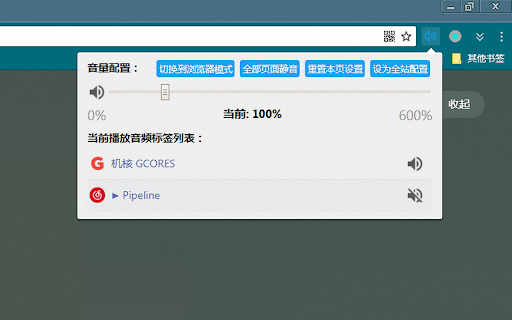
Manage the volume of each tab Support Chrome browser Native and H5 two modes to control volume H5 mode, which can automatically remember the previous volume configuration, but only supports HTML5 standard audio and video Browser Native mode, support for Flash and other multimedia , automatic configuration cannot be implemented due to the limitations of the Chrome browser (the configuration can be loaded after manually opening the extension page)

Volume Control
Audio volume control for Chrome™. Set sound level for each tab separately with audio control and sound booster. Individually control the volume of each tab in your Chrome browser with the Volume Control extension, a powerful tool designed to enhance your browsing experience by providing an easy-to-use audio management interface. Whether you're multitasking with several tabs or focusing on a single audio stream, this extension offers you the convenience of controlling the volume of each tab individually, all from a central, user-friendly popup. # Features of the Volume Control Extension: 1. Increase Volume Up to 600%: If you find that your speakers or headphones are too quiet, the Volume Control extension allows you to amplify the sound up to 6 times its original level. This means you can increase the volume beyond the normal 100% limit that Chrome provides, making it perfect for environments where external sound sources are weak, or when watching content that may have low audio quality. Simply slide the control over 100%, and you'll enjoy a louder, richer sound, no matter what you're listening to. 2. Displays All Tabs Playing Audio: With so many tabs open at once, it can be difficult to find the one that's playing sound. Volume Control makes it easy by displaying a list of all the tabs that are currently producing audio. This feature saves you time and hassle, as you won't need to click through each tab to locate the source of the sound. Whether it's background music, a video, or a notification sound, you can quickly identify and control the volume of each tab with ease. 3. Fast Navigation Between Sound Tabs: Have multiple audio streams going at once? The Volume Control extension provides fast navigation between tabs with sound. You can switch directly to the tab that's playing audio, helping you manage your browsing and audio experience more efficiently. No more searching for which tab is playing that background music or trying to find the one video playing sound out of 20 open tabs—just navigate in seconds! 4. Instantly Mute Tabs: There are times when you need to quickly mute a tab without having to pause or close it. With Volume Control, all you have to do is click the speaker icon next to the tab in the popup menu, and the tab will be muted instantly. Whether it's an unexpected ad, a noisy notification, or a video you're no longer interested in listening to, muting is just a click away. 5. Visual Sound Levels on Toolbar Icon: The extension’s toolbar icon not only gives you quick access to the popup menu but also displays the current volume level for each tab directly on the icon itself. This means you can always keep track of which tabs are playing sound and at what volume level, even without opening the extension. The visual indicator makes it incredibly easy to monitor and manage the audio levels of your active tabs at a glance. 6. Minimalistic and Intuitive Design: One of the standout features of the Volume Control extension is its clean and minimalistic design. The interface is straightforward, making it easy to navigate and use, even for those who may not be tech-savvy. Its simplicity ensures that anyone can enjoy the benefits of precise audio control without being overwhelmed by complicated settings or design elements. # Who Can Benefit From the Volume Control App? The Volume Control extension is a versatile tool that can be useful for a wide range of users: - Music Lovers: Whether you're listening to music while working or relaxing, having precise control over each audio source can greatly enhance your listening experience. Boost the volume of your favorite tracks without affecting the sound of other tabs. - Content Consumers: If you regularly watch videos on YouTube, streaming platforms, or other websites, this extension can act as a speaker booster, making it easier to enjoy content even when the original audio is too quiet. - Professionals: People who work in environments with multiple audio sources, such as video editors, sound designers, or anyone who manages several tabs with audio, will appreciate the ability to adjust the volume levels of individual tabs quickly and easily. - Students: For those who use their browser for studying, listening to lectures, or engaging in online discussions, this extension allows you to manage background sounds while focusing on specific audio streams. - General Users: Even casual internet users can benefit from the extension’s ability to mute annoying sounds or amplify quiet ones, making everyday browsing more pleasant. # Additional Features for Extension Promotion and Redirection: The Volume Control extension can also be a gateway to discovering other useful tools. It offers integrated promotions for other helpful extensions that you might want to install, enhancing your overall browser functionality. Furthermore, it includes redirection options that lead to additional resources and websites, although it should be noted that some redirection might point to sites not directly related to the extension. This feature is aimed at broadening your browsing experience and introducing you to related tools that could further improve your browser’s capabilities. # Speaker Booster Functionality: If you're frustrated with the low volume output from your speakers or headphones, the Volume Control extension is here to help. By simply sliding the volume control over 100%, you can increase the sound to levels that exceed the standard limits of your browser. This speaker booster functionality is perfect for watching videos or listening to music where the audio is too low to be enjoyable. Boosting the volume up to 600% gives you flexibility and control, ensuring that you can always hear your content at the desired volume level, without having to rely on external devices or settings. In short, the Volume Control extension is an essential tool for anyone who wants greater control over their browsing experience. From boosting the volume of quiet tabs to instantly muting annoying sounds, this extension simplifies your online audio management. With its easy-to-use interface, useful features, and visual sound levels, it's perfect for a wide range of users—whether you’re a music lover, video consumer, or someone who simply wants more control over the sound levels in your browser. Install Volume Control today and experience the convenience of an all-in-one audio management tool!

Tab Volume Controller
Control volume independently for each browser tab. 🎧 Take full control of your tab audio — effortlessly. Tired of switching tabs just to pause music or quiet noisy pages? Tab Volume Controller lets you independently manage audio for each browser tab, all from one place. - Control volume for individual tabs - Mute or unmute any tab with one click - Play/Pause media directly from the extension (no need to switch tabs!) - Clean UI (with dark theme support) — minimal, focused, and fast - Keep your workspace productive and distraction-free 👉 Try it now and upgrade your browser’s audio experience.

Volume Manager
Do note that once you started modifying volume: - You cannot toggle fullscreen of this tab. This is due to the Chrome API limitation. - Your system may not go into sleep/suspend/monitor off because Chrome will mark the current tab is "capturing" and inhibit doing so.

Volume Controller
Audio Volume Controller for Chrome. Set sound level for each tab separately with audio sound booster Hello music lovers and audiophiles! Now your online experiences will become a true audio carnival thanks to our awesome Volume Controller for Google Chrome! 🚀 Now your low sound can transform into a real "ear blast" - just as you've always dreamed! ✨ Here's why our extension is the bomb: - Increase volume up to 6 times (up to 600%): Yes, you heard us right! Just drag the volume slider on any tab and enjoy music or video at full volume. A great way to get an audio punch for those who always wanted to feel the music to the fullest! 🎶 - Sound and bass amplifier in one: Our sound amplifier will make your favorite tracks even richer and more expressive. You'll hear every bass beat as if it's hitting you right in the heart! 🔊 - Quick access to all tabs with audio: Volume Controller automatically finds all tabs with active music or video playback. Now switching between tracks is not a hassle with remote control but a true pleasure with a simple click of the mouse! 🎵 - Instant mute: Simply click on the speaker icon in the pop-up window to instantly mute sound on the selected tab. Very convenient for those moments when you suddenly need peace and quiet. 🔇 - Minimalistic interface: Our modern interface allows you to enjoy sound control without extra effort and ambitious plans for world domination. Simple, clear, and effective - just like your favorite melodies playing in your head! 💻 - Additional features: You can also customize an equalizer to make every chord sound even brighter, save your favorite volume settings for each tab separately, and use Volume Controller as a reliable assistant for all things sound-related. Download our extension now and let your ears relax, enjoying every note and sound effect with Volume Controller! Don't miss the chance to make your music and video experiences incredible with Volume Controller! 🌟 Let the music play! 🎧
