
ogngclmkdkdmdekchmghneecloclcffg
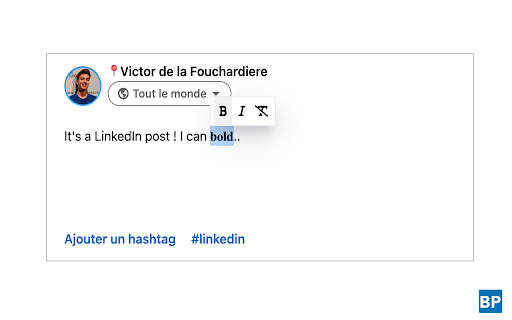
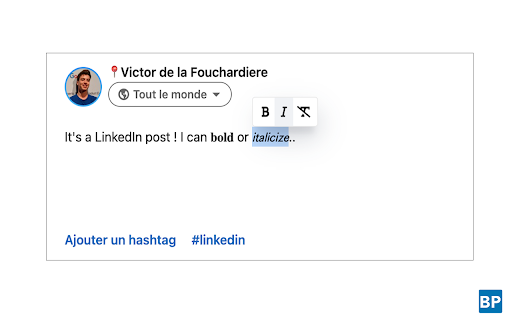
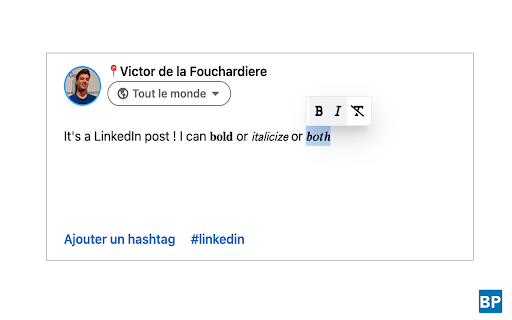
Web extension that allows to bold and italicize text on the LinkedIn website. Want to format the text in your LinkedIn posts? This extension allow you to bold and italicize text on the LinkedIn website (ONLY FOR POSTS, NOT COMMENTS). LinkedIn does not natively allow formatting, but that doesn't mean it's impossible. Selecting a text inside the creation post modal will show a tooltip to bold and italic your current text. This extension is very useful if you are a creator on LinkedIn. If you are a developer, you can contribute to the development of this extension : https://github.com/viclafouch/beautify-post

Waalaxy - LinkedIn Automation Tool
Make LinkedIn your No. 1 acquisition channel with Waalaxy. Automated prospecting and recruitment made easy Waalaxy’s mission is pretty simple: Make LinkedIn your No. 1 acquisition channel. Our goal is to make automated prospecting and recruitment easier than ever. With our intuitive extension, you can easily import prospects directly from LinkedIn and set up your prospecting campaign with just a few clicks - no technical skills required! Here’s a glimpse of what you can achieve with Waalaxy: Automate your LinkedIn outreach and email follow-ups effortlessly. Extract profiles from LinkedIn People Search, Sales Navigator, and Recruiter Lite with just a few clicks. Set up personalized prospecting campaigns in minutes and let Waalaxy handle the rest, freeing up to 70% of your time to focus on.. well, whatever you want. Enrich vital prospect data instantly and sync it with your favorite CRM like Hubspot, Pipedrive and 2000+ apps through Zapier/Make. Stay organized and ensure that no lead slips through the cracks. Manage multiple LinkedIn accounts seamlessly within a unified workspace. Collaborate with your team, share leads, and analyze performance statistics, making Waalaxy ideal for sales, marketing, and recruitment teams. Streamline your LinkedIn conversations with Waalaxy's integrated inbox. Create message templates, schedule timely follow-ups and much more, all within one intuitive interface. Waalaxy is directly integrated into LinkedIn interface. It’s like activating the hidden god mode. Find your prospect’s email, schedule messages, create reusable message templates & more, directly in LinkedIn. Start using Waalaxy for 0€, for as long as you want with our freemium plan. Give a try to our premiums plans risk-free with a free trial. Our expert team is ready to assist you 5/7 day directly on the chat, ensuring you get the most out of every feature (and without having to wait days that someone replie to your emails). Join over 100,000 professionals who have revolutionized their LinkedIn prospecting with Waalaxy. Transform your outreach and experience accelerated lead generation today! Begin your journey with Waalaxy and turn multi-channel prospecting into a money-making game.

EasyGen - Intelligent LinkedIn content, made easy.
Turn your thoughts into viral LinkedIn posts with EasyGen—your direction, our AI support. ☑ Edit your post on Linkedin with a mobile-preview. ☑ Connect your EasyGen account to your Linkedin. ☑ Get access to every features EasyGen has to offer. WARNING: EasyGen will never connect to your Linkedin API. Your account is safe. EasyGen is a tool made for Linkedin. Ruben Hassid - the founder - made his own AI public after growing several accounts publicly with EasyGen. This is the free Chrome extension from the web app (app.easygen.io).

LinkedIn Text Formatter
A Chrome plugin to format LinkedIn posts with bold, italic, underline styles, makes your posts stand out and readable. LinkedIn Text Formatter is the ultimate Chrome plugin designed for LinkedIn content creators who want to stand out. Whether you're a content creator or a professional crafting LinkedIn posts, this tool is built to help you structure your posts effectively and highlight key sections. Use keyboard ctrl+b, ctrl-i, ctrl+u shortcuts to format the text. With the competitive nature of LinkedIn, making your posts visually appealing is essential. LinkedIn Text Formatter gives you the power to enhance readability and engagement by formatting your text with bold, italic, and underline styles. This LinkedIn text formatter makes your content more professional and impactful, helping you capture the attention of your audience quickly. Format your LinkedIn posts using these features : 𝐛𝐨𝐥𝐝 𝑖𝑡𝑎𝑙𝑖𝑐 u̲n̲d̲e̲r̲l̲i̲n̲e̲ • Bullet List [1] Number List ➔ → ➤ Ability to add Arrows With LinkedIn Text Formatter , you don’t need to leave the LinkedIn platform to format your posts. This Chrome plugin allows you to transform your text directly within the LinkedIn post section, just like using a native text editor. 𝐁𝐨𝐥𝐝, 𝑖𝑡𝑎𝑙𝑖𝑐𝑖𝑧𝑒, u̲n̲d̲e̲r̲l̲i̲n̲e̲ without switching between tools. It's designed to integrate smoothly with LinkedIn, making content creation faster and more efficient

HappyInAI - LinkedIn Text Formatter for Post Editor
Enhance your LinkedIn posts with advanced text formatting options directly in the editor. Enhance Your LinkedIn Posts with Advanced Formatting Tools HappyInAi - LinkedIn Text Formatter empowers you to create visually appealing and engaging LinkedIn posts by providing a suite of advanced text formatting tools directly within the LinkedIn post editor. With this extension, you can: - Apply Text Styles: Bold, italic, underline, strikethrough, and combinations of these styles to emphasize important points in your posts. - Special Text Styles: Use unique Unicode-based styles such as monospace, script, bold script, fraktur, double-struck, circled, parenthesized, full-width, negative circled, and negative squared letters to make your text stand out. - Case Conversion: Quickly convert selected text to uppercase or lowercase with a single click. - List Formatting: Format your text as ordered (numbered) or unordered (bulleted) lists to organize your content effectively. - User-Friendly Toolbar: Access all formatting options through an intuitive toolbar added directly below the LinkedIn post editor. - Undo/Redo Support: Maintain full control over your editing with support for undo and redo actions. - Improve Readability: Make your posts more readable and engaging with proper formatting. - Highlight Key Points: Emphasize important information to capture your audience's attention. - Stand Out: Differentiate your content from others by using unique text styles. - Easy to Use: Simple and straightforward interface integrated seamlessly into LinkedIn.
