
ofpglhlcdbjdhlacgbljnildhajfmlei
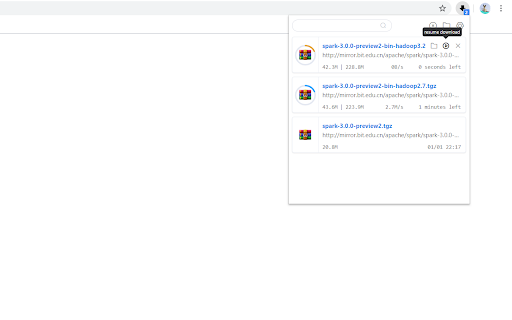
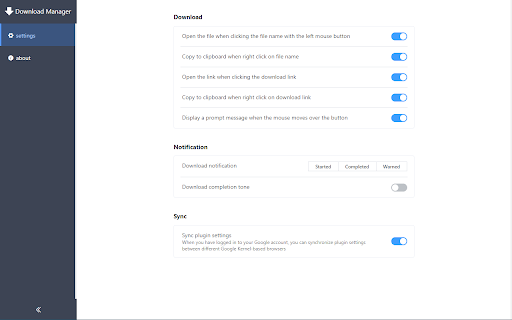
You can manage downloaded files more conveniently! If you have any questions, you can feedback on Github: https://github.com/xinghaix/download-manager。 Fully compatible with the V3 plugin version protocol

Card Bookmarks
Card bookmark is a browser bookmark tool. The original bookmark bar will occupy the space of the webpage, while the card bookmark is displayed in a pop-up way, which disappears when it is used up. At the same time, it provides more space to display frequently used bookmarks. In order to make it easier to use, search and set-top functions have been added in succession. Now the latest version is to add cloud services to facilitate data synchronization. This major update: 1. Add a switch icon to the right of the title (bookmark data classification) in the upper left corner; 2. Further optimize the loading speed of bookmarks when opening; 3. Optimize the search experience, faster; Some usage tips: 1. When searching for bookmarks, click the bookmark icon to open the bookmark folder and scroll to the current bookmark location; 2. Double-click the search box to search for the previous input again; 3. When the bookmark (folder) is right-clicked, a dashed box is added to the unselected list to prompt that multiple selections are supported;

Elite Download Manager
Easily manage all your downloads from toolbar popup! Elite Download Manager is an extension that lets you easily access the download library from the browser toolbar popup. You can manage all downloads without opening the download tab in your browser. Using this add-on could save you time while you are browsing as it gives you quick access to all your downloaded items from the toolbar popup UI. Please note that what happens in the popup gets updated in the download library simultaneously and vice-versa. There are also several buttons for each item within the toolbar that have a tooltip title and are self-explanatory. If you want to report bugs or have a feature request, please fill out the bug report form on the addon's homepage (https://mybrowseraddon.com/download-manager.html).

Downloads Button
Easily open downloads in a new tab via the toolbar button. Downloads Button is a simple, easy-to-use and lite addon that helps you open downloads tab as quickly as possible with just one click. a. Adds a toolbar button to open downloads page in a new tab. b. Adds a context menu item to open downloads page (similar to toolbar button). c. If downloads tab is already open, clicking on the toolbar button will only reload the tab. d. You can still open downloads tab with (Ctrl+J) hotkey. e. The toolbar icon supports both the light and dark browser themes. Note: to report bugs, please fill the bug report form in the addon's homepage (https://mybrowseraddon.com/downloads-button.html).

Bookmarkie - Bookmarks in popup
View and manage your bookmarks in a popup. Maybe the most beautifully designed popup bookmark you can ask for Chrome. View, organize or edit your bookmark within a popup menu. @Ztail, Daniel and Mirosław Żylewicz also contributed to this extension.
