
ofjllmjenihjgacgncmlknpmkkpicajc
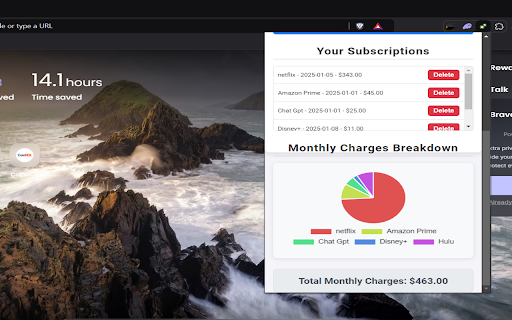


Manage your subscriptions easily! Subscription Manager – Take Full Control of Your Subscriptions! 🚀💳 Ever subscribed to something and completely forgot about it? 💭 Only to realize it’s been draining your wallet month after month? With Subscription Manager, those days are over! This powerful yet user-friendly extension helps you track, manage, and organize all your subscriptions in one place. From streaming services like Netflix and Spotify to gym memberships and productivity tools, Subscription Manager has got you covered. Start saving money today by keeping an eye on recurring expenses and canceling subscriptions you no longer need. 💸✨ 🌟 Key Features That Make Life Easier 🔹 Simple, User-Friendly Interface Our intuitive design makes it easy for anyone to track subscriptions with just a few clicks. Whether you’re a tech pro or a beginner, managing your subscriptions has never been easier! 🔹 Never Forget a Subscription Again Forgot to cancel that free trial? Or that gym membership you never use? Don’t worry—we’ll help you stay on top of it! Set reminders (Coming Soon 🚀) and avoid those sneaky renewal charges. 🔹 Save Money Instantly Track your recurring payments, spot services you don’t use anymore, and cancel them easily. Watch your savings grow month after month! 💰 🔹 Comprehensive Expense Overview Get a clear breakdown of your subscription costs. Know exactly how much you’re spending on streaming, fitness, software, and more. Perfect for creating a budget and taking control of your finances! 📊 🔹 Beautiful Interactive Charts Visualize your spending with professional, easy-to-read pie charts. Instantly see which subscriptions are taking up the biggest chunk of your budget. 🔹 Multi-Currency Support Traveling or living abroad? No problem! Convert your subscription charges into different currencies like USD, EUR, GBP, INR, and JPY. 🌎 🔹 Secure and Private Your subscription data stays local to your browser—no external servers or third-party tracking. Your privacy is our priority. 🔐 🔹 Customizable Subscription List Add, edit, and delete subscriptions effortlessly. Tailor your list exactly to your needs. 💡 How Can Subscription Manager Benefit You? 1️⃣ Save Money Every Month We’ve all been there—subscribing to something and forgetting to cancel it. Those small charges add up quickly! With Subscription Manager, you can review your list regularly, cancel unused subscriptions, and instantly start saving. 2️⃣ Organize Your Finances No more messy spreadsheets or forgotten expenses. Keep all your subscriptions neatly organized in one place for easy access and tracking. 3️⃣ Plan Your Budget Smarter By knowing exactly how much you’re spending on subscriptions, you can allocate your money wisely and avoid overspending. 4️⃣ Avoid Overdraft Fees Never let a surprise subscription renewal push your account into overdraft territory. Stay informed and prepared. 5️⃣ Perfect for Busy Lives Life’s busy enough without worrying about tracking dozens of subscriptions. Let Subscription Manager handle it so you can focus on what matters most. Who Can Benefit from Subscription Manager? - Streaming Junkies: Love Netflix, Hulu, Disney+, Spotify? We’ll help you keep track of all your favorite services. 🎥🎵 - Fitness Enthusiasts: Manage gym memberships, fitness apps, and wellness subscriptions. 🏋️♀️ - Freelancers & Professionals: Easily organize your work-related subscriptions like Adobe, Slack, or Trello. 💼 - Budget-Conscious Users: Track every dollar spent on subscriptions to maximize savings. 💵 How It Works 1️⃣ Add Subscriptions Input the service name, charges, and payment date. 2️⃣ Track Expenses View a detailed breakdown of your subscriptions and monthly charges. 3️⃣ Save Money Identify and cancel unnecessary subscriptions to reduce your recurring expenses. - Insights & Reports Get detailed insights into your spending patterns. Why Choose Subscription Manager? 🔑 Saves You Time Forget manual tracking—Subscription Manager automates it for you. 🔑 Saves You Money Cancel unused subscriptions and put that money back into your pocket. 🔑 Keeps You in Control No more surprises or hidden charges. Stay informed and in charge of your finances. Start Saving Today! 💡 Whether you’re juggling a handful of subscriptions or managing a long list of services, Subscription Manager is your ultimate tool for staying organized, saving money, and managing your expenses effortlessly. 🔽 Download Subscription Manager now and take control of your subscriptions! 🔽

Subscription Management Tool
Use the subscription management tool to manage subscriptions effectively. No more surprise renewals with this subscription tracker. 💵 Managing recurring expenses is often harder than it should be. Our subscription management tool helps you track every renewal and avoid surprise charges. Designed for clarity and simplicity, it gives you a clear picture of how much you spend each month on services and apps. 🧾Never let renewal dates catch you by surprise—avoid stress and keep everything under control. ⚡️ With this extension, you can easily organize your digital subscriptions in one place. Forget about searching emails for receipts or wondering when a service will charge your card. The subscription management tool alerts you ahead of time so you stay in control. 🔒 Protect your wallet from unexpected fees and last-minute charges. Gain confidence in your monthly planning, and always know exactly where your money is going. Simple, secure, and designed to put you in charge. ➤ Tracks unlimited recurring payments across categories ➤ Sends renewal reminders before charges happen ➤ Offers clear spending summary ➤ Works seamlessly inside your browser ➤ Keeps your data locally meaning privately 📌 This extension solves that by consolidating everything. It acts well as an app for subscriptions. You no longer need to juggle multiple subscription management apps that feel overly complicated. It serves as a reliable subscription manager app 🧍♂️ Our users find it helpful when facing these common problems: 1. Forgetting when services renew and getting unexpected charges 2. Struggling to manage subscriptions across several payment methods 3. Losing track of monthly expenses because of scattered invoices 🚅 The extension works like other subscription management tools but stays lighter and faster. It’s also a great fit for teams looking for a saas subscription management tool that is simple to adopt. 1️⃣ Install the Chrome extension in seconds 2️⃣ Add your active items manually through intuitive UI 3️⃣ Get automatic reminders for renewals 4️⃣ Review monthly spending inside the dashboard 5️⃣ Adjust, cancel, or update from one central place by going directly to the website from the extension 6️⃣ You don’t need subscription management tool guide to start using it 💡This subscription management software is flexible enough for personal and professional use. Whether you need an app for managing subscriptions for your family or a simple way of tracking recurring payments for a small business, it can handle both. 🟢 Instant visibility into all services you pay for 🟢 Better budgeting thanks to detailed expense charts 🟢 Centralized control through a single organised system 🟢 Reliable alerts that prevent surprise billing 🟢 Similar to popular applications you already use but in your browser We designed the subscription management tool to work well for freelancers, households, and small companies. If you run SaaS products, you can use it as part of your saas subscription management + tool setup to keep renewals organized. Wondering if this management tool is secure? We don’t store the data anywhere and do not sell user information. This makes it one of the safest subscription billing management tools available for browsers. Here are a few reasons to try the tool now: • It acts as a reliable tracker whenever you need • Works as an easy track expenses app without extra clutter • Provides a clear spendings overview in one click • Doubles as a subscription revenue management tools helper for small businesses 💡 How do I know my data is safe? 📌 Local storage on your browser is used. 💡 Does it support multiple currencies? 📌 Absolutely, perfect for global users. 🤑You’ll no longer have to ask how to keep track of my monthly budget or switch between several software that controls your recurring payments monthly budget. This extension saves you time and money by keeping everything under one clean dashboard. 💰 The subscription management tool is ready to install now. Add it to Chrome, add your tracking items, and gain peace of mind. You’ll have a clear overview of recurring charges, accurate reminders, and smarter control over your spending. 🫵 Take the next step and start using the tool today. Staying organized with your renewals has never been this simple or effective. Take control over your finances.

Monthly Bill Tracker
Efficiently track and manage monthly bills: use monthly bill tracker. Bills organizer with an annual, monthly calendars for tracking The Monthly Bill Tracker app is an easy-to-use tool designed to help you manage and organize your payments. It helps you track monthly bills with useful features. This bill organizer features customizable payment reminders, printable lists, and secure data storage, making it a reliable tool for simplifying bill management while safeguarding your information. ⭐ Core features: 1. The app helps you log each payment and automatically creates a simple, easy-to-manage list of bills. 2. Categorize for easy organization. Assign bills to categories (e.g., utilities, subscriptions) to clearly track your spending and improve financial planning. 3. Sort by due date. Arrange monthly bills, including recurring payments, by payment date to maintain clear organization and ensure timely payments 4. Customizable payment reminders. Select your preferred notification time: 1 or 2 days before, daily, at the start of the month, or at the end of the month, to ensure all payments are made on time. 5. Calendar view. See all your monthly bills in a calendar view, making it easy to track due dates at a glance. 6. Printable list. Need a hard copy? The app lets you print a list of your bills. This makes it easy to reference or discuss your budget. 7. Secure, browser-based data storage. To improve privacy, the extension keeps all data in your browser. This means that servers do not receive any information. You can use it securely and privately. Managing your finances can be a daunting task, but knowing how to keep track of monthly bills is essential for maintaining financial health. One effective method is to use a bill organizer. This tool allows you to list all your invoices, their due dates, and amounts, ensuring you never miss a payment. 🏆 Benefits of using Benefits of using the Monthly Bill Tracker online application. 1️⃣ Complete control. With this app, users can effectively manage all in one place, helping avoid late fees and stay organized. 2️⃣ Flexible and convenient reminders. The app provides daily or scheduled reminders. 3️⃣ Enhanced organization with categories. Users can group payments into categories, which provides a clearer overview of expenses and supports better budget management. 4️⃣ Data security with local storage. Since the browser stores data, the software keeps your information private and safe. To effectively track payments, enable notifications in Chrome browser to get alerts for upcoming or overdue payments. This helps you stay on top of your monthly bills. 📖 How to Use • Add your monthly bills, with details like amount and due date. This keeps track of bills with a clear and organized list. • Set the billing frequency for each payment - choose from 1–6 months or annual - to match your payment schedule. • Set up reminders. Customize notifications to receive 1 or 2 days before, daily or monthly reminders. This app helps users make all payments on time. • Organize by categories. Categorize bills to see where your money is going, making this extension an essential tool for budgeting. • Print your list. Generate a printable list at any time - either for a month or for the entire year. The application makes it easy to have a physical copy on hand. • Stay secure with local data storage. Your data stays secure in the browser. This program ensures privacy, as it doesn’t share data online. ✨ Advantages ‣ User-friendly interface. It's easy to navigate. Setting up and using it is simple, even for beginners. ‣ Flexible reminder options. Customize reminders based on your payment schedule, making it a highly adaptable app. ‣ Secure local data storage. Data stays in the browser, so you don’t need to worry about server-based storage. This Monthly Bill Tracker app prioritizes privacy and user control. ‣ No internet required for data security. The extension only uses local storage, so it does not send sensitive information to servers. This keeps your data safe from third parties. ‣ Printable and editable list. The app lets you edit and print easily. A handy tool for tracking or discussing payments exists. By regularly updating, you can easily see which bills are due and how much you’ve already paid. This practice not only helps in tracking your expenses but also aids in budgeting for future payments. Remember, the key to financial stability is consistency and organization. Start implementing these strategies today to simplify your financial management. 🗂️ Categories to groups 📍 Utilities. Track electricity, gas, and water invoices for effective home budgeting with calendar features. 📍 Rent or mortgage. Ensure timely payments by scheduling reminders. This feature helps avoid penalties. 📍 Subscriptions. Organize streaming, fitness, or software subscriptions under a single category. This app lets you monitor recurring expenses. 📍 Insurance premiums. Keep track of health, auto, and home insurance premiums. This app to keep track of monthly bills simplifies insurance management. 📍 Loan repayments. Monitor loans with reminders. This feature in the app that keeps track of bills keeps financial commitments on track. With this organizer, tracking becomes organized, secure, and efficient. This tool is perfect for anyone who wants to manage their finances. It helps you keep track of your monthly payments easily.

Youtube Tabs - Subscription Organization Tool
Tidy up your Youtube subscription list with tab organization features ATTENTION: YouTube appears to have recently stopped displaying all subscriptions within the sidebar. Youtube Tabs is purely a UI modification, meaning it can only organize the subscriptions it sees. Unless this changes, Youtube tabs may soon have to be sunsetted. Say no more to enormous and cumbersome lists of subscriptions. Group your subscriptions just how you want them quickly and easily directly from the sidebar! The Youtube Tabs extension builds functionality into the Youtube UI, allowing you to easily sort your subscriptions into different tabs within the side-menu of Youtube itself. • Create tabs within the subscription panel • Select and organize your subscriptions directly from the side-panel • Customize names and colors • Favorite subscriptions • Show/Hide tabs • Move tabs around to have your favorite subscriptions right where you want them • Quickly organize new subscriptions Simply install, activate, and navigate to Youtube. A help/info menu will open showing you all the functions of the extension as well as the newest updates. WARNING: This extension saves data locally and can be lost if you reset your browsing data. You can backup your tab data via the import/export buttons in the help menu (Accessible via the "?" button in the Subscriptions header). If you clear your browser's local data (or reset/uninstall your browser) without a backup copy, your tab data will be lost. Note: The functionality for this extension removes the ability to drag the scroll bar in the subscriptions panel. This is a minor inconvenience that unfortunately could not be avoided, although this may change in a future update. Currently tested on Chromium and Firefox browsers.

YouTube Sort Subscriptions
Do you have tons of YouTube subscriptions and sometimes miss video releases from channels you usually watch? This lightweight extension will sort your YouTube subscription videos by interest. It will reorder items in the "Today" section in your YouTube subscriptions page (https://www.youtube.com/feed/subscriptions). The extension does not add, remove or change any content except from re-ordering the videos. Videos with equal interest will be left ordered by release date. Interest is defined as number of videos viewed from a channel, so videos from channel you've watched the most will appear first in the subscriptions page. However, the extension does not use the watch history so it will only start counting from the moment it is installed. As such, it will not have a lot of impact and should be left in the background for some time before seeing its effects. Clicking on the extension icon will display the number of videos viewed from each channel, giving you an overview of which channels you watch the most (including channels you may not be subscribed to). Each channel count can be reset to 0 by clicking on the cross on its left. The extension does not collect, transmit or share any information, personal or otherwise, nor uses any third-party analytics or advertising frameworks.
