
ofhioacmkjbbalfidehfdecjfnllhdno
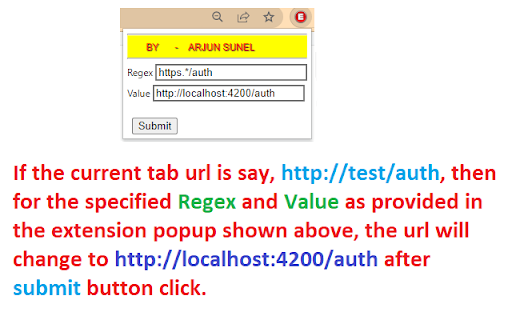
If you need to replace some specific parts of the current tab url matching a pattern with new value, then this extension is for you. You can provide the data for the pattern and the new value, then hit submit. The URL will get changed automatically.

Advanced RegEx URL Redirector and Text Replace
Redirect URLs and replace text or links on web pages using Regular Expressions. Advanced RegEx URL Redirector and Text Replace Redirect URLs and replace text or links on web pages using Regular Expressions. Syncs across devices. Detailed Description: Powerful tool for developers and power users to automate web browsing tasks. Use Regular Expressions (RegEx) to redirect URLs, replace text content, or modify links on any website. L - Link Replacement: Modify href, src and other attributes dynamically. Fix broken links or swap resource URLs on the fly. T/t - Text Replacement: Replace visible text on webpages. Supports both Case-Sensitive (T) and Case-Insensitive (t) matching. Live Preview: Test your Regular Expressions with real-time validation and result preview before saving. Excluded Domains: specific domains or URLs where rules should not apply. Sync & Backup: Your rules are automatically synced to your Google account. Easily Import and Export settings as JSON. Performance: Optimized with Mutation Observers to handle dynamic content efficiently without slowing down your browser. Perfect for SEO testing, environment switching (prod/dev), or simply customizing your web experience.

Url Redirector
To redirect the URL from X to Y based on user provided filters. In addition, can have excluded paths This tool is use when we need to auto redirect the url from x to y. In addition have option to allow the excluded path. In this case if the request url matches the exclude path that is /checkout then it won't route https://www.xyz.com/checkout to https://www.abc.com/checkout. Note: All the params will be automatically carry forward if params are not added over source url. Original Url: https://www.xyz.com?someparam=somevalue&anotherparam=anothervalue Then route carry forward the params over destination automatically and the final url will be https://www.abc.com?someparam=somevalue&anotherparam=anothervalue

URL Rewriter
Configure the rewrite rules you'd like in the extention options. Rules are of the form: Where %s1 and %s2 are the first and second capture groups, respectively. For example, the following rules may be useful: # Fallback: grab first URL and use it .*(https?://[^\s]+).* --> %s1 .*(www\.[^\s]+).* --> %s1 .*(www\d+\.[^\s]+).* --> %s1 (.*) --> https://www.google.com/search?q=%s1 The first identifies a url starting with http and will go to that url. The second identifies urls with www. The third identifies urls such as www2, www3, etc The fourth rule falls back on a google search for the entire string.

URL Auto Redirector
Make browsing quicker and simpler by redirecting URLs to skip referral/AD pages and adapt mobile pages gracefully. URL Auto Redirector redirects URLs automatically with Regular Expression presets. It enables you to skip referral/AD pages, trim query strings and adapt mobile pages gracefully, which is time-saving, helps to be more productive and improves web browsing experiences. We have several built-in rules as default. URL Auto Redirector opens up infinite possibilities of redirections, you might create your own powerful rules in the option page. We are very appreciated if you want to contribute awesome rules of URL Auto Redirector. Contribute on: https://github.com/URLAutoRedirector/awesome-rules
