
ofdbpkdfpkbdeehllfmpafeofnbcjnal
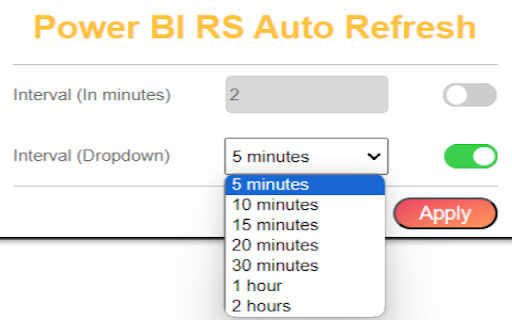

Automate the Refresh button click in Power BI Report Server A plugin to automate the refresh button click in Power BI Report Server. Users have the flexibility to set the refresh interval in two ways: 1. Input a custom value in the textbox 2. Select from dropdown options The latest interval settings will be applied automatically to newly opened tabs and upon startup. Take note that any changes made in the current tab will not be automatically implemented in tabs that are currently being opened.

Power BI Slider
Display Power BI dashboards as slideshows on TVs and other screens. Control page rotations, refresh intervals, and more. With Power BI Slider, you can automate the presentation of your Power BI reports on TVs and other screens. All you need is a valid Microsoft Power BI account. The platform offers automation features such as rotating report pages, viewing time for each page, and intervals for checking data updates. The extension will be automatically enabled when you access your report through the Power BI Service (https://app.powerbi.com). By pressing the presentation button in the extension's popup, Power BI Slider will request your permission to access your report. Simply grant access and you will be automatically redirected to the presentation settings screen. If you need to create a presentation using more than one report, the platform even offers an exclusive feature called “Compositions,” which allows you to build your presentation using multiple reports.

Coolors to Power BI Theme
Extracts color codes from Coolors palette pages and saves them as Power BI Theme JSON file - Developed by Vahid Doustimajd "Coolors to Power BI Theme" is a powerful extension that helps you to extract a Power BI theme from Coolors.co . With this extension, you can effortlessly extract color hex codes from Coolors palettes and create beautiful Power BI themes in just a few clicks. Here's what you can do with "Coolors to Power BI Theme": 1. Easy Palette Extraction: Browse Coolors.co to discover an endless array of stunning color palettes. When you find one that catches your eye, simply open the palette page. 2. Automatic Theme Generation: With a single click on the extension button, "Coolors to Power BI Theme" instantly downloads a Power BI theme JSON file based on the colors from your selected Coolors palette. 3. Ready to Use: Your Power BI JSON theme file is ready and you can import it into Power BI to check your reports and visualizations in your chosen color palette. 4. Customization Options: The generated theme JSON file is fully customizable, allowing you to fine-tune the color scheme to perfectly match your design preferences. Tailor your Power BI themes with ease and precision. 5. Time-saving Efficiency: Say goodbye to manual color selection and tedious theme creation. "Coolors to Power BI Theme" streamlines the process, saving you valuable time and effort. 6. Availability: The JSON theme file can be used in any report you have and it can be stored for future use Unleash your creativity and enhance your Power BI visualizations with the vibrant color palettes from Coolors.co. Download "Coolors to Power BI Theme" now and transform the way you design and present data in Power BI! In this new version, I have added exciting new functionality to enhance your experience. Now, our extension not only supports Coolors palette pages but also supports the 'Palette Generator' page. This means you can effortlessly extract color codes and create Power BI theme files from both Coolors palette pages and the dedicated creation page. Whether you're browsing existing palettes or designing your own, our extension has got you covered. Upgrade now and enjoy a seamless workflow with our improved compatibility and enhanced features!"

PowerBI Direct Report Redirector
Redirects the user to the Power BI Report Viewer URL found in the iframe src attribute. [PowerBI Direct Report Redirector] is a powerful and user-friendly Chrome extension designed to streamline your experience when working with Power BI Report Server (On-Prem Version). With a single click, this extension allows you to directly access the source URL of the embedded Power BI report, opening it in a new tab for an enhanced and focused Full-Screen view. - Automatically detects Power BI Report Viewer iframes within the active web page. - Provides a direct link to the source URL of the Power BI report in case you want to only copy & Paste the URL to users. - Opens the Power BI report in a new tab with just one click, allowing for a more in-depth analysis. - Compatible with any website containing a Power BI Report Server even inside Company internal Networks. 1. Install the [PowerBI Direct Report Redirector extension]. 2. Navigate to a web page containing a Power BI Report Server Portal. 3. Click the [PowerBI Direct Report Redirector] extension icon in your browser toolbar. 4. The extension will display a direct link to the Power BI report, or a message indicating that no Power BI Report Viewer iframe was found on the current page. 5. Click the "Open Power BI Report" button to open the Power BI report in a new tab. Whether you're a data analyst, business professional, or simply someone who needs quick access to Power BI reports, PowerBI Direct Report Redirector is the perfect tool to enhance your productivity and optimize your data visualization experience. This is used for enterprises who prefer to share only direct Report links to users instead of full access to the portal and folders.

PBI Pilot - Seu assistente de Power BI
Converse com seus dados utilizando todo o poder da AI Generativa no Power BI Converse com seus dados utilizando todo o poder da AI Generativa no Power BI. Execute consultas em tempo real, converse com seus dados, gere gráficos e muito mais
