
ofakngilfpgpkkdoacedlpdcojebcgea
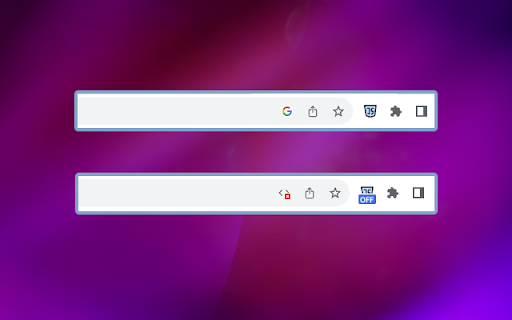
MZ Disable JavaScript is a Chrome extension that allows users to disable JavaScript execution on specific websites. 1. Enable/Disable JavaScript for Specific Websites: users can toggle JavaScript on or off for individual websites with a single click. 2. 'OFF' Badge for Disabled Websites 📌: the extension adds a visual indicator in the form of an 'OFF' badge to websites where JavaScript has been disabled. 3. Real-time Updates: the extension ensures real-time updates, instantly applying changes in JavaScript settings without requiring users to refresh the page. 4. Secure and Privacy-Focused 🛡️: privacy is a top priority. The extension does not track or store user data, ensuring a secure and private browsing experience. 5. Keyboard Shortcuts ⌨️: Alt+1 keyboard shortcuts for enabling/disabling JavaScript to enhance accessibility. 1. Start by installing the extension from the Chrome Web Store. 2. After installation, you should see the extension's icon in the Chrome toolbar, typically located in the top-right corner of your browser. It might look like a puzzle piece, a gear, or another icon, depending on your browser version and theme. 3. Click on it and pin the MZ Disable JavaScript extension to the top bar. 4. Click on the MZ Disable JavaScript extension icon to enable/disable JavaScript for specific website.

Simple JavaScript Disabler
Disables JavaScript on the current tab Description: JavaScript Toggler is a lightweight and efficient Chrome extension that empowers users with the ability to quickly enable or disable JavaScript execution on the webpage they are currently viewing. With a simple click of the extension icon, users can toggle the state of JavaScript, enhancing their browsing experience by improving page load times, reducing data usage, and increasing security on demand. This extension is perfect for users who frequently encounter websites overloaded with scripts that slow down their browser, consume excessive data, or pose security risks. JavaScript Toggler is also an invaluable tool for web developers and testers who need to check the functionality of web pages with JavaScript turned off. Features: One-Click JavaScript Toggle: Instantly enable or disable JavaScript on the current tab with a single click on the extension's icon. Per-Site Setting Persistence: The extension remembers the JavaScript setting for each site, applying your last choice every time you visit. Lightweight and Fast: Operates smoothly without affecting browser performance, ensuring a seamless user experience. Enhanced Privacy and Security: Helps protect against malicious scripts and enhances privacy by disabling JavaScript on sites known for tracking or intrusive ads. Easy to Use: Designed with a straightforward user interface, making it accessible for users of all skill levels. Developer-Friendly: A handy tool for developers and testers to quickly simulate environments where JavaScript is disabled. How It Works: Upon clicking the extension icon, JavaScript Toggler evaluates the JavaScript setting for the current webpage. If JavaScript is enabled, the extension disables it for the domain of the currently active tab and vice versa. After toggling the setting, the extension automatically refreshes the page to apply the new setting, ensuring that users can immediately see the effect of their action. Privacy and Permissions: JavaScript Toggler is designed with user privacy in mind. It operates strictly on the active tab, without requiring broad permissions or collecting any user data. The extension uses the activeTab permission to modify content settings exclusively for the site you are visiting when the action is initiated, minimizing its access to your browsing activity. Ideal Users: Privacy-Conscious Individuals: Users looking to enhance their privacy and security on the internet will find JavaScript Toggler a useful addition to their browsing toolkit. Web Developers and Testers: Professionals who need to test web applications with and without JavaScript can greatly benefit from the quick toggle functionality. Everyday Users: Anyone looking to improve their web browsing experience by managing JavaScript execution on-demand, especially on heavy-script sites. Summary: JavaScript Toggler stands out as an essential Chrome extension for managing JavaScript execution, providing users with control, security, and an improved browsing experience. Its simplicity, combined with powerful functionality, makes it a must-have tool in the digital age.

Disable JavaScript
Adds the ability to disable JavaScript on specific sites. JavaScript Toggle - Complete Control Over Script Execution Take full control of JavaScript execution in your browser with this powerful, privacy-focused extension. Perfect for enhanced security, faster browsing, and precise script management across websites. Core Features: Flexible JavaScript control: enable or disable JS globally, by domain, or per tab Customizable default behavior: choose whether JS starts enabled or disabled Smart domain management: whitelist/blacklist domains with automatic subdomain support Convenient shortcuts and context menu options (fully customizable) Proactive domain control: add sites to your lists before visiting them Comprehensive script blocking: stops all JS including inline scripts and external files How It Works: When you disable JavaScript for a site like google.com, the extension blocks all scripts that would normally load from that domain - including both inline JavaScript and external script files. Note that scripts from blacklisted hosts may still load if embedded on non-blacklisted sites, giving you granular control over your browsing experience. Cross-Browser Compatibility: Mozilla Firefox (Desktop and Mobile) Google Chrome (Desktop) Privacy & Security First: Built with complete transparency and user privacy in mind. The extension is fully open source, requires only essential permissions, and never logs or tracks your data. You can even use the unpacked version for maximum control and verification. Community-Driven Development: Active development with community input welcomed. Feature requests and bug reports can be submitted through GitHub, and pull requests are encouraged. Ongoing development roadmap available on the project's GitHub page. Professional Support: Comprehensive support available through direct email contact or the Chrome Web Store support form for any questions, issues, or feature suggestions.

JavaScript disable Chrome
Quickly toggle JavaScript on/off in the Chrome Browser. JavaScript disable extension. 🔒 Disable JavaScript for Chrome - your assistant for managing JavaScript on websites. Allows you to disable JavaScript execution for convenient content viewing without intrusive pop-ups, ads, and other unwanted elements. 🛡️ Key Features: 👉 JavaScript Management ✔️ Disable JavaScript on selected sites with a single button press. ✔️ Enable and disable JavaScript on individual tabs for greater control. ✔️ Automatically disable JavaScript on selected sites when opening tabs. 👉 Operating Modes ✔️ Manual mode: manually control JavaScript execution on sites. ✔️ Automatic mode: default disabling of JavaScript on sites for a more comfortable viewing. 👉 Custom Settings ✔️ Adding and removing exceptions for sites where you want to keep JavaScript running. ✔️ Saving exception settings between browser sessions. 👉 Reviews ✔️ "Excellent extension! Now I can read news without annoying ads." - Alexey ✔️ "Very convenient, Disable Javascript Chrome disables js on specific sites, thank you!" - Elena ✔️ "With this extension, I no longer worry about pop-up windows. Highly recommend!" - Ivan 💻 How to Use: 🔸 Click the "Add Disable Javascript for Chrome" button and pin it to the toolbar. 🔸 Go to the site where you want to disable JavaScript. 🔸 Click the extension button to enable or disable JavaScript on the current page. ❓ Frequently Asked Questions: 📌 How can I tell if JavaScript is disabled on a site? The extension will show an icon on the toolbar indicating the current status. 📌 Can I enable js for a specific element on the page? Yes, you can add exceptions for sites or specific elements on pages. 📌 Will some site functions be unavailable due to JavaScript being disabled? Yes, some functions may be unavailable when the Disable Javascript Chrome extension is disabled, but you can always temporarily enable it for the necessary sites.

Disable JavaScript Toggle
Toggle JavaScript on the current page. Prenez le Contrôle Complet avec l'Extension Disable JavaScript Transformez votre expérience de navigation en ligne avec l'extension Disable JavaScript ! Vous avez désormais le pouvoir de désactiver et de réactiver JavaScript à la volée pour n'importe quel site web que vous visitez. Que vous soyez soucieux de sécurité, à la recherche de meilleures performances, ou désireux de personnaliser votre expérience, cette extension est conçue pour répondre à vos besoins spécifiques. ➡️ Activation/Désactivation Instantanée : Avec un simple clic, désactivez ou réactivez JavaScript sur la page en cours. Oubliez les manipulations compliquées dans les paramètres de votre navigateur. Contrôlez le contenu instantanément sans effort ! ➡️ Indicateur Visuel : Profitez d'une transparence totale grâce à un indicateur clair qui vous informe si JavaScript est activé ou désactivé. Gardez toujours un œil sur l'état de votre page pour une gestion optimale. ➡️ Design Moderne et Convivial : Profitez d'une interface utilisateur élégante et intuitive. L'extension est facile à utiliser, rendant votre gestion de JavaScript simple et sans tracas. ➡️ Installation Facile : Ajoutez l'extension à votre navigateur Chrome en quelques clics. La configuration est rapide et sans complication. ➡️ Accès Rapide : Cliquez sur l'icône de l'extension dans la barre d'outils pour ouvrir la fenêtre de contrôle. Accédez à toutes les fonctionnalités instantanément. ➡️ Contrôle Instantané : Utilisez le bouton bascule pour activer ou désactiver JavaScript sur la page actuelle. Gérez votre contenu web avec une simplicité remarquable. Thanks you ! ❤️
