
oenlnmjoffhofiapelknhhelmmlcbfae
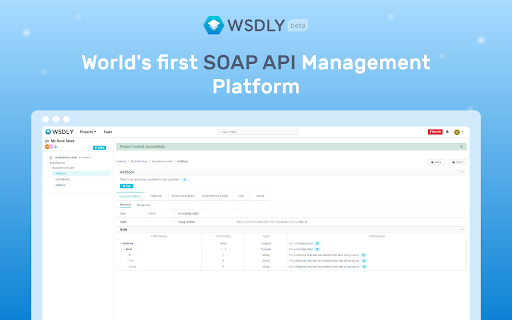


Tool manage and test SOAP API. It parses WSDL and generates human-readable documentation. Enhance your SOAP API management experience with the WSDLY Chrome Extension. With WSDLY, you can streamline the way you work with SOAP APIs, making them more discoverable, reusable, and manageable. Whether you're a technical expert or a non-technical user, WSDLY empowers you to optimize your API integration process effortlessly.🏆 📝 Automated SOAP API Documentation Accelerate your development process with WSDLY's one-click document generation. Say goodbye to complex technical jargon, as WSDLY transforms your API documentation into a more human-friendly and easily comprehensible format. ✨ Zero Code SOAP API Consumption Unlock the potential of your SOAP APIs without the need for coding. WSDLY caters to both technical and non-technical users, enabling seamless integration with SOAP-based systems. 🔄 Convert Payloads to Suitable Formats (JSON/XML) Effortlessly convert complex structures between JSON and XML formats using WSDLY. Save time and resources by adapting your data to the desired format with ease. ⚡️ Streamlined Service Impact Calculation with Dependency Graph Minimize downtime caused by legacy software with WSDLY's advanced service impact calculation. Effectively manage dependencies between different components of your system, ensuring smooth operations and enhanced reliability. 🔬 Test SOAP APIs While Designing Validate the functionality and suitability of your SOAP APIs during the design phase with WSDLY. Test and fine-tune your SOAP APIs before implementation or deployment, ensuring they meet the requirements of your intended use cases. 🌐 Visualize SOAP API Structure Improve comprehension and boost productivity by conveniently visualizing hierarchies of request-response structures within SOAP APIs. WSDLY's intuitive visualization capabilities simplify complex API structures for better understanding. 🏢 Central Platform For SOAP API Repository Discover, manage, and reuse SOAP APIs effortlessly with WSDLY's one-stop-shop platform. Developers can easily explore and leverage APIs across various applications and projects, promoting efficiency and code reusability. 🔒 Control Your SOAP API Resources Apply authorization and usage limits to selectively expose data and services to employees, partners, and customers. WSDLY provides you with granular control over your API resources, ensuring secure and optimized access. 📈 Increase Your SOAP API Visibility Create a customizable developer portal to showcase your SOAP APIs. With WSDLY, you can effortlessly share APIs with internal teams, partners, and customers, fostering collaboration and accelerating innovation. Join WSDLY's rapidly growing community of satisfied users and experience the world's first-ever SOAP API management platform. Simplify your SOAP API workflows, enhance productivity, and unlock the true potential of your APIs with WSDLY Chrome Extension. Get started with WSDLY today and revolutionize your SOAP API management experience. Download the WSDLY Chrome Extension now and take control of your SOAP APIs like never before.

WSDL documenter
Parses the WSDL files and all imported XSD and generates a human readable documentation

RestMan
RESTMan is a browser extension to work on http requests. RESTMan is an extension to work on REST APIs over http and https. Click on the RESTMan Icon that displays on your taskbar. Type the url in the main input field and choose the method to use: GET/POST/PUT/DELETE/PATCH. Click on the arrow "Send" or press Ctrl+Enter. You'll see info about the response (time, size, type) and you'll be able to see the content response in the response section. New - #42 Migrate extension to Manifest V3. New: - #25 Share request. - #24 Add OPTIONS to the list of http methods. Fixes: - #11 Different color for every HTTP method. - #18 Extension no longer uses resources when it's not being used. New: - New dark theme! Based on material design colors. - Side by side layout for Body and Response panels. - Options popup page to save theme and layout for future sessions. - Improved history dropdown. Adding ability to move through options with up/down keys, better mouse click handling, options get scrolled into view when out of scroll, pressing enter to select option. - More url space. - Improved "running" indicator. Fixes: - Fixed replacement of line endings in request editor. - Added error message for failed requests. New: - Improved history dialog. It now popus from the url bar, it filters entries based on what's been typed. - New HTML preview for responses. It will render the response as an html. Due to security issues, some scripts, images and other resources might be blocked. - Added extension version in main windows. - Major UI overhaul. - Extension won't duplicate entries in history. - Adding clear all button to headers and form body sections. - Ctrl+Enter sends request. - Pressing enter on url textbox sends request. - Several small fixes. - GET, POST, PUT, PATCH, DELETE requests. - Custom request headers. - Raw and Form data body. - View highlighted response. - View response headers.

JSON Pathfinder
Find and copy JSON paths with ease. Validate JSON, explore structure, and get instant error diagnostics. JSON Pathfinder is a lightweight Chrome extension that helps developers and data analysts work with JSON data. Instantly find paths to any property in complex JSON structures, validate your JSON, and get intelligent error feedback when there are syntax issues. - Interactive JSON Explorer**: Navigate through nested objects and arrays with expandable/collapsible nodes - One-Click Path Copying**: Click any property to see and copy its exact path - Multiple Path Formats**: Choose between dot notation (`data.users[0].name`) or bracket notation (`data['users'][0]['name']`) - Instant Validation**: Visual indicators show whether your JSON is valid or invalid - Smart Error Detection**: Get specific error messages and suggestions for fixing invalid JSON - JSON Beautification**: Format messy JSON with a single click - Persistent Storage**: Remembers your last used JSON input - Chrome Web Store (Recommended) 1. Visit the [Chrome Web Store](https://chrome.google.com/webstore/detail/json-pathfinder/[extension-id]) 2. Click "Add to Chrome" - Manual Installation 1. Download this repository or clone it with Git: `git clone https://github.com/isaee/json-pathfinder.git` 2. Open Chrome and navigate to `chrome://extensions/` 3. Enable "Developer mode" using the toggle in the top-right corner 4. Click "Load unpacked" and select the downloaded folder 5. The extension is now installed and will appear in your extensions toolbar 1. Click the JSON Pathfinder icon in your browser toolbar 2. Paste your JSON into the text area 3. If your JSON is valid, you'll see a green checkmark; if not, you'll see a red X with error details 4. For valid JSON, the parsed structure will appear below in a collapsible tree view 5. Click on any property to see its path 6. Use the dropdown to switch between dot and bracket notation 7. Click "Copy" to copy the path to your clipboard - API Development: Quickly find the exact path to specific data in API responses - Debugging: Validate JSON and pinpoint syntax errors with helpful suggestions - Data Extraction: Generate the correct path syntax for data processing scripts - Learning JSON: Understand nested JSON structures through visual exploration

SOAPNoteAI - The Best Way to do your SOAP Notes
SOAPNoteAI - Turn your dictation, in-person and telehealth sessions into SOAP notes in minutes. Works with SimplePractice and more. SOAPNoteAI - The Best Way to do your SOAP note Turn your shorthand, audio dictation or AI Scribe session recordings into a comprehensive SOAP note in minutes. Reduce your daily documentation time with our HIPAA-compliant AI-powered assistant. With this extension, record your conversation and let AI generate the SOAP note for you which you can sync to your EMR. v0.1.10 - Bug fixes and Enhancements
