
oenbhebfdnilmnmdilcocjngkaijjamc
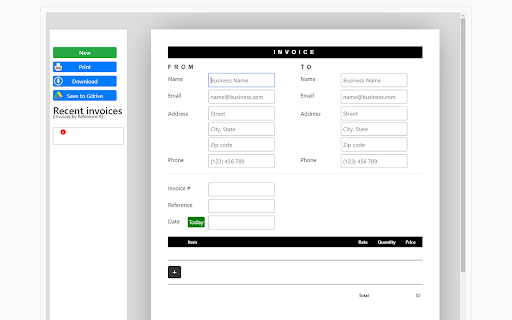
This software can let you do less work and send invoices effortlessly in a timely manner. Do you need to make an official looking invoice for your business? Need a simple and effective manner to make an invoice? Enter in the details such as amount to be paid, business name etc The Invoice is created and can be saved in PDF Format You can save your invoice on your Google drive also This software is 100% free, you can begin making professional looking invoices today with Invoices Maker

Invoice Maker
Create professional Invoices in Minutes. Easily send your invoice by email, text, WhatsApp, or download in PDF. Invoice Maker App allows you to Create Professional Invoices in minutes. Features: - Custom Branding - Use your company logo. - Print, Export or Email in PDF format. - Customizable templates with unlimited theme colors - Add Tax, Discounts, Shipping & handling & Amounts already paid info to your Invoices - Multi-Currency Support and more

Avatier Universal UI
Modernize your digital workforce with Avatier for Chrome. Discover a breakthrough seamless collaborative self-service IT experience and automation for the entire enterprise without compromising privacy and security using Chrome. Get more done with the Chrome and Avatier Now more simple, secure, and faster than ever - with Google’s smarts built-in. Utilizing the Avatier for Chrome extension allows users to customize their browser experience. Introducing Avatier for Chrome which integrates with the leading MFA solutions in the industry to provide a true-passwordless secure Identity Management experience. Leverage Avatier OTP SMS/Email or phoneless MFA, Duo Security, Google Authenticator, Okta Verify, Ping Identity, Radius, RSA SecureID, Symantec VIP, and many other FIDO2 WebAuthn compliant solutions. Discover all you can do with Avatier for Chrome: * Single Sign-on for Chrome. Modern SSO solutions need to support a diverse workforce with a choice of how and where they would like to securely consume cloud access. Avatier for Chrome Extension enables access when your workforce needs it the most while surfing the web. With Just-in-Time (JIT) cloud app user provisioning/deprovisioning it has never been easier to onboard your workforce across your cloud applications. * Self-Service Group Management for Chrome. Microsoft/Azure group membership is paramount as it controls your role in the company, access to files, and even cloud application access via leading SSO solutions like Avatier. Avatier for Chrome allows self-service group membership requests with push notification for workflow approval. Now you can request creation, deletion, renaming and even group ownership conveniently using Chrome. * Certification Campaigns for Chrome. Verifying workforce granular access has never been this easy. Avatier for Chrome ensures access governance is continuously being met by empowering managers to approve, deny, allow an exception, or re-assign certifications to a co-worker. * Universal Workflow Approval for Chrome. Push notification instantly alerts you to urgent matters that require your attention. Using Chrome with Avatier don't ever miss an important workforce request for roles, access, assets, or even generic change control. Approve/Deny ServiceNow and Workdays using Avatier's Universal Workflow Platform(TM). * User Management for Chrome. Never panic when its time to disable or delete user access. Avatier for Chrome you can request disabling user access now and schedule deleting the user later. * Self-Service Password Management for Chrome. Your workforce needs self-service password reset and synchronization without requiring an expensive call the help desk. Your service desk needs a secure friendly assisted password reset form anywhere. Avatier for Chrome gives your workforce the seamless ability to perform these actions wherever they are by securely authenticating with a variety of flexible authentication MFA options. Avatier's Password Policy Manager will also ensure that your password meets the enterprise password policy and maintain strong passwords across all systems. Achieve more together with Avatier for Chrome. If you are ready to see Avatier for Chrome in action we are offering an exclusive FREE trial to qualified organizations. Schedule yours today: https://calendly.com/avatier-cloudtrial/avatier-for-chrome-kickoff-meeting?month=2020-06

Zoho Invoice Timer
Start a timer and log time for your projects in Zoho Invoice, anywhere on the web! Easily log your work time from Chrome using this handy Zoho Invoice extension. What is Zoho Invoice? Zoho Invoice is a robust and complete invoicing solution used by thousands of businesses to invoice their clients. With powerful time tracking features built right into the web app, you can easily invoice your clients for the hours that you put in. Timer Extension for Google Chrome With the Zoho Invoice Timer extension, turn on a timer whenever you get to work, and stop the timer when you're done. You can also manually log time after you are done with your work, or view and edit all your recent time entries right from the extension. When you're done recording your work time, use the Zoho Invoice web-app and send an invoice to your client for the work you've done with just a few clicks! If you haven't signed up already, try out our forever free plan by creating a new account at https://www.zoho.com/invoice If you're facing problems with the extension, or if you have any questions at all, don't hesitate to email us at support@zohoinvoice.com, and we will get back to you as soon as we can. Shortcut keys: shift + alt + i will open the Zoho Invoice timer extension.

Invoice Generator
Use an online invoice generator software to quickly create an invoice with a free template and get paid faster. The invoice generator app simplifies the process by enabling users to build invoices efficiently without compromising data security. This tool helps business owners, freelancers, and entrepreneurs make professional invoices that look polished and can include a logo. Here’s a detailed look at its primary features and advantages. 🌟 Key features of the invoice generator 1. Simple creation: this tool allows users to make invoices in just a few steps, offering a streamlined approach without complex setups. 2. Efficient management and tracking: users can maintain a structured list of all generated invoices, making it easier to track paid and unpaid invoices and manage financial records in one place. 3. Quick access to saved client details: this extension allows users to save client details, making it faster to select repeat payers or payees. 4. Logo and branding options: customize each document by uploading a business logo, adding a professional touch that strengthens brand identity with every created invoice. 📖 How to use invoice generator The app is designed to make invoices generating simple and accessible. Here’s a step-by-step guide: 1. Create and add client information. Fill in a unique number. Enter or select stored recipient details, including name, contact information, and billing address. 2. Fill in invoice items. Complete essential fields like line item descriptions, due date, prices, and quantities for accurate billing. 3. Upload logo (optional). Personalize your invoice by adding a company logo to each document for a polished, branded appearance. 4. Generate and download PDF. Preview, then download it as a PDF with a single click. This quick generate invoice PDF feature is ideal for archiving or sharing. 🔐 Privacy and data security The invoice generator prioritizes user privacy, storing all data directly in the browser. Unlike traditional software, it doesn’t send information to external servers, eliminating potential security concerns associated with cloud-based tools. 💡 Benefits of using the invoice generator 1️⃣ Instant PDF download. Small businesses can create and download high-quality PDFs instantly without additional software, making record-keeping seamless. 2️⃣ Secure, local storage. The browser-based design means all information stays private and secure, eliminating the need for cloud storage. 3️⃣ Improved efficiency. By storing details of recurring clients, the quick invoice generator app reduces the time needed for repeat transactions. 4️⃣ With customizable branding options, users can create professional-looking invoices that enhance their business’s image. 🌐 Who can benefit from this app? 🔸 Freelancers and small business owners. It's perfect for freelancers who need to generate quickly without costly software. 🔸 E-commerce sellers. Online sellers can track transactions and make invoices for customers with ease, streamlining their online sales process. 🔸 Consultants and service providers. For professionals billing clients directly, this app makes managing client invoices professional and organized. 🔸 Mobile and remote businesses. Access from any device with a browser, making it convenient for remote work and mobile billing. ▶️ Top reasons to use • Unlike paid platforms, this free software is accessible to all users at no charge, making it ideal for startups and individuals. • User-friendly design. With a clean, intuitive layout, users can make invoices online without technical experience. • Accessible across devices. Generate and download from any device with internet access, keeping it convenient for remote work. As a web-based solution, users can generate invoice templates from any device. ⁉️ Frequently asked questions ❓ Is the extension secure? ‣ Yes, the app keeps all data local in the user’s browser, ensuring privacy and eliminating any data transfer to external servers. ❓ Can I customize my template? ‣ Absolutely, users can add logos and adjust the template to fit their brand’s look and feel. ❓ How do I generate a PDF invoice? ‣ Simply complete the fields, and the app lets users download a PDF immediately, making it easy to store or send. ❓Is this tool suitable for larger businesses? ‣ While ideal for freelancers and small businesses, this generator may not replace ERP systems but serves as a quick solution for smaller, personalized invoicing needs. Advantages of choosing an online invoice generator 🔹 Secure, local data storage. Since all data remains in the browser, users don’t have to rely on cloud storage, enhancing data security. 🔹 Quick, easy access. This tool allows users to create and send within minutes, making the process efficient and stress-free. Summary of features ✔️ Free to use and accessible. This invoice generator tool offers all essential invoicing functions without fees, providing value to small businesses and freelancers alike. ✔️ Browser-based privacy. The app’s local storage design keeps information secure, with no need for cloud integration. This software offers enhanced security over cloud-based alternatives. ✔️ Print and PDF generation. Generate and download professional invoices in PDF format, ideal for archiving and sharing. ✔️ Professional branding options. Upload a business logo and create polished, branded bills. The invoice generator app offers a streamlined, secure, and business friendly way to create invoices that cater to freelancers, consultants, and small business owners alike.This online solution enables quick, secure, and professional invoicing, integrating seamlessly into any business workflow.
