
oefncahpjhmbhahohenajofmeleahjen

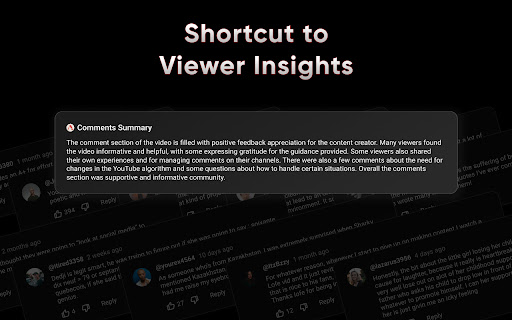
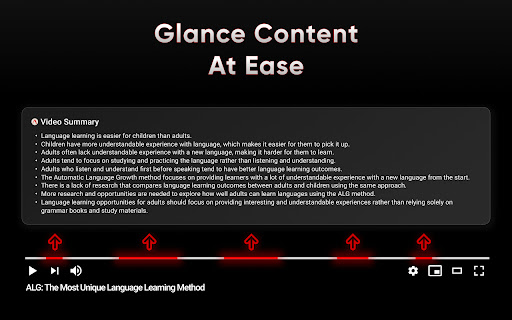
Youtube analyzer helps you to analyze the youtube videos and comments YouTube Analyzer – Advanced Video, Comment & Channel Insights Understand YouTube Content Faster and Smarter YouTube Analyzer is a powerful Chrome extension that helps you instantly understand YouTube videos, analyze audience sentiment, and evaluate entire channels — all in one place. Powerful Video Summarization Instantly extract key points from any YouTube video. Our AI delivers concise, accurate summaries so you can focus on what matters. Deep Audience Sentiment Analysis Understand how viewers truly feel. Analyze comments at scale and uncover trends, opinions, and reactions without manual effort. Channel Analytics and Insights Go beyond individual videos and analyze full YouTube channels. Access key metrics such as: Subscriber count Total views Total videos Channel creation date Upload frequency (30-day and 90-day activity) Identify content patterns, publishing consistency, and overall channel performance to make smarter decisions. Automatic and Seamless Integration Works directly within YouTube. Simply open a video or channel and get insights instantly with no setup required. Built for Real-World Use Designed for students, content creators, marketers, researchers, and professionals who need fast, reliable insights. Flexible Pricing Plans Start with free access and upgrade for advanced features as your needs grow. Key Features and Benefits AI-Powered Summaries Quickly understand video content without watching the full length. Video and Comment Intelligence Combine content analysis with audience sentiment for deeper insights. Channel-Level Analysis Evaluate growth, activity, and performance across entire channels to support research, competitor analysis, and strategy. SEO and Trend Insights Identify patterns in content and engagement to support content planning and discovery. Simple and Clean Interface Built to integrate seamlessly into YouTube without disrupting your experience. Who It’s For Students looking to learn faster Creators analyzing competitors and trends Marketers understanding audience behavior Professionals extracting insights efficiently Join users who are transforming how they consume and analyze YouTube content. For more information, visit youtubeanalyzer.tech. Start using YouTube Analyzer today and turn YouTube into a source of instant insights.

YouTube Summary with ChatGPT & Claude
Summarize YouTube videos, web articles, and PDFs to save time, powered by ChatGPT, Claude, Mistral AI, and Gemini. YouTube Summary with ChatGPT & Claude is a free Chrome Extension that lets you quickly summarize YouTube videos, web articles, and PDF you're consuming. Use this extension to save time and learn more quicker. YouTube videos, web articles, and PDF summarization functions are powered by ChatGPT (OpenAI), Claude (Anthropic), Mistral AI and Google Gemini. ## What are the benefits of using YouTube Summary with ChatGPT & Claude? The main benefits are saving time, increasing productivity, and improving learning. YouTube Summary with ChatGPT & Claude reduces the need to watch long videos when you're just looking for the main points. The summaries let you absorb information quickly so you can spend time on other tasks. ## How do I use YouTube Summary with ChatGPT & Claude? Using YouTube Summary is easy. After installing the browser extension, simply open a YouTube video you'd like to summarize. Click the YouTube Summary icon in your browser toolbar, and it will generate a summary and provide an option to access the video transcript if available. You will see a summary of the video with or without timestamps. You can click on the timestamps to jump to the corresponding part of the video. You can also click the "Copy Transcript" button to copy the transcript of the YouTube video to your clipboard. ## Can I customize the length of the YouTube video summaries? Yes, you can customize the length of the video summaries generated by YouTube Summary. Adjust the settings within the extension to tailor the summaries to your preferred level of detail. Also, you can customize the prompt to use to summarize the content. ## Is YouTube Summary with ChatGPT & Claude suitable for educational purposes? Yes, YouTube Summary with ChatGPT & Claude is a valuable tool for educational purposes. It provides concise summaries and transcripts that can aid in research, studying, and learning from YouTube videos. ## Can YouTube Summary with ChatGPT & Claude handle videos in languages other than English? Yes, YouTube Summary is capable of summarizing videos in multiple languages, making it a valuable tool for international users. You can also choose what language you want the transcript to be in. Fore more details, please visit the website: https://glasp.co/youtube-summary

YoutubeDigest: summarize using ChatGPT
Generates summaries for youtube videos using ChatGPT Discover the power of YouTubeDigest, a cutting-edge tool that leverages ChatGPT AI 🧠 to generate concise and informative summaries of your favorite YouTube videos. Say goodbye to wasted time ⏰ and enhance your productivity by previewing video content before committing to watch. Customize your experience with a range of summary formats: - Get a quick tl;dr summary in a single paragraph. 💨 - Digest the main points with bullet-point summaries. 📋 - Dive deeper with layered bullet points, including video chapters. 📚 - Enjoy a comprehensive overview with article-style summaries. 📰 Unlock additional benefits with our versatile extension: - Choose specific time ranges for tailored summaries. ⏳ - Seamlessly summarize and translate content between languages. 🌍 - Export your summaries as PDF, DOCX, or plain text for easy sharing and reference. 📤 Experience YouTube like never before with YouTubeDigest – your ultimate time-saving companion! 💡 FAQ: Do I need a chatgpt account to run this extension ? Yes, the extension requires that the user has a chatGPT account in order for it to work. How do I make it work in Brave browser ? Disable "Prevent sites from fingerprinting me based on my language preferences" in brave://settings/shields, this is needed because the extension needs to access the session you have for chatgpt and that option is preventing us from doing that. Is this extension able to summarize videos without youtube transcript ? No, right now the video must have a transcript, but this will change in the future. Does it only work for youtube ? That is correct, but we can extend that. If you have any requests, please add it in the support tab. How can I request adding a new language ? Please request the new language from the support tab and we will try to prioritize it. Release notes: 2.4.0.0 - Add support for Google Gemini 2.3.0.0 - Summarize as short video - Summarize as tweet and post tweet - Remove Medium V2.2.0.0 - Add medium spoort V2.1.0.0 Provide both GPT 3.5 and GPT4 options V2.0.0.0 Change the extension to use open AI API V1.4.0.0 - Add Chat with video summarization - Bug fixes V1.2.0.3 - Bug fixes for article summarization V1.2.0.2 - Fix include timestamp bug V1.2.0.0 - Add support for custom prompts - Add support for sharable links - Change UX for article to use tabs - Bug fixes V1.1.0.0 - Export experience with timestamp and video link - Auto cleanup for old conversations. - Ability to abort summarization. V1.0.0.2 - Bug fixes - Add model choice to custom settings. - Add Urdu language V1.0.0.1 - Fixing hanging export behavior. - Add dislike dialogue - Add custom settings after summarization. - Fix Articles that don't complete. V1.0.0.0 - Fix the login issue in some browser - Rewrite the article generation code. - Ability to have custom settings for video summarization. - Ability to customize the time range of the summarization. V0.0.2.8 - Add the ability to choose the model for chatgpt plus users. V0.0.2.6 - Add scrolling - UI fixes - Minor summary improvements - More locales V0.0.2.5 Make the model name dynamic to handle the model name changes V0.0.2.4 Fix the extension for chatgpt plus V0.0.2.3 Fixes for metrics V0.0.2.2 - Add initial support for text to speech. - Fix the article generation summary. - Add caching for the summary in local storage so that other users can use it. V0.0.2.1 - Add timestamps for bullet point summary. - Improve the quality of the summary for bullet points and layered bullet points. - Show partial layered bullet points summary instead of waiting till one bullet point is complete.

Highlight Analyzer: Video Clip Assistant for YouTube & Twitch
Visualizes viewer excitement in YouTube and Twitch live archives with graphs. Highlight Analyzer is an innovative tool that visualizes the most engaging moments in YouTube and Twitch livestream archives. Streamline your clip creation through data analysis and AI technology. In the PRO version, our AI automatically analyzes YouTube videos to identify humorous moments and suggests clip-worthy scenes with detailed descriptions. Key Features: ■ Highlight Graph Visualizes stream engagement through graphs (showing frequency of laughter and comment intensity) ■ Channel Rankings Ranks and displays the moments that generated the most laughter for each channel ■ Table of Contents Creates a table of contents from timestamped comments ■ Timestamp Notes Allows you to save timestamped notes for each video ■ AI Assistant (PRO Feature) Clip suggestions and scene descriptions for YouTube streams □ Supported Languages (for laughter analysis): English, Japanese, Korean (한국어), Chinese (中文), Indonesian (Bahasa Indonesia) With Highlight Analyzer, you can visualize stream engagement and create more compelling clip videos. It helps you capture the most captivating moments and supports effective content creation that keeps viewers engaged.

YouTube Summary with ChatGPT & Claude — AI Video Summarizer
Summarize YouTube videos in one click with ChatGPT & Claude. Save time, skip the fluff, and learn faster. Save time on YouTube. Get the key ideas in one click. YouTube Summary lets you summarize YouTube videos instantly in one click. Read the main points faster, skip the fluff, and learn more from lectures, tutorials, podcasts, interviews, presentations, and long-form videos. A one-time upgrade allows you to create summaries on-page, using your own ChatGPT or Claude API key. ✨ Features 🎯 One-click YouTube summaries — opens directly in ChatGPT or Claude. Totally free. 🔑 Bring your own key — connect your OpenAI or Anthropic API key, with a one-time upgrade. 📝 On-page transcript with clickable timestamps ⏱️ Jump to key moments while watching 🌐 Choose your summary language 📹 Better support for long videos and long transcripts 🚫 No daily limits from the extension 🚫 No account or sign-up required 👥 Built for Students, researchers, founders, marketers, language learners, professionals, and anyone who uses YouTube to learn, study, research, or stay informed. ▶️ How it works 1. Add your OpenAI or Anthropic API key in Settings 2. Open any YouTube video 3. Click the summary button 4. The video opens in ChatGPT or Claude with the summary prompt ready 5. Read the summary, jump to timestamps, or ask follow-up questions
