
ochkpboobonjcodacmcjipmgalplpdcp
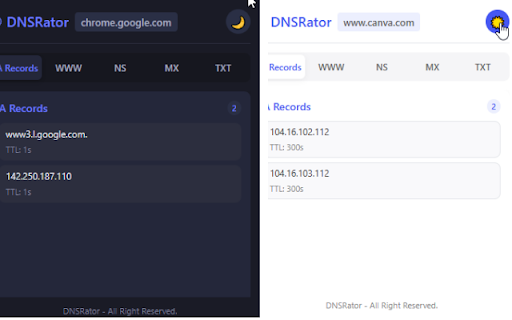
DNS record viewer and IP geolocation lookup extension. DNSRator is a user-friendly Google Chrome browser extension developed for web developers, cybersecurity professionals, and network administrators. This extension allows you to view the DNS (Domain Name System) records of the websites you visit directly through your browser, providing valuable insights. Quick and Easy Access: You no longer need external tools or command-line interfaces to access website DNS records. With a single click, you can instantly access all important DNS records (A, MX, CNAME, TXT, etc.). Security Analysis: When evaluating the trustworthiness of a website, DNS records (such as SPF, DKIM, DMARC) offer important clues. DNSRator allows you to easily examine these records, helping you to be more aware of potential phishing or email spoofing attempts. Education and Learning: For students and beginners who want to understand the DNS system, DNSRator provides a practical and visual learning tool. In summary, the DNSRator extension simplifies the daily workflows of web professionals, improves diagnostic and security analysis processes, and is a valuable tool for anyone interested in learning about DNS.

CFList
Find domain IPs via Cloudflare API, and view WHOIS and DNS records. Find website IP addresses quickly through Cloudflare DNS API and open them with a custom port. A useful tool designed for software developers, network administrators, and cybersecurity specialists. Features: • Quick IP address lookup for domains • Open discovered IP addresses with custom port numbers • Detailed DNS record querying • View Name Server (NS) information • Query and display WHOIS information • Check comprehensive DNS record details • Easily access previous queries with search history • Convenient access during browsing with side panel support • Cloudflare API integration • Full Turkish and English language support • Backup of settings and history data • Advanced interface and error management

InboxIQ DNS Records Extractor
Extract DNS records from Mailgun, SendGrid, or Postmark and export as BIND zone files or CSV for fast, client-ready DNS setup. Streamline Your DNS Setup Process DNS Records Extractor is the ultimate time-saving tool for web developers, IT professionals, and digital agencies who need to configure DNS records for clients. Stop copying and pasting DNS records one by one – extract them all at once and import them in bulk! ✅ Smart Extraction - Automatically detects and extracts DNS records from Mailgun, Sendgrid, Postmark or any that use a recognizable format. ✅ Multiple Export Formats - Download as BIND zone files (.txt) or CSV files for universal compatibility ✅ Bulk Import Ready - Files formatted for direct import into Cloudflare, GoDaddy, AWS Route 53, and other DNS providers ✅ Client-Ready Format - Copy-paste friendly output for sending setup instructions to clients ✅ Universal Compatibility - Works with Mailgun, SendGrid, and other email service DNS configuration pages 💡 Perfect For 1. Navigate to any DNS configuration page (Mailgun, SendGrid, etc.) 2. Click the DNS Records Extractor icon 3. Click "Extract DNS Records" to scan the page 4. Choose your export format: • Copy All - Traditional copy-paste for emails/documents • Export BIND - Download .txt file for DNS servers • Export CSV - Download .csv file for DNS providers 5. Import the file directly into your DNS provider's bulk import feature • And many more! • Follows DNS standards (RFC 1035) for proper formatting • Automatic domain detection and relative name formatting ⏱️ Save Hours of Work Transform your DNS workflow from tedious manual entry to automated bulk import. What used to take 30+ minutes of careful typing now takes just 30 seconds of extraction and import. • All processing happens locally in your browser • Open source and transparent 📞 Perfect for Client Communication Generate professional, formatted DNS record lists that you can send directly to clients with clear setup instructions. No more back-and-forth emails trying to explain complex DNS configurations. • Works with any DNS configuration page • Regular updates and improvements Start streamlining your DNS workflow today! Install DNS Records Extractor and never manually type DNS records again.

IntoDNS - DNS Analyzer
Analyze DNS settings of any website instantly with IntoDNS.TR

DNS Lookup Tool
Resolve DNS records for one or multiple hostnames. DNS Lookup Tool is a simple and lightweight Chrome extension that helps developers, IT professionals, and curious users quickly check DNS records for any hostname — without needing to use command line tools. 🔹 Features: • Resolve multiple hostnames at once (one per line). • Supports common DNS record types: A, AAAA, CNAME, MX, NS, TXT, and ANY. • Choose between Google DNS and Cloudflare DNS resolvers. • Displays results in a clean, terminal-style format including TTL, class, record type, and data. • Line breaks and alternating colors for readability. • Advanced options are hidden by default to keep the interface clean. • Resizable popup window for comfortable viewing. 🔹 Why use it? Instead of opening a terminal and typing `nslookup` or `dig`, you can get quick DNS answers directly in Chrome with a single click. This makes it great for debugging websites, checking CDN records, or learning how DNS works. Privacy: This extension does not collect, store, or share any personal data. All DNS queries are sent directly to the resolver you select (Google DNS or Cloudflare DNS).
