
ocgmjfcfjilnmobeocoklcbpcanilpjd
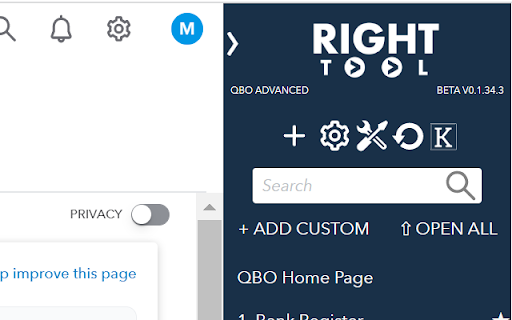

RightTool increases your productivity with QuickBooks Online. Designed by Hector Garcia CPA, not associated with Intuit, Inc. Developed with Hector GarciaCPA and the makers of MonkBe. https://qbo.intuit.com/*: In order for us to add the sidebar and features into QBO. We do not track any user specific information and we use no external code to be 100% sure that you are safe and nothing is done without your permission. RightTool by Accounting Pro Tools LLC is a Chrome extension designed for QuickBooks Online power users that want to enhance the navigation experience and functionality within QuickBooks Online. Note: QuickBooks Online is owned by Intuit, Inc. We have no association with Intuit, other than our sheer love for millions of small business that use QuickBooks as their operating system, we simply want to compliment that with an enhanced experience with RightTool! Some of the features you will love are the following: - Collapsible Right-sided Navigation bar: in navy blue, an homage to QuickBooks Desktop 2013 and above! With +New button and Gear Menu next to each other - Open Tabs: allows you to see all the open tabs/windows related to QuickBooks and quickly switch across tabs or close them All Shortcuts & Reports: database of all the direct shortcut and reports you can access with on click, no need to use standard navigation workflows (over 250 direct links) - Favorites: allow users to pick their favorite shortcuts and reports to save into the Favorites menu (plus the ability to create custom shortcuts and quickly open ALL favorites in one click) - Keyboard Shortcuts: with over 38 keyboard shortcut combinations to help you navigate both RightTool and QuickBooks - Quick Search: Ability to search within shortcuts and reports list, plus a 1-click amount/text search - Other UI enhancements: such as opening all drill down reports in new tabs, keeping the left navigation bar closed, improved Bank Feeds tools, collapse/expand report groupings, and many more!

Clockify Time Tracker
Track time from anywhere on the web and improve productivity. Track time from anywhere on the web with one click. Later, analyze and export time at https://clockify.me/reports/summary • Integrates with 50+ web apps • Idle detection • Reminders • Pomodoro timer • Automatically start/stop timer • Start a timer from selected text • Start/stop timer shortcut (Ctrl+Shift+U) • Default project for new time entries Q: Why does the extension need access to "read and change all your data on the websites you visit"? A: We use the "Read and change all your data on the websites you visit" permission only for putting a timer button on other websites and taking the task's names as a description for the timer. If you don't wish to see the button on other websites, you can disable it in extension's Settings>Integrations. The code for this extension is open source. Feel free to examine it and contribute on Github: https://github.com/clockify/browser-extension For more information on how Clockify works, check out our help article https://clockify.me/help/apps/chrome-extension If you have any issues or feedback, send us an email at support@clockify.com Clockify is a time tracker that allows you to track the time you spend on projects and analyze your productivity. You can use Clockify on the web, desktop, and mobile – all your tracked data is synced in real time so you can seamlessly switch between devices. - Free and simple online timer - Analyze time in reports and export data - Invite team and track time together - Manage projects and monitor progress

Dextension
DEXTension fuses Dext's efficiency with leading accounting systems like Xero and QuickBooks Online, making accounting effortless. DEXTension: Supercharge Your Accounting with Dext, Xero, and QuickBooks Online DEXTension brings the unparalleled efficiency of Dext into the heart of leading accounting systems like Xero and QuickBooks Online. Designed to make accounting effortless, DEXTension is the bridge that connects the best of Dext, with the best of your preferred accounting software. Seamless Integration: Experience the seamless fusion of Dext with Xero and QuickBooks Online. DEXTension ensures you have the powerful features of Dext right where you need them, enhancing your accounting workflow like never before. Dext Everywhere: Right click on a pdf or drag and drop a document in your browser for instant upload to the Dext. Data Health Scores: Instantly gauge the health and completeness of your accounting data. With DEXTension, you can easily access detailed insights within Dext Precision without leaving your dashboard. Invoices and Bills Insight: Stay ahead with real-time visibility of bills, expenses, or invoices in Dext that are yet to be updated in Xero or QuickBooks Online. Make informed decisions with the assurance of up-to-date data. Previously Coded Transactions: In Dext Prepare, effortlessly view how similar transactions have been categorized and taxed in Xero or QuickBooks Online, all without switching systems. Invoices with Attachments: Access invoice attachments directly in Xero or QuickBooks Online interfaces, eliminating the need to toggle between tabs. Streamlined Bank Reconciliation: DEXTension enriches bank reconciliation with additional context from Dext: - Inline full transaction descriptions - Inline attachments - Inline Tracking Categories - Supplier Statement and Remittance views Tags: Utilize Dext Precision tags within the Xero or QuickBooks Online interface to better organize and define client work. Paperwork Requests: Easily compile and send emails detailing missing transaction paperwork or information, directly from your integrated Gmail or Microsoft Outlook account. Please note: For users in France, Xero and QuickBooks integrations are currently unavailable. However, you can still enjoy the Dext Everywhere feature ABOUT DEXT Empower Your Accounting with Dext products. Dext Prepare: Embrace automated data extraction for receipts, invoices, or bank statements. Enjoy 99% accuracy and integrations with over 11,500 banks and institutions. Dext Prepare is your go-to tool for eliminating manual data entry. Dext Precision: Gain deep insights into your accountancy practice data. Access real-time, accurate figures, proactive insights, and client health scores. With efficient workflows and seamless integration with Xero and QuickBooks Online, Dext Precision is the ultimate tool for modern accountants. With DEXTension, step into a world where accounting is not just an administrative task but a seamless part of your day to day workflow. Experience the future of accounting today – efficient, intuitive, and effortless.

Asana
Easily create and search for Asana tasks from anywhere in your browser. This official Asana Chrome Extension enables you to easily create and search for Asana tasks from anywhere in Chrome. View, edit, and search for tasks alongside your work • Complete tasks • Add collaborators • Edit task details (assignee, due date, project, section, and description) • Search by task name, without switching tools From the small stuff to the big picture, Asana organizes work so teams know what to do, why it matters, and how to get it done. It’s free to get started, simple to use, and powerful enough to run your entire business. Learn more about Asana at www.asana.com.

Fathom AI Note Taker for Google Meet
Install this Fathom for Google Meet Chrome extension to unlock: * Ability to use Fathom on any Google Meet - without it you have to make sure to join the meeting from the Fathom desktop app * Embedded recording controls right inside Google Meet, so you never have to dig for the desktop app * Instant join for any Meet link you click — even unscheduled calls It’s AI notetaking for the way you work. Fathom captures, transcribes, and summarizes your Zoom, Google Meet, and Microsoft Teams meetings, now available bot-free, so you can stay fully present in the conversation and let the notes take themselves. 🆓 Free forever. Unlimited recording, transcription, and storage. Get set up in minutes. 🥇 #1 rated AI Notetaker on G2, used at 300K+ companies. 🔒 Enterprise-grade security: SOC 2 Type II, GDPR, and HIPAA compliant, with SSO/SCIM available. ⚡ Instant, Shockingly Accurate Summaries: The moment your call ends, you get a clean transcript, a high-quality summary, and AI-generated action items delivered straight to your inbox. Turn a 30-minute call into a 1-minute read. 🪐 Ask Fathom – Across Every Meeting You've Ever Had: A ChatGPT-style interface for your entire meeting history. Ask things like "What did the customer say about pricing last quarter?" or "Summarize every conversation about the Acme deal" and get instant, cited answers. 🛸 Bot-Free Capture: Record meetings without a bot joining as a visible participant. Stay present, stay private, and skip the "who invited the notetaker?" conversation. 🤖 ChatGPT & Claude Integrations: Bring your meeting intelligence into the AI tools you already use. Connect Fathom to ChatGPT or Claude and pull insights, draft follow-ups, or analyze patterns across calls. 🎯 AI Scorecards & Coaching: Auto-grade calls against custom criteria — perfect for sales, customer success, and interview workflows. Managers coach with confidence; reps level up faster. 🔥 Auto-Updates Salesforce, HubSpot, and Asana: No more post-call data entry. Fathom logs the call, writes the summary, updates the right fields, and creates tasks in your project tools — automatically. 🔔 Keyword & Topic Alerts: Get notified the moment a competitor, feature request, or critical topic gets mentioned in any meeting across your team. 🙏 Easily Share Highlights & Clips: Show, don't tell. Clip key moments from any call and share them with teammates, prospects, or leadership in a couple of clicks. 🔌 Works with the tools you already use: Slack, Notion, Gmail, Zapier, plus a Public API and MCP server for custom workflows.
