
ocginjipilabheemhfbedijlhajbcabh
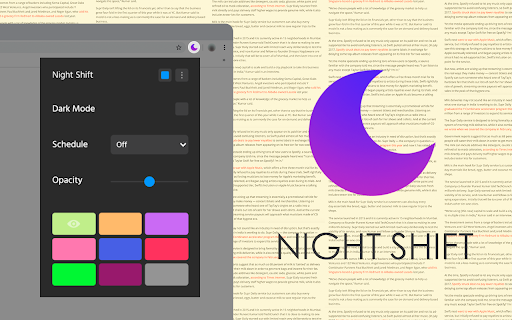
Night Shift automatically shifts the colors of your browser content to the warmer end of the color spectrum after dark. Night Shift automatically shifts the colors of your browser content to the warmer end of the color spectrum after dark. ⚡ You need to refresh all the tabs, which were opened BEFORE the Night Shift was installed. You can also restart Chrome to refresh all the tabs at once. Otherwise, Night Shift will work only with the newly opened tabs. ⚡In accordance with the Chrome Browser policies, Night Shift is restricted to work on the Chrome Web Store and Home Page. Please open any other website (for example, YouTube) after installing this extension and check the extension in action. Night Shift provides itself on a scheduled basis, you can choose from 3 options: 1. Sunset to Sunrise (Chrome colors will be shaded every day automatically on Sunset). 2. Off (manually enable the Night Shift to shade the screen) 3. Custom (set up your own schedule to start up and finish display color adjustments) Take care of your eyes. Change screen brightness to special eye-protective colors from the list or to a color that you prefer. Night shift changes the colors of the screen to warm and eye-protective shades. You can set automatically change screen mode by schedule or select a color theme for a certain website. Working on a computer a night time may take affect your eyes. Night Shift Mode is a good opportunity to reduce screen brightening to take care of your eyes. Dark Mode isn't suitable for all websites, so applying warm colors to all websites will be the best alternative for screen tinting. Screen Shader Mode is a pleasure for your eyes!

Daydream Night Mode
Get rid of the sun-like pages and have a sweet Daydream... Get rid of the sun-like pages and have a sweet Daydream. Provide a universal dark mode access to all websites with customizable brightness. You can also exclude any website from the extension if the website already provides dark mode or the extension does not work well with the website.

Dark Night Mode
It is a night mode for the entire Internet. It darkens all the websites you visit so that you can browse without straining your eyes Dark Night Mode is a Free Open Source Software which makes all the websites you browse into dark/night mode so that you can browse the internet without straining your eyes. It is an extremely useful chrome extension for those who use internet especially at night. We use a unique algorithm to apply dark mode to all the websites in real-time as you browse. It basically detects the color of each element of a website and intelligently converts it to a darker shade. Bright colors are darkened at more intensity than dark colors so that most of the colors are preserved. Unlike other similar extensions, we do NOT invert the colors, so black websites will not change its color into white. An added benefit is that the images will also not be distorted! I think we were hit by the one-star-bot-ratings because we were the only extension to have this intelligent-algorithm. Now, after this extension became popular, one another super famous extension have copied this feature of ours. We have also put immense effort in eliminating the flashes of bright white screen while loading different websites. It was a challenging task due to the limitations of chrome, but we were able to eliminate this problem with 99.9% success rate. Using the brightness slider, you can adjust the brightness of your browser beyond what your computer's brightness adjuster allows. This is useful in dimming the brightness to your likening. For example, by default the images are shown with normal color, but you can darken it by sliding down the brightness slider. There is also an Auto mode which will automatically turn on the Dark Mode at night 8:00PM and will turn off at morning 6:00AM. It was complicated to develop an option to customize this timing, but we are working on it and may add this option in the future versions. There is also Whitelist feature which can be helpful if you do not want the dark mode to work on certain websites. Since this extension will darken all the websites you visit at night, you will initially not enjoy it due to the huge change in your routine. However, our internal studies have shown that people start getting used to it after about three weeks of use. Some people have claimed that this extension helps them sleep better while some others have said that it helped them reduce the burning sensation in their eyes caused by extensive browsing of the internet in the dark. This plugin is NOT 100% perfect. It never will be perfect because many websites are developed in a non-standard fashion and there is no easy way to detect a site and perfectly change its colors in real time withing milli-seconds so that the user do not see the bright colors. It is a double edged sword - If we add more conditions to make the algorithm smarter, then it will affect the processing speed and the user will see flashes of white light, so we had to make some choices to get an optimal balance. If you want your browser window to also look black similar to how it is shown in the screenshots, then you must install a Dark Chrome theme as well. We suggest to search "Morpheon Dark Theme" and install it in google chrome. It took us - two developers two whole months of full time developmental efforts to conceptualize, design, code, test, calibrate and deploy this extension. We had initially started it as a side project aiming to make it in couple of days, but it ended up taking significantly more time than expected! We hope you enjoy it.

ReaDark - Reading & Dark Mode
ReaDark - Reading & Dark Mode for turning all websites in Chrome browser to reading or dark mode or both. It's 100% ad-free. ReaDark - Reading & Dark Mode is a fast, lite, simple and open source add-on that automatically turns the colors of your browser content to warmer or darker. (github.com/onursert/readark) The add-on consists of a small screen that allows you to control those preferences. The first switch called "Reading Mode" and provides you to turn the colors of your browser content to warmer. Second switch called "Dark (Night) Mode" and provides you to change the colors of your browser content to darker. Turning on reading mode protect your eyes from reading for hours. Hence you can easily continue to read EPUBs or e-books much longer. Turning on dark mode protects your eyes from bright colors. Social networks, mainstream sites, and all other new tabs will be in dark mode with ReaDark. No needs to open every website settings one by one - just one add-on makes every website in dark mode. Chrome Browser policies restrict ReaDark to work on the Chrome Web Store and Home Page.

Midnight Lizard
Custom color schemes for all websites: night mode, dark themes, blue light filter, screen shader, high contrast, grayscale, etc. Midnight Lizard color schemes work across all websites. There are many predefined color schemes and you can install more from midnight-lizard.org ✔ Choose between dark, light, grayscale or colorful color schemes ✔ Modify existing or create new color schemes ✔ Use different color schemes on each website ✔ Adjust brightness, saturation, contrast and hues ✔ Improve accessibility and readability ✔ Increase contrast to make text easier to read ✔ Apply blue light filter to shift all colors towards red light ✔ Keep original images and hues without inversion ✔ Schedule automatic activation and deactivation ✔ Use keyboard shortcuts to toggle extension ⮚ on current website: Alt+Shift+L ⮚ globally: Alt+Shift+M ✔ Use with PDF and local files (enable in browser settings) ✔ Shade bright colors and images ✔ Change any colour you want ✔ Synchronize your settings ✔ Configure background, text, buttons, links, borders, images and scrollbars ✔ Apply globally, per-website or with url match patterns ✔ Switch between websites blacklist and whitelist modes ✔ Use Simplified mode to improve performance on heavy websites ✔ Contribute to our open source project on GitHub.com/Midnight-Lizard ✔ Donate to our OpenCollective.com/Midnight-Lizard Please use browser themes in order to style New Tab page, tabs and toolbars - extensions cannot do that. Also extensions don't work on New Tab page, Chrome Web Store and browser settings.
