
ocabkmapohekeifbkoelpmppmfbcibna
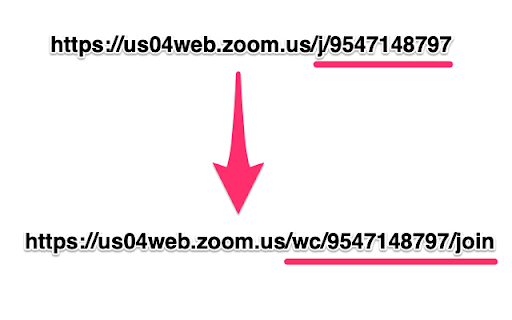
Note: Prior to March 2022 this extension was called "Zoom Redirector". Zoom issued a trademark violation against this extension and had Google take it down, so it is now called "Xoom Redirector".

URL Auto Redirector
Make browsing quicker and simpler by redirecting URLs to skip referral/AD pages and adapt mobile pages gracefully. URL Auto Redirector redirects URLs automatically with Regular Expression presets. It enables you to skip referral/AD pages, trim query strings and adapt mobile pages gracefully, which is time-saving, helps to be more productive and improves web browsing experiences. We have several built-in rules as default. URL Auto Redirector opens up infinite possibilities of redirections, you might create your own powerful rules in the option page. We are very appreciated if you want to contribute awesome rules of URL Auto Redirector. Contribute on: https://github.com/URLAutoRedirector/awesome-rules

Conferfly Extension
All-in-one video conferencing optimization toolkit for Zoom, Microsoft Teams, Google Meet, and more. ✓ Auto-Join Meetings tabletAutomatically joins meetings in the browser and skips the join screen. If no account is signed in, it joins as a guest using the room name. Enabling this disables Meeting Tools above and applies recommended settings. ✓ Conferfly in Kiosk Mode Activate Conferfly's Kiosk Mode. You can enable this setting instantly or schedule it for a specific time using the option below. To exit kiosk, unlock the room if it's locked, then click the 'kiosk options' and 'Exit Kiosk' button. ✓ Enable Extension to Open Meetings On a Selected Display When enabled, meetings open in a new window on the selected display. If Kiosk mode is enabled, they open in Kiosk mode; otherwise, they open maximized. When disabled, meetings open in a new tab. ✓ Close all Tabs/Windows and Reload Conferfly Daily at Specific Time Enables browser clean up by automatically closing all windows and tabs at the defined time each day. Conferfly will be reloaded and will enter Kiosk Mode if enabled above. (lock the room when using this option). ✓ Auto-Close Google Meet Tab Automatically close the Google Meet tab/window when the call has ended. ✓ Auto-Launch Zoom Meetings in Browser Automatically open Zoom meetings in your browser, bypassing annoying pop-ups. The tab/window will automatically close after the call ends. ✓ Auto-Close Zoom Tab (App Join) Automatically close the Zoom meeting tab/window 5 seconds after joining the meeting through the Zoom app or after 15 seconds of page inactivity. ✓ Auto-Launch Microsoft Teams Meetings in Browser Automatically open Microsoft Teams meetings in your browser when you click the meeting button. The tab/window will close after the call ends. ✓ Auto-Close Teams Tab (App Join) Automatically close the Microsoft Teams meeting tab/window 5 seconds after joining the meeting through the Teams app or after 15 seconds of page inactivity. ✓ Auto-Launch Webex Meetings in Browser Automatically open Webex meetings in your browser when you click the meeting button. The tab/window will close after the call ends. ✓ Auto-Close Webex Tab (App Join) Automatically close the Webex meeting tab/window 5 seconds after joining the meeting through the Teams app or after 15 seconds of page inactivity. ✓ Auto-Close RingCentral Automatically close the RingCentral tab/window when the call has ended. ✓ Auto-Close Dialpad Automatically close the Dialpad tab/window when the call has ended. ✓ Auto-Close Lark Automatically close the Lark tab/window when the call has ended. ✓ Display Exit Button on All Pages Adds an exit button to the top left/right of the screen, as displayed on this page, to allow users to close tabs easily. ✓ Manage Incognito Lets the extension manage Incognito windows, add an Exit button, and auto-close them at the scheduled time (if Reload Conferfly Daily is enabled). ✓ Keep Computer Awake Prevents screen (monitor/tv) from dimming and locking without changing the power settings on the computer.

Peek for YNAB
Check on your YNAB category and account balances, and quickly add transactions. The Peek for YNAB extension gives you a snapshot of your current YNAB category and account balances. You can pin your favorite categories and accounts, view recent transactions, and add transactions right from the extension. Split transactions and transfers are fully supported. You can also setup customizable notifications and alerts for each budget. Peek for YNAB is a third-party extension, and is not maintained or supported by YNAB (the company). Please do not reach out to YNAB's official support channels for help or issues related to this extension. Instead, please refer to the extension's help page: https://peekforynab.com/help

Stop It Grandpa
NOW AUTOMATICALLY UPDATES! Boomer parents becoming increasingly radical over time? Got a friend who's starting down the path of white supremacy? Thinking your friends are sneaking in that direction and it's freaking you out? No problem! Just get this app onto their browser and they'll be redirected from their favorite propaganda to more rational news sources. It's like child block for the elderly!
