
oblajhnjmknenodebpekmkliopipoolo
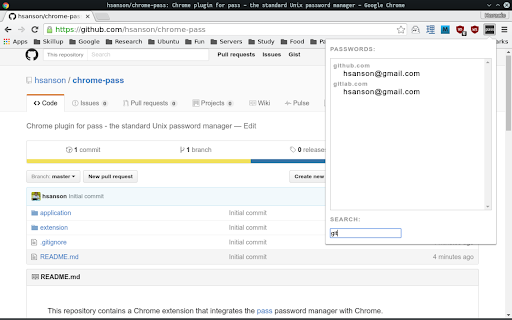
Chrome plugin for *pass* the standard unix password manager. Simple extension to integrate pass - the standard Unix password manager - with chrome. 1. This plugin requires the chrome-pass python package installed on your machine. 2. You must also have the unix password manager (pass) installed and your password store located at $HOME/.password-store. 3. Chrome version 107 or later. To install the chrome-pass python package in Ubuntu:

Gopass Bridge
Gopass Bridge allows searching and inserting login credentials from the gopass password manager. Gopass (https://www.gopass.pw) is the awesome command line password manager. This plugin enables input of login credentials from gopass. To access gopass, a native app has to be configured in the browser in addition to this plugin. The native app is a wrapper that calls gopass-jsonapi to communicate via stdin/stdout. For details on configuring native messaging, see the plugin development page on https://github.com/gopasspw/gopass-jsonapi/blob/master/README.md

Firenvim
Turn your browser into a Neovim GUI. This Chrome extension lets you use Neovim directly from your browser. Contrary to other extensions, it does not open a new OS window. In order to install it you need: - This Chrome addon - Neovim >=0.4.0 - The firenvim neovim plugin: https://github.com/glacambre/firenvim - Once the firenvim neovim plugin is installed, run `:call firenvim#install()`

pass-browser-chrome
Make secrets easily accessible from your pass' ~/.password-store pass-browser-chrome is a browser plugin for your secrets managed by pass: https://www.passwordstore.org/

KeePass Tusk - Password Access and Autofill
Readonly KeePass password database integration for Chrome and Firefox Tusk adds KeePass functionality to your browser. It does not require KeePass to be installed, and is suitable for using KeePass with Chromebooks. Tusk is read-only and can be configured without granting the extension access to manage your cloud storage accounts. It can be used with these cloud providers. * Google Drive (somewhat reliable) * Dropbox (recommended) * OneDrive (unreliable) * OwnCloud and NextCloud via WebDav (somewhat reliable) * KDBX Version 4 Support * WebDAV support * OTP support * Shared Link support * HTTP fetch support * Better security practices and updates. Tusk is a fork of CKP and seeks to provide improvements to the UI, better security practices, and KDBX version 4 support. Visit https://subdavis.com/Tusk for more information. Tusk is Open Source and provided under an MIT license. ** UPDATE LOG ** ================ v2024.8.12 - Google Drive permissions regression fix --------------- v2024.8.10 - Fixes for OTP and Credential caching --------------- v2024.8.7 - Fixes for non-Chrome browsers. --------------- v2024.8.2 - Updates Google Drive integration, fixes for shared URLs. ---------------- v2024.07.30 - Upgrade to manifest v3, various bug fixes. Removes PCloud. Updates many dependencies. ---------------- v2018.9.27 - Bugfix #257 ---------------- v2018.9.16 - UI Update, new settings, bug fixes. ---------------- v2018.6.27 - Bug fixes ---------------- v2018.6.16 - CRL+SHIFT+SPACE opens popup, other fixes. ---------------- v2018.5.19 - Pcloud and hotkey navigation! ---------------- v2018.2.25 - WebDAV support! ---------------- v2018.2.17 - KDBXv3.1 (chacha20+AES KDF) ---------------- v2018.2.12 - Solve race condition when opening before cache expires. ---------------- v2018.1.31 - TUSK_URLS custom field ---------------- v2018.1.23 - KeeOTP support; clipboard timeout preferences. ---------------- v2018.1.16 - solve #64, add Hotkeys Ctrl+Shift+Space ---------------- v2018.1.8 - fix bug with XML-based keyfiles ---------------- v2018.1.7 - use persistent background page ---------------- v2018.1.5 - Tusk! A ground-up rewrite of the UI + major bugfixes.
