
obdgcbahccikfdekeofjpafkmndkfofe
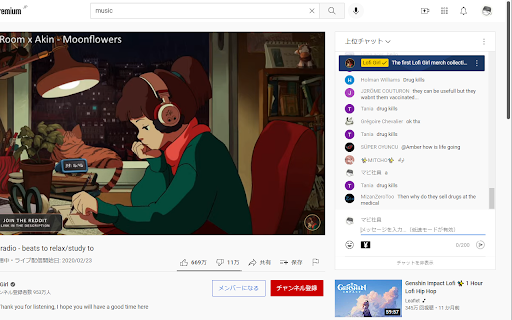
YouTubeライブのチャットからユーザーのチャンネルに移動します。 YouTubeライブでは現在のチャットからチャンネルに移動することが出来ません。 この拡張機能ではそれを可能にしております。 youtubeライブのモデレーターの方はこの拡張機能を使用し なりすましを防止出来ます。 使い方: 拡張機能を導入後 チャットのアイコンをクリックすると別タブにてユーザーのチャンネルページが表示されます。 注意事項: チャンネルが正しく表示されない場合は一度ライブページを更新して再度アイコンをクリックしてください。

ネットショップまとめ検索
Amazonの商品ページにネットショップまとめ検索のリンク、又はネットショップまとめ検索ページを追加します。 複数のネットショプ・オークション・フリマサイトを一度にまとめて検索が可能です。 開催中のセール情報もまとめて表示します。 リンク表示、検索結果の自動表示などは全て設定でカスタマイズが可能です。 インストールすることにより、利用規約に同意いただいたものとみなします。 https://matome-search.com/privacy-policy/

Smooth Japanese fontization
Replace with smooth Japanese font. Improve the visibility of the font.

Return YouTube Comment Username
This script replaces the "handle" in the YouTube comments section to user name The "Return YouTube Comment Username" rewrites the YouTube comment username to the traditional username format. Due to an update to YouTube, user IDs beginning with @, called "handles," are now displayed in the name field of the comments section, and traditional usernames are no longer visible in the comments. By using this extension, the comment field's * Can be Replace @handle with conventional user name * Can be Display in the format "@handle (Username)" * Can be Display in the format "Username (@handle)"

VisiOS - Tab / Bookmark Manager OS
The Legendary Tab/Bookmark Manager OS 🚀 VisiOS offers two main features: 🚀 A tab manager of epic proportions and an OS that legends are made of. 🟢 Main functions of the tab manager: ✅ Sort tabs and tab groups ✅ Search tab titles and copy tab links ✅ Directly restore 404 tabs with Internet Archive ✅ YouTube top mode 🟢 Main functions of the OS ✅ 20+ languages available ✅ 9 desktops (toggle between 2D and 3D modes) ✅ Save bookmarks from the tab list, toolbar, and HTML files ✅ Generate bookmark HTML files for all browsers ✅ Sync, add, and merge bookmarks to your browser ✅ Create folders that maintain the hierarchy of all currently open tabs or all bookmarks ✅ Password-lock desktops and folders ✅ Built-in video player (37 video sites supported, including YouTube, TED, and Spotify) ✅ Create video playlists (supports YouTube playlist URLs) ✅ Playlist lets YouTube work like an iPod, with shuffle support ✅ Free App Store (download various apps to your OS for free) ✅ Draw on desktops, apps, and folders with 2D painting functionality ✅ Code editor for developing your own apps on the OS ✅ Quicklook like on MacOS ✅ Hypersearch (search across all 9 desktops at once) ✅ Robo-sort (sort folder hierarchies all at once) ✅ Word processor (supports LaTeX for advanced formula editing) ✅ Fully customizable fonts and icons ✅ Wide range of backup and reset options ✅ Add texts and lists anywhere on your desktops and folders ✅ Infinite scrolling (desktops behave almost like Google Maps) ✅ ChatGPT and various AIs will be more easier to use ✅ Warp points (navigate directly to specific coordinates across all desktops) ✅ Sidebar OS You can save bookmarks anywhere on the 9 desktops. It's really easy to import, export, sync, and merge bookmarks. You can also install various VisiOS apps for free, including games, utilities, language learning apps, cryptocurrency tools, and more. When you first install the extension, click on the extension icon, and then select "Launch VisiOS" in the pop-up menu. (NOTE: Recommended to pin the VisiOS extension) 🚀 How to change your preferred language: 🚀 Right-click anywhere on any desktop and select “Settings” to change your preferred language.
