
obanalcjjhlhikmhfkeifieifjbpnchg


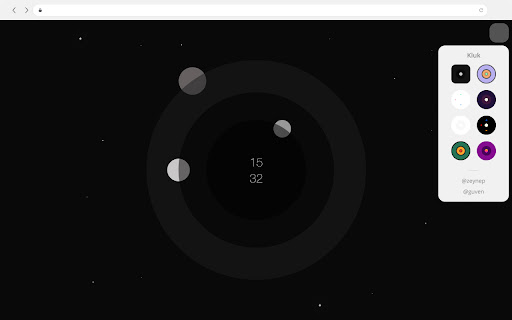


Kluk is the new tab clock. New tab allows you to see an analog clock when you open it. You can use it with 8 clock theme. The themes were inspired by galaxies and orbits. This extention made with love! Designer : https://x.com/guvensozmen Developer : https://x.com/zeynepsnotes Follow and feedback to us.

Pastel New Tab with a clock
Clean & minimal new tab page - a pastel background and a clock It's just a simple new tab page. Shows a random pastel colour background with a clock in the middle of screen. The browser button just opens a new tab, so would ideally be hidden away. 1. Quick action buttons at bottom of new tab: - Hide/show clock, - Hide/show frequently visited websites - Select 12 hour or 24 hour clock - Select serif or sans-serif font - Pin the current colour 2. Settings page provides options to: - Remove new tab page, - Send feedback, and - Donate to one of the charities I like >> "Read a list of your most frequently visited websites" This permission allows the new tab page to show your most frequently visited websites. The permission is only requested when 'Show top websites' button is used. Read more here: https://updatenotes.blog/2017/11/02/pastel-new-tab-now-with-your-top-websites/ You may read more about 'tabs' permissions here: https://developer.chrome.com/extensions/tabs UPDATE 11 Aug 2024: 1. Updated to Chrome manifest version 3 2. Added permission for favicons when viewing frequently opened sites UPDATE 24 Jul 2020: 1. Button to open default Chrome new tab page UPDATE 14 Apr 2020: 1. New: Follow system dark mode option - dark screen when dark, random pastel when light 2. New: Darker, integrated dark mode screen 3. Language and background code improvements UPDATE 30 Mar 2020: 1. New: Show icons for frequently visited websites UPDATE 09 May 2019: 1. New: Switch to dark mode (non-pastel) with one click 2. New: Add custom colours 3. Bug fixes UPDATE 23 Feb 2019: 1. Tuned the master list of pastel colours 2. Bug fixes UPDATE 12 Feb 2019: 1. See full page grid of available pastel colours 2. Pin or remove pastel colours from grid page 3. Bug fixes and updates UPDATE 08 Feb 2019: 1. Select from serif or sans-serif fonts 2. Frequently visited websites slide in/out 3. Bug fixes and updates UPDATE 02 Nov 2017: 1. Show frequently visited websites for easy access

hexagonTab
Hexagon bookmarks accented with a chosen colour. Customise the layout, style and background with hexagonTab. Save bookmarks to your start page on a unique hexagonal grid. hexagonTab keeps the new tab page clean and simple with a focus on presenting links to your most frequented sites. hexagonTab does NOT collect or use your personal or browser data in any way.

Minimal New Tab Clock
A simple, ultra-lightweight clock to replace your tab menu. V1.8.1 - Added rudimentary ability to change the clock's font V1.7.0 - Updating colour picker to include HEX and HSL input - Added ability to close menus with 'Escape' key - Fixing issue with analogue clock hands not being styled correctly on custom theme - Updating style scripts to reduce the amount of 'flash-of-unstyled-content' V1.6.1 - Adding additional icon sizes for hdpi screens V1.6.0 - Fixed an issue with the second hand glitching - Clock face size is a bit more responsive - Improved performance & memory leaks - Improved keyboard controls - Menu now stays open after making selections - Trimmed unneeded code and other files - Use locale-specific dates instead of hardcoded English V1.5.0 - Add scaling to clock, fade out menu, and performance improvements V1.4 - Added a theme picker - Custom colour can be picked from the theme picker - Current day now updates when your system clock changes to the next day - Minor performance improvements V1.3.1: - Fixed an issue with 12hr format clock and AM/PM display - Performance improvements - Fixed keyboard interaction issues - Added a link to colour change functionality questionnaire V1.3: - Removed leading zero on 12hr format - Moved second hand to the top of the stack V1.2: - Dark theme (click the lightbulb to use) - Analogue clock - 12 hour digital clock

nightTab
A neutral new tab page accented with a chosen colour. Customise the layout, style, background and bookmarks in nightTab. Features: - Display the time, date and a search bar in the header. - Present any number of bookmark tiles organised in groups. - Customise the layout, background image or video, theme, font and accent colour. - Backup your setup to a local file. nightTab does NOT collect or use your personal or browser data in any way.
