
oakcfomieebeghjpaddodebohcmkalje


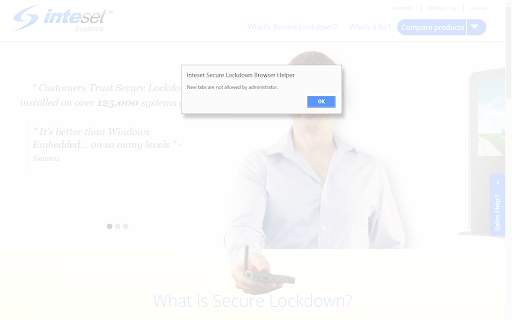
Traps network errors, shows user a friendly error page allowing return to the previous page, allows to block new windows and tabs. Chrome's ability display and represent your browser application is second to none. However, when running in Chrome's Kiosk Mode, the browser suffers from some drawbacks. For example, in kiosk mode, there is no browser navigation, tabs or menus available. This becomes a problem if your application tries to open a new window, tab, or leads to a website that is blocked. When in Kiosk Mode, if a new window or tab is open, the main application will be inaccessible as it will be covered by the new window or tab page. Also, if the user clicks to other websites that are black listed, Chrome will throw an error page, but will give no means to return to the main kiosk website causing the user to be stuck on the error page. The Inteset Secure Lockdown Browser Helper alleviates these problems by trapping the above scenarios and offering the user an easy way to return to the main kiosk application. The Helper simply advises the user of the situation with a friendly dialog and gives them the opportunity to return to the previous page. It's as simple as That!

Proctor360
The Proctor360 Chrome Extension enables secure remote proctoring by providing features that ensure the integrity of online exams. Its primary purpose is to facilitate secure password entry and monitor the exam environment through browser lockdown and activity tracking, ensuring a fair test-taking experience. All functionalities—remote password input, browser tracking, and lockdown—serve the single purpose of maintaining security and integrity in online exams.

Thinlabs Kiosk
Thinlabs Chrome Kiosk extension Thinlabs Kiosk extension for Chrome browsers allows a single URL or multiple URLs that are specified in the extension settings to open in a fullscreen kiosk mode. Multiple tabs are displayed on a tab bar if more than one url is specified in the extension options. The extension options page can be password protected. The same password is used to prevent the users from closing the kiosk mode browser. To start chrome in iosk mode create a shortcut with the --kiosk switch ( "C:\Program Files (x86)\Google\Chrome\Application\chrome.exe" --kiosk ) and place it in the startup folder. Disable this setting "Continue running background apps when Google Chrome is closed." For additional information, technical support, and feature requests please contact us: https://www.thinlabs.com/content/contact-us

Chrome Browser Lockdown
When a teacher or admin assigns an assignment or assessment in Castle Learning, they may enable an option to Enable Browser Lockdown. If they have enabled that option AND this extension is installed on the device that the student is using to complete the assignment or assessment, it will close all other tabs and will not allow the student to open a new tab or browser window.

GrabzIt Web Monitor
Monitor changes on part of web pages or a whole web page and get informed of the changes as an email or call to a webhook. Do you have something on the web that you need to keep an eye on? With GrabzIt's Web Monitor, you can easily track website changes and automate your responses. Perfect for: - Tracking price drops for online shopping. - Getting alerted when out-of-stock items return. - Monitoring competitor website changes. - Triggering automated workflows in Zapier or Make via Webhooks. Simply select an entire webpage or just a specific element to watch. When a change is detected, get notified instantly by email, or send a call to a webhook if you want another app to handle it. Set how frequently you want to check for changes, and you are done! Once installed, follow the instructions in the extension popup to create your free GrabzIt account. This allows you to sync your monitored pages to the cloud, save your history, and access our powerful webhook integrations. Backed by GrabzIt's enterprise-grade web scraping infrastructure, you can trust your monitoring is fast and reliable.
