
oadlfcoffgcjbckkkgjgcffpknhhodoa


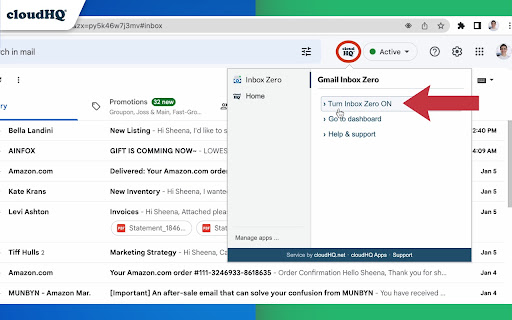


Focus mode for Gmail - solution for Inbox Zero Dealing with the high volume of emails that many of us receive on a daily basis can be a challenging task. This extension helps you manage the overwhelming amount of emails in your Gmail inbox by simplifying the interface and allowing you to focus on the task at hand. With just a few clicks, you can remove distractions and quickly clean up your inbox to achieve the coveted goal of "inbox zero." ~~~~~~~~~~~ How to use this extension: To use the extension, simply click the cloudHQ icon in the upper right corner of your Gmail and select "Turn Simple View ON." When you're finished organizing your inbox, click "Close Simple View." ~~~~~~~~~~~ Here are some tips for achieving inbox zero: ✅ If an email can be answered in a few minutes or less, do it right away. ✅ If the email contains information you'll need to refer to later or doesn't require a response, archive it. ✅ If the email would be better handled by someone else, forward it and then archive it. ✅ If a response will take longer or require more work, use the snooze feature to defer it until a more convenient time, add it to your TODO label, or add it to Google Tasks. ✅ Once you've processed your inbox, you can then tackle emails in your TODO label or snoozed emails. ~~~~~~~~~~~ cloudHQ. Helping your productivity, 1 click at a time. cloudHQ website: https://www.cloudhq.net/ App website: https://www.gmail-inbox-zero.com/ Pricing: https://www.gmail-inbox-zero.com/pricing Support page: https://support.cloudhq.net/category/browser-extensions/gmail-inbox-zero/ Blog: https://blog.cloudhq.net

Auto Label for Google Gmail™ by cloudHQ
Automatically create filters and labels for clients, customers, prospects, etc. Auto Label for Gmail by cloudHQ categorizes email messages by client email address and/or domain name, and automatically creates filters and catalogs them inside one of 6 Gmail Labels. This extension is a unique app because it not only filters and labels new emails, but also automatically organizes all your old email exchanges with that email address and/or domain name. These are the 6 Gmail Labels that this app organizes for your inbox: 1. Clients 2. Leads 3. Prospects 4. Opportunities 5. Team 6. Suppliers Here's why we think you need these 6 Gmail Label categories: 1. Clients: are your current clients. 2. Leads: are possible prospects who are not yet qualified. 3. Prospects: are qualified leads where your contact person makes buying decisions. 4. Opportunities: are when your contact considers your product/service. 5. Team: are your internal team that you work with. 6. Suppliers: are your external team that you hired. With these 6 Gmail Labels, you're ready to catalog and organize your inbox to be the most productive self you can be while working in Gmail. This extension allows you to create filters and labels for any recipient or domain with one click. Here is how to use it: 1. Compose your email 2. Enter your recipient's email address 3. Click on the "Gmail Auto Label" button and select the label name for this email recipient or recipients' domain Website: https://www.gmail-auto-label.com Pricing: FREE Support page: https://support.cloudhq.net/category/browser-extensions/gmail-auto-label/ Blog: https://blog.cloudhq.net

Gmail Message Preview by cloudHQ
Do you want to be able to see your emails quickly, without having to actually open them? Now, instead of just reading the subject headline of your emails, Gmail Message Preview lets you preview your emails in 4 different ways. You can preview your inbox emails without actually opening them with the following choice of views: ✔️ 1st line of your email ✔️ First 2 lines of your email ✔️ First 3 lines of your email ✔️ Entirety of your email This lets you quickly scan your emails without ever even clicking on them. And Gmail Message Preview by cloudHQ will never trigger "tracking pixels" - we will block *ALL* tracking attempt during previewing an email. cloudHQ. Helping your productivity, 1 click at a time. cloudHQ website: https://www.cloudhq.net/ App website: https://www.gmail-message-preview.com/ Pricing: https://www.gmail-message-preview.com/pricing Support page: https://support.cloudhq.net/category/browser-extensions/gmail-message-preview/ Blog: https://blog.cloudhq.net Gmail and Google Workspace are trademarks of Google LLC. Use of these trademarks is subject to Google Permissions.

Formatted Email Subject Lines by cloudHQ
Are you looking for a way to make your emails stand out in someone's inbox? This extension lets you to change the format style of your email subject line, and helps your emails get opened faster because they stand out from the crowd. You can change your email subject line formats to: - 𝗕𝗼𝗹𝗱 - 𝙄𝒕𝒂𝒍𝒊𝒄𝒔 - 𝘽𝙤𝙡𝙙 𝙄𝙩𝙖𝙡𝙞𝙘 - U̲n̲d̲e̲r̲l̲i̲n̲e̲ - 𝔻𝕠𝕦𝕓𝕝𝕖 𝕊𝕥𝕣𝕦𝕔𝕜 - S̶t̶r̶i̶k̶e̶t̶h̶r̶o̶u̶g̶h̶ - 🅆🄷🄸🅃🄴🅂🅀🅄🄰🅁🄴 - B🅻🅰🅲🅺🆂🆀🆄🅰🆁🅴 - Ⓦⓗⓘⓣⓔⓑⓤⓑⓑⓛⓔ - 🅑🅛🅐🅒🅚🅑🅤🅑🅑🅛🅔 To change the format style of your email subject line, just do the following: 1. Select text in the subject line by highlighting it 2. Click on the "Subject Style" icon on right side of subject line 3. Select the format style you prefer! You can can have formatted subject line like: - *𝟮𝗡𝗗 𝗥𝗘𝗤𝗨𝗘𝗦𝗧* I'd really appreciate your help - U̲R̲G̲E̲N̲T̲: Must respond by 𝗘𝗢𝗗 𝗧𝗢𝗗𝗔𝗬 - 𝘚𝘱𝘦𝘤𝘪𝘢𝘭 𝘊𝘢𝘳𝘦 𝘐𝘯𝘴𝘵𝘳𝘶𝘤𝘵𝘪𝘰𝘯𝘴 𝘐𝘯𝘴𝘪𝘥𝘦 - Holiday Gift to You (was $2̶0̶0̶.0̶0̶, now $𝟭𝟬.𝟬𝟬) This is an excellent solution for: - Marketing professionals - Sales professionals - Teammates - Anyone who wants their emails to stand out cloudHQ. Helping your productivity, 1 click at a time. cloudHQ website: https://www.cloudhq.net/ App website: https://www.format-email-subject.com Pricing: https://www.format-email-subject.compricing Support page: https://support.cloudhq.net/category/browser-extensions/format-email-subject/ Blog: https://blog.cloudhq.net Demo: https://www.cloudhq.net/demo Google Workspace, Google Sheets, Google Drive, Google Alerts and Gmail are trademarks of Google LLC. Use of this trademark is subject to Google Permissions.

Email Zoom Text Reader by cloudHQ
Gmail magnification and reading program tailored for low-vision users Do you have trouble reading email text? Are regular page magnifying apps bothering you because it magnifies so many other things on your page, along with your email text? We understand your pain point, but you don't have to suffer anymore! Now you can install Email Zoom Text Reader by cloudHQ for free, and enjoy magnified text in your emails, as you see 👀 fit. (See what we did there? 😊) This extension will *only* modify the font size of Gmail messages without changing the page width, size of icons, menus, etc. cloudHQ website: https://www.cloudhq.net/ App website: https://www.email-zoom-text-reader.com/ Pricing: https://www.email-zoom-text-reader.com/pricing Support page: https://support.cloudhq.net/category/browser-extensions/email-zoom-text-reader/ FAQ page: https://support.cloudhq.net/email-zoom-text-reader-faq-frequently-asked-questions/ Blog: https://blog.cloudhq.net
