
nppiigcgjgghnpdflckpalmdmpnfglfa
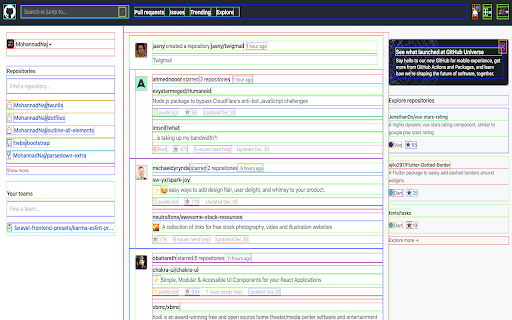
Add CSS Outline property to all elements on the page for debugging CSS Layout. A Chrome Extension for adding CSS Outline property (with different colors) to all elements on the page. Mainly this is useful for debugging CSS Layout and discovering potential issues. - Click the extension icon for activating/deactivating. - The outline colors are randomized based on it's order on the page. - The colors are randomized by assigning different cumulative Hue degree and a fixed Saturation (99%) and Light (50%). - On deactivating, the extension will restore the old outline value if it was there, and remove the style HTML attribute if it wasn't there before activating.

Layout Bounds
View webpage layout bounds for developer purpose This tool help developer to toggle layout bounds view for the active tab. - Click on action to enable "layout bounds view". - Click again on action to disable "layout bounds view" and see original webpage view. "Layout bounds view" - Classic view of page, Remove all background and show dash borders for all elements on page.

HTML & CSS Design Analysis
Helps you analyze an HTML page by disabling or enabling various features. Tools for disabling CSS: - Disable external CSS (added using 'link' tag): - Disable inline CSS (added via 'style' attribute) - Disable internal CSS (added via 'style' tag) - Disable external print CSS (added using 'link' tag) - Disable internal print CSS (added via 'style' tag) - Disable internal handheld CSS (added via 'style' tag) - Disable external handheld CSS (added via 'style' tag) Tools for hiding images: - Hide all images. - Hide background images. - Make background images invisible. Image utilities: - Display image alt attribute. - Display image dimension. - Display image path. - Make all images full size or natural size. - Make all images invisible. - Replace image with alt attribute. Outline images: - Images with adjusted dimensions. - Images with empty alt attributes. - Images with oversized dimensions. - Images without alt attributes. - Images without dimensions. Miscellaneous tools - Linearize page. - Display hidden elements. - Mark all links as visited. - Mark all links as un-visited. - View source code. Tools for reloading assets, such as: - reload external CSS. - images etc. Supported elements: This software supports iframe elements and shadow dom as well. Nested shadow elements and nested iframe elements are not fully supported by this tool. This tool also does not support shadow root opened with the closed mode. Privacy notice: This software neither collects nor transmits any personally identifiable information. This software does not track your browsing behaviour. Information necessary for functioning of this software is stored on the devices of the end user, our servers do not have access to this information. For more information please read our privacy policy and terms of service.

Debug CSS
When enabled adds outline to all elements on the page, Hold Ctrl and hover to get more detail In the latest version we have addressed the issue where the extension stopped working after mandatory `manifest_version upgrage` from Google. also, we have addressed the issue in which user were unable to see the styling for the bottom most element of the page. we have added tooltip feature which gives a basic styles in tooltip itself. A lightweight extension for Google chrome to show outline of all the element exist on page. while working on web page development the one of the difficult part is to position the element as required and check which element affecting the other one. This chrome extension allows user to see outline on every element of the page. Hold the keyboard Ctrl button and hover element it will show the element details along with the value. Post installation simply click on the extension icon to turn it On or Off. If you are a keyboard shortcut lover like me simply hit `Alt+Shift+C ` key to toggle the extension. This extension works on CSS outline attribute: add the below code snippet in any CSS of a web page The extension does the same the only thing is; it gives different color to different element(s) while the code snippet adds red outline to every element. # Other work and repository [A lightweight customizable plugin for jQuery to show horizontal length in form of vertical progress bar.](https://github.com/pranayjoshicse/VerLim.js) [listed on jqueryscript.net](https://www.jqueryscript.net/other/Simple-Custom-Reading-Indicator-with-jQuery-VerLim-js.html) [Demo](https://www.jqueryscript.net/demo/Simple-Custom-Reading-Indicator-with-jQuery-VerLim-js/)

Inspect Flow
The complete developer tool for Tailwind CSS! Increase your productivity and build Tailwind CSS websites faster with Inspect Flow! - Inspecting Tailwind CSS websites has never been easier! Quickly hover over elements to see the styles applied. - Quickly view components in CodePen and copy the HTML in a single click. - Edit elements in real-time and get instant feedback before finalizing changes in your code base. - Can't remember the name of a utility class? Every class name is at your fingertips when adding new utility classes with our auto-complete integration.
