
npnhelfdhpnmbkpjcahmjmafnpneneke

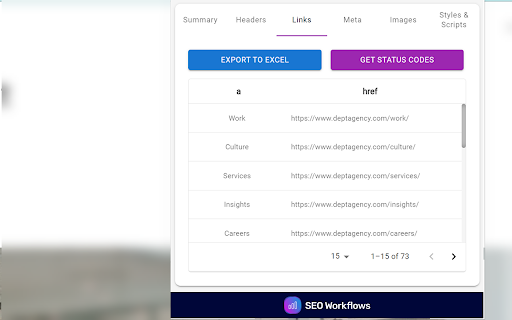
Chrome extension to review the on-page SEO attributes of a page. Elevate your website's SEO performance with the SEO On-Page Analyzer Chrome extension, a comprehensive tool designed to help SEO practitioners with quick webpage analysis. 🔍 Complete On-Page Analysis: Dive into the essentials of SEO with evaluations covering title tags, header tags, links, images, stylesheets, scripts, meta tags, word counts, and more, ensuring every aspect of your page is optimized for search engines. 💾 Export to Excel: Seamlessly export analyzed data to Excel for detailed analysis and streamlined reporting, making it easier to identify areas for improvement and track your optimization efforts over time. 🔗 Link Tester: Within the "Links", "Images", and "Styles & Scripts" sections, utilize the link testing feature to verify all links, ensuring there are no non-200 status code responses. This aids in debugging and optimizing your web pages for better performance and user experience. 👩💻 User-Friendly Interface: With an intuitive interface designed for both beginners and seasoned SEO professionals, navigating through the extension’s features and utilizing its capabilities has never been easier.

SEO Pilot
SEO Pilot helps you in your daily SEO tasks such as On-Page SEO analysis, Link Checking, Tags and Assets Preview and more Made by marketers, SEO Pilot is an SEO Tool geared at helping you optimize your content for SEO and quickly generate new content at scale. SEO Pilot provides accurate SEO metrics and metadata right where you need it. It allows you to check on-page meta-data and display the primary SEO metadata for any website page for the best SEO. Analyze On-Page SEO 1. Page Metadata - Retrieve the main Meta Tags and metadata for any webpage including Meta Tags, Canonical URL, and more to help you spot and resolve any SEO Issues. 2. Find Broken Links - Check all Broken Links on a page and categorize them based on HTTP Status Code. 3. Analyze Every Link (Internal & External) - Improve the search visibility and rank of your website by assessing your internal & external links, enabling you to improve the quality of your links. 4. Extract Heading Structure - Clear and concise headings are important for SEO. They help users navigate the content and find what’s relevant to them. 5. Retrieve Image Data - Get key SEO information about your images such as the alt text, image size (to ensure image has been compressed), and more. 6. Social SEO tags - Verify OpenGraph and Twitter Card metadata so your content appears the way you want it on social. Contact Information Extractor 1. Email Addresses - Extract all emails found on the page and export them to CSV. Build lists and use them for outreach campaigns or to suggest partnerships. 2. Social Profile URLs - Understand a site’s social presence by extracting 15+ social URLs. 3. Phone Numbers - Automatically scan the page for phone numbers and export them so you can reach out to site owners. Ring ring. SEO Article Writer / AI Writer (Paid Feature) 1. Overview - Our AI Writer enables you to take an existing page as inspiration to generate a new article. Want to take an existing top-ranking page and create something similar or want to re-write some of your existing pages? No problem, our AI Writer does exactly that. Sign up for a paid plan on SEOPilot.io to access this feature! 2. AI Writing Process - creating an article is a simple three step process: a) Extract Headings - Retrieve headings from an existing webpage inside your current browser tab. b) Refine Your Article Outline - Customize the headers (H1-H6) to suit your needs. Remove, re-write, or add your own new headings. c) Generate the Article - Our AI Writer will then craft an SEO-optimized article based on your input. You can then export and publish your article on your website or wherever you need. SEO Pilot replaces all the popular SEO tools (paid or non-paid) in the Chrome store. People Also Ask Section (PAA) on google search page a) After enabling PAA feature from the SEO Pilot Extension settings, a section will appear at the right side of the google search page. That section shows People Also Ask questions as a list. b) You can change the extraction level (from level 1 to level 5) to get more People Also Ask questions. c) You can download the data as CSV. The data points are PAA, Description and URL. Search Results on google search page a) Below the PAA section, there's another section named Search Results. b) You can download the Organic Search Results as CSV. The data points are TITLE, Description and URL. Permissions explained: Allow this extension to read and change all your data on websites you visit - This is necessary to retrieve all of the necessary HTML and SEO metadata from any page in which you open the extension.

On-page SEO analyzer by Chunky Squirrel
A tool to analyze on-page search engine optimizations Check the most important SEO factors for any website: (1) Title tag and meta description: check if the page has a valid title tag and meta description, and what their contents are. (2) H1 to H6 titles: check if a page has an H1 title, as well as H2 to H6 titles. (3) Optimized images: check the name and alt tag for all the images on a page (4) Keyword check: on-page analysis for any keyword or keyphrase of your choice. (5) Links: check what internal and external links a page has, as well as whether there's a canonical link. v 2.0: - checking for robots meta tag - icons for title semantics - checking for canonical link - internal links are checked for broken links

SEO Lens | A free tool for On-page seo
One stop solution for on-page SEO reports. Get your reports and improve your SEO in 1 click. SEO Lens is your ultimate free tool for comprehensive on-page SEO optimization. IMPORTANT: - The extension will not work in tabs that were open prior to installation. After installing this extension, either reload your open tabs or restart Chrome. - We do not collect any data or store any personal information. With just one click, you can generate comprehensive SEO reports that cover all crucial elements, including: - title and descriptions - Image - Link - Structured data - Heading structure - Social tags (OG and Twitter) - Canonical tags - Robots.txt - Sitemaps - Robots meta tags and more Streamline your SEO workflow and elevate your website’s performance effortlessly.

SEO Buddy - On-Page SEO Analyser
A complete On-Page SEO tool to help you analyse your webpage and optimize it for better ranking SEO Buddy is a complete On-Page SEO tool to help you analyse your webpage and guide you to optimise it for better ranking. ✅ Analyse On-Page SEO: This extension analyse the existing On-Page SEO following good practices and get a performance score ✅ Reliable Benchmark: Most essential On-Page SEO conventions are used to calculate the score of your current On-Page SEO score. ✅ Checklist for Improvement: It suggests checklist containing best practices to improve the SEO ranking. ✅ Detail overview of each factors: All the best On-Page SEO practices are presented in a detail manner like External/Internal/ Broken Links, Images missing alt, useful integrations etc. ✅ Technologies Detection: It has technology detection feature like Built-With and Wappalyzer to detect which technologies are being used on the webpage. ✅ Super fast and efficient: On-Page SEO analysis are done very efficiently within seconds ensuring reliable results. ✅ Clean and User friendly UI/UX: Ensuring a great experience is important to us. In every aspects we tried to guide the user through as less cluttered informations as possible. Besides all the above mentioned features, we are actively working bringing newer features. If you have questions, concerns or feature request, please send an email to rahulbaruri1@gmail.com. We will to reply you as early as possible.
