
npdeilagbbimhnbbdjmagmedchnpjeid
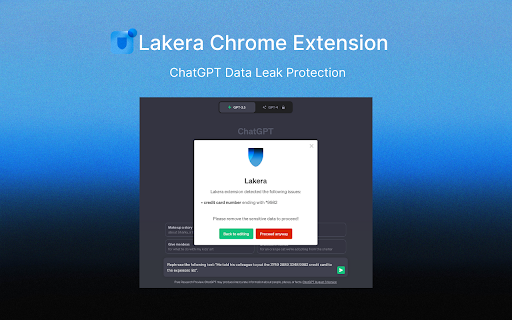
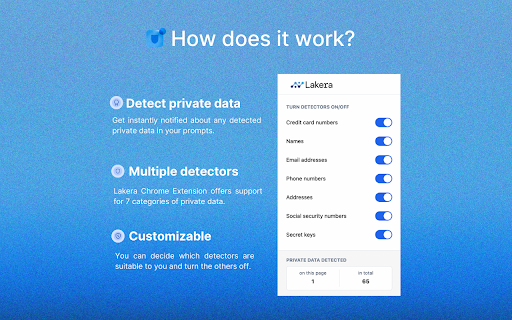
Lakera Chrome Extension provides a privacy guard that protects you against sharing sensitive information with ChatGPT. Whether it is a document that needs to be summarized and contains personal information or accidentally pasting private data from your clipboard to ChatGPT, the extension protects you from disclosing important data. The entire data processing is running in the user’s browser (locally on the computer), thus no data leaves the machine. The code is open source for maximum transparency. The extension offers support for the following categories of private data: • Credit card numbers • Anglophone names • Email addresses • Phone numbers • US street addresses • US social security numbers • Secret keys You can decide which ones you want to be protected against leaking by turning their respective detectors on or off after clicking on the extension icon. The support for the mentioned categories is currently limited to English language. The extension analyzes your input before you submit it to ChatGPT and warns you about the detected private data. Afterward you can decide if you still want to proceed or if you want to change your input accordingly. The extension does not collect any kind of data. Lakera is a fast-growing startup based in Zürich, Switzerland that is committed to solving AI safety, to foster innovation and benefit humanity. The source code for the extension is published at : https://github.com/lakeraai/chrome-extension Learn more about Lakera and our products at: https://www.lakera.ai

RemindSecure Anti-Phishing
All-in-one security: Set reminders, prevent phishing, manage passwords, and browse safely with expert guidance. Stay secure while browsing online with real-time monitoring and protection. If you're looking for a tool that combines task management with complete online security, RemindSecure is your all-in-one solution for staying organized and protected in the digital world! What You Can Do with RemindSecure? Save quick notes and organize your tasks efficiently. Set custom reminders for any moment. Easily reschedule expired reminders. Clear and user-friendly interface. Password Manager: Store and manage your credentials securely. Password Generator: Create strong, unique passwords. Link Safety Control: Prevent dangerous clicks in emails. Anti-Spoofing Scanner: Verify email authenticity. XSS Protection: Prevent cross-site scripting (XSS) attacks from compromising your data. Suspicious Activity Monitoring: Keep track of any unusual activity on your accounts. Cookie & localStorage Protection: Safeguard your sensitive information from unauthorized access. Input Sanitization: Ensure data inputs are safe and free from harmful code. URL Validation: Automatically validate URLs to prevent malicious redirects. Clickjacking Protection: Safeguard your browser from malicious clickjacking attacks. ⭐️ Perfect for: Daily task and password management. Secure email handling. Safe online transactions. Safe online browsing with real-time monitoring. Personal organization. This extension uniquely combines productivity tools with comprehensive security features. Whether you're managing your schedule, handling sensitive emails, or protecting your online accounts, RemindSecure provides everything you need in one intuitive package. All-in-one task and security management. Real-time protection and alerts. Continuous monitoring of your browsing activity. Complete security toolkit with advanced protection features. User-friendly interface. Password management system. 📥 Download RemindSecure now and experience the perfect balance of organization and cutting-edge security!

LinkShield
LinkShield helps you identify unsafe websites and links to keep you safer online. ---- Short Description (Summary): Browsing in 2026 requires more than a filter. LinkShield is Audit-Validated (100% detection rate) against modern phishing, BitB, and WebTransport threats. Experience the new gold standard in real-time AI security. ---- Full Description: Do you want to browse the internet with absolute peace of mind? Meet LinkShield, your personal digital bodyguard designed for maximum online security and safety. Cyber threats are evolving. Fraudsters now hide malicious links inside images, QR codes, or use "look-alike" characters (homoglyphs) to impersonate your bank or favorite services. LinkShield is the only extension that unmasks these hidden dangers using technology that goes far beyond standard security. Why choose LinkShield Security? 🛡️ Proactive Background Analysis (Premium): We scan websites and scripts in the background, blocking dangerous domains before the page even finishes loading. 📱 QR Code Protection: See a QR code on your screen? LinkShield instantly verifies the destination's safety before you are redirected. 🔡 Advanced Homoglyph Detection: We detect characters from foreign alphabets (like the Turkish 'ı') used to spoof famous brands like PayPal, Microsoft, or your local bank. ⚡ Seamless Performance: Thanks to our optimized scanner, you won't experience any browser lag. High-end security without compromising speed. Safe Internet for Everyone Whether you are working, banking, or shopping, LinkShield provides the essential security you need. Stop phishing ads in search results and navigate with confidence. Install LinkShield today and experience the new gold standard in online safety.

GPT Privacy: Anonymize your Chat GPT prompts
Anonymize your Chat GPT prompts and safeguard your privacy. Automatically swap your prompts data with custom placeholders. Elevate Your Data Privacy with Anonymized Prompts GPT Privacy is a easy to use Chrome extension designed to safeguard your interactions with GPT-based services like ChatGPT. With a strong commitment to your data security, the app ensures that your chats and inquiries remain confidential and protected. 🔒Real-Time Anonymization: Automatically or manually anonymize sensitive data in your prompts, ensuring that your personal information stays private. 👍User-Friendly Experience: Seamlessly integrates into your browsing experience, offering intuitive controls and clear visual feedback. 🏠 Local Anonymization Processing: All anonymization processes occur locally within your browser. Rest assured, your data never leaves your device or gets transmitted over the internet. 🏠 Local De-Anonymization Processing: All deanonymization processes occur locally within your browser. ⚙️ Customizable to Your Needs: Choose between automatic and manual anonymization modes, tailoring the level of privacy protection to your preference. Perfect for Privacy-Conscious Users Whether you're discussing personal matters, sharing sensitive information, or simply seeking an extra layer of privacy, GPT Privacy is your reliable companion. It's particularly beneficial for users who frequently interact with AI-powered chatbots and want to maintain the confidentiality of their conversations. 1. Install the extension with a click. 2. Select your preferred mode - 'Automatic' for hassle-free anonymization or 'Manual' for specific control. 3. Set your Anonymization Rules Enjoy peace of mind knowing your prompts are secure. We Value Your Feedback Got suggestions or feedback? We'd love to hear from you! Click the "Share Feedback" button to tell us how we can improve. Install Privacy Prompt today and experience a new standard of privacy in your AI interactions!

FDev Security
You are protected absolutely with our awesome features: Realtime protection, block seen and typing indicator, blur messenger! # INTRODUCTION You are often afraid about "malicious" websites on the internet. It seems that you cannot know when your sensitive data was stolen by attackers. And when your information, data is hacked by someone (such as banks account, Facebook, ...), you just realized that your data is very importance and you begin to care about the security when you browsing in the Internet. Let's CoderDocs Security protect you with real-time protection feature. And we also has another awesome features like: Facebook (+Zalo) privacy, Privacy Web Experience, Blur Messenger, Malware URL scanning, .... # FEATURE 1: REAL-TIME PROTECTION When you install CoderDocs Security extension successfully, this feature will enable real-time immediately. This feature is the most important, so you cannot disable it. When you visit a malware site, the warning popup will be displayed to warning you about this malicious site. # FEATURE 2: FACEBOOK (+ZALO) PRIVACY You can easily enable / disable this feature by check or uncheck the checkbox of every small functions. This feature includes: - Block "Seen" indicator: When you receive a Facebook message, you click to view this message, the sender will see the status "seen" in their message space. But if you enable this function, the sender can not see the status "seen" any more. They never know whether you saw the message or not. - Block "Typing" indicator: Similar with block "seen", the sender can not see the "typing" indicator when you compose the message in Facebook message space (the three dots indicator "..."). - Block "Seen" status in Story: When you click to view the Story of someone, they will know that you have seen their Story. But with this function, nobody can know that you saw their Story. You can click and see your ex-girlfriend any time. - Block "Typing" indicator in Comments space: When you are typing the comment in any post. People can see the indicator "Someone are typing ...". But if you enable this function, this indicator will be disappear forever. - NOW, it support block seen and typing indicators in Zalo web version. Note: Block "Seen" status in Story and block "Typing" indicator in Comments are disable now because some technical problems. # FEATURE 3: PRIVACY WEB EXPERIENCE You can also easily enable / disable this feature by check or uncheck the checkbox of every small functions. This feature includes: - Block important sites when you absent: When you go out, you forgot to lock your computer, someone can open you browser, they can open some important site such as Facebook, Gmail and see your sensitive information. If you don't want that thing happen. Let enable this function. It allow you to block some importance sites that you don't want anyone access to if you have to lend your computer or you go out. - Block tracking Ads Scripts: This function allow you to block the tracking scripts like Facebook, Google. For example, you go to an e-commerce website, when you comeback to Facebook, the previous items in e-commerce website will be display. You can enable this function to block them. - Browser for kids: This function allow you to block almost porn sites in the world. If your kids uses your computer, let enable this function. # FEATURE 4: URL MALWARE SCANNING This is a feature that allow you to operate directly on the user interface. Let go to menu path: TOOLS / SECURITY / MALWARE SCAN and explore this feature. This feature allow you to analyze any URL and inform for you if the URL will be redirected to the website that contains any malware/virus. # FEATURE 5: BLUR MESSENGER This feature allow you to hidden all information when you chat with someone in the Messenger (messenger.com). Just don't care anyone who often peek at your messages. It only work with Messenger - Open Messenger (messenger.com) - Click Settings Icon in the left side bar. - Enjoy the new Messenger feature. More information about CoderDocs Extension: https://lenhatthanh.com/en/coderdocs-security/
