
npbdkdphbeljebmbcddcpignamfbfpkg
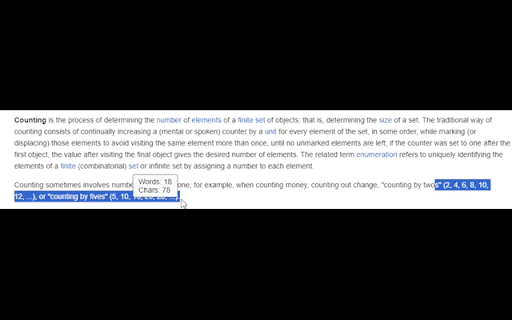
Count words quickly and easily. Highlight text and instantly get the word & char count. Simple Word Counter: Quickly Count Words and Characters Simple Word Counter accomplishes the task of counting words and characters that you've selected quickly.. Just by highlighting the text, a popup will immediately show the total word and character count. Key Features: • Instant Word and Character Count: Simply highlight any text and a tooltip will promptly display the total count of words and characters. • Customizable Tooltip: Manage the tooltip's visibility with a straightforward on/off toggle. PLEASE NOTICE: This extension does NOT function on all websites - it will function on most. 1. Download and install the Simple Word Counter extension from the Chrome Web Store. 2. Highlight the text you want to count on any webpage. A tooltip will automatically pop up near the selected text, showing the word and character count. Additional Settings: • To access more settings, click on the extension icon to open the popup. • In the popup, you can adjust the tooltip's display and set the default behavior for new websites. PLEASE NOTICE: This extension does NOT function on all websites - it will function on most.

Word Counter
Count words and characters in selected text with a single click. Just right-click on any text to analyze it! Word Counter: The fastest way to count words and characters in any selected text on the web. No copying, no pasting, just select and count instantly. ✓ INSTANT COUNTS: Get word count, character count (with or without spaces), sentence count, and paragraph count in one click ✓ WORKS EVERYWHERE: Count text on any website, email, document, or social media platform ✓ MULTIPLE DISPLAY OPTIONS: Choose between in page popup (default), system notification, browser alert, or optional floating counter ✓ FLOATING COUNTER (OPTIONAL): Enable the floating counter in settings to see real time word count as you select text, no right click needed ✓ ACCURATE COUNTING: Advanced sentence detection handles abbreviations, ellipsis, and headings, matches popular word counter tools ✓ ZERO LIMITATIONS: Count text of any length with no restrictions ✓ PRIVACY FOCUSED: All counting happens locally, no data is ever transmitted Perfect for writers monitoring word limits, students working on essays, content creators optimizing SEO, professionals drafting emails, and anyone who needs quick text analysis. Two ways to use: • Right click on selected text and choose "Word Counter" for instant results • Enable floating counter in settings for automatic counting as you select text (requires page refresh) Simple, fast, and essential for anyone working with text online.

Highlighted Words Counter
A floating word counter that shows the word count of highlighted text Highlighted Words Counter is a lightweight, intuitive, and powerful Chrome extension designed to instantly show you the word and character count of any highlighted text on any webpage. Whether you're drafting content, editing documents, or simply curious about your text, this extension makes it effortless to track your content’s length. Key Features: - Instant Floating Counter: Automatically displays a floating counter in the bottom-right corner when you highlight text, providing both word and character counts at a glance. - Customizable Appearance: Personalize your counter with adjustable background color, text color, transparency, and font size—tailor it to match your style or workflow. - Effortless Clipboard Copy: Simply click on the word or character count to instantly copy the value to your clipboard, streamlining your editing and writing processes. - Seamless Across Webpages: Works on all websites without interfering with your browsing, ensuring a consistent experience everywhere you go. - Easy-to-Use Interface: Features a user-friendly settings page with clear instructions, quick reset options, and direct links for support and feature suggestions. Take control of your highlighted text today with Highlighted Words Counter—efficient, customizable, and designed for your everyday productivity.

Webpage Word Counter
Analyze your website text with style with the Webpage Word Counter chrome extension 🚀 Webpage Word Counter Extension for Chrome: Instantly Count Words on Any Website! 🚀 Introducing the Webpage Word Counter Chrome Extension – a sleek, lightweight, and powerful tool tailored for Chrome users who need to count words on a website quickly and effortlessly. This word counter for websites delivers accurate word counts for any webpage you visit, plus it even counts words for specific text selections. A must-have for content creators, SEO experts, researchers, students, and every Chrome user looking to optimize their work. 1️⃣ Visit any webpage you need analyzed. 2️⃣ Click on the Webpage Word Counter Extension icon. 3️⃣ Instantly see the total word count for the entire website page. 📄 4️⃣ Want a count for a specific section? Simply highlight it and click the Word Counter icon – you'll see both the webpage’s total and the highlighted segment’s word count. 👉 Effortless to Use: One click activates this webpage word counter tool. 👉 Flexible Counts: Get word counts for the entire page or any snippet with ease. 👉 Real-Time Analysis: Instant in-browser word counts, with all your data staying private. 👉 SEO Boost: An ideal companion for SEO analysts, helping with keyword density and competitive insights on any website. 💡 Why wait? Enhance your Chrome browsing with the Webpage Word Counter Extension! Start using this word counter for websites today to stay ahead in your content game! 🔒 Privacy Matters: This Chrome extension operates entirely on your device. Your data remains private, as we do not store or access the contents of the analyzed webpages. Frequently Asked Questions (FAQ) Q: How can I check the word count of highlighted text? A: Simply highlight the text you want to analyze, click on the Webpage Word Counter icon, and the extension will show both the total word count for the page and the word count for your selected text. Perfect for SEO word count analysis or finding total word count for specific sections! Q: Can I count words on a specific webpage or website only? A: Absolutely! This extension counts words for any webpage or website you visit. Just click the extension icon to see the web page word counter in action for the entire page, or highlight specific text to get a segmented count. Q: Is this SEO word counter useful for analyzing web content? A: Yes, it’s ideal for SEO professionals who need quick insights into keyword density or total word count on competitor sites. This SEO word count tool provides accurate word counts for entire webpages, helping you make informed content and keyword decisions. Q: Can I use this as a total word counter for any site I visit? A: Definitely! It’s designed as a total word counter for any webpage you access on Chrome. Whether it’s a blog, an article, or a competitor's webpage, it shows the total word count instantly. Q: Is my data safe with this extension? A: Yes, privacy is our priority. The Webpage Word Counter operates entirely on your device, meaning no data is stored or accessed externally. Enhance your productivity and optimize your SEO strategy effortlessly with the Webpage Word Counter Extension! Start using this tool today to count words on any website and stay ahead in your content game.

Word Counter
Count the number of selected words in chrome Count words effortlessly with the Word Counter Chrome extension! 🚀 Simply select text on any webpage 🖱️ Instantly see the word count in a stylish popup 💬 Beautifully designed with a sleek interface 🎨 🌟 Why Word Counter? Perfect for writers, editors, and students 📚 Boost your productivity by keeping track of your content length 🚴♂️ Handy tool for bloggers and content creators 📢 🎉 How to Use: Select text on any webpage. Click on the Word Counter extension icon. Enjoy the instant word count magic! ✨ 🔗 Permissions: Access to selected text on webpages 🌐 No intrusions, just counting words! 🚫 Download now and level up your word counting game! 🚀✨
