
noolmkffnijecchbeambmfjabgdefnkf

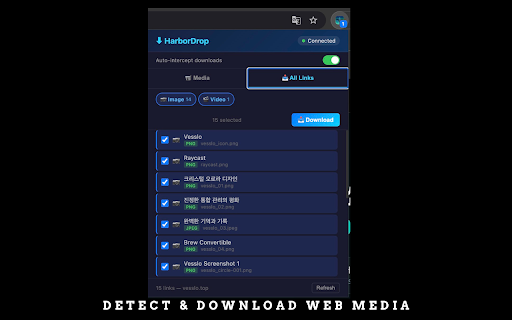
Intercept downloads and detect web videos to send to HarborDrop app. HarborDrop is a companion browser extension for the HarborDrop macOS download manager. It helps users detect downloadable media (including HLS/m3u8 streams, direct video/audio files, and downloadable links) and forward user-initiated download requests to the local desktop app for organized downloading. Features: - Media detection: Detects HLS streams (m3u8), direct video, and audio URLs on the current page context. - Download all links: Lists downloadable links on the page (video, images, documents, archives) with category filters. - Optional download interception: When enabled by the user, browser downloads can be handed off to HarborDrop. - Right-click download: Send a selected link to HarborDrop from the context menu. - Native integration: Communicates with the local HarborDrop macOS app via Native Messaging. How it works: 1. Open the HarborDrop extension popup on the current page. 2. Select media/link and click Download. 3. The HarborDrop desktop app performs the actual download, progress tracking, and file organization. Privacy: HarborDrop does not send personal data to external servers. Data is processed locally between the extension and the local HarborDrop app via Native Messaging.

Web VideoDownloader
Download videos and audio from web pages. Supports HLS streaming. 100% private. Web VideoDownloader (WVD) — The easiest way to download video and audio from any web page. WVD is a free Chrome extension that automatically detects video and audio files as you browse. No complicated setup, no accounts, no subscriptions. Just click the icon and download what you need. ★ KEY FEATURES • Auto-detection — Videos and audio files are found automatically as pages load • Inline preview — Watch videos right in the popup before downloading • HLS/M3U8 streaming — Download live and adaptive streams with quality selection • 37 languages — Full interface translation for users worldwide • Download progress — Real-time speed and progress tracking for every file • Privacy first — Everything runs locally on your device, nothing leaves your browser ★ HOW TO USE 1. Visit any web page that contains video or audio content 2. Click the WVD icon in your toolbar 3. Browse the list of detected media files 4. Preview inline or click download to save the file ★ PRIVACY WVD performs 100% local processing. No data is collected, no analytics are used, and no account is required. The extension only reads HTTP headers to detect media files — it never accesses page content or personal information. ★ COPYRIGHT NOTICE WVD automatically blocks DRM-protected platforms such as YouTube, Netflix, Disney+, and Spotify. Users are responsible for ensuring downloads comply with applicable copyright laws and terms of service.

Coursemos Downloader
다운로드하려는 비디오가 있는 웹페이지 방문 확장 프로그램 아이콘 클릭 "Scan Current Page" 버튼을 눌러 스트림 URL 스캔 원하는 URL 선택 (여러 개 발견된 경우) MP4/MP3 형식 선택 "Download" 버튼 클릭 후 다운로드 완료 대기

HDS & HLS Video Downloader - M3U8 & TS Stream Saver
Download and save HLS live streams (m3u8) and TS video files easily and securely. The best HLS downloader extension. Easily detect and download HLS (m3u8) video streams from any website. Modern, fast, and secure. HDS / HLS Video Downloader is the ultimate tool for detecting and saving HTTP Live Streaming (HLS) videos. Features: - Smart Detection: Automatically finds .m3u8 playlists and .ts video segments as you browse. - One-Click Action: Copy the stream URL or download the playlist file immediately. - Modern Design: Enjoy a sleek "Deep Ocean" dark theme with glassmorphism UI. - Privacy Focused: No data collection, works entirely on your device. How to use: 1. Play a video on any website. 2. The extension icon will show a count of detected streams. 3. Click the icon to see the list and download/copy the link. Note: This extension downloads the playlist file (.m3u8). For the full video file, you may need a player that supports HLS or a tool like FFmpeg.

Downie (Unofficial)
Sends current page to Downie. PS: 1. This is not the official version. 2. For unsupported sites, clicking on the Downie icon will not open Downie and a message will be displayed ============================= Important: We had to lock the download of YouTube videos because of restrictions of the Chrome Store. There are always videos which are protected by the sites and cannot be downloaded.
