
noanamjfnkagakdookblkinjdpgdakjm
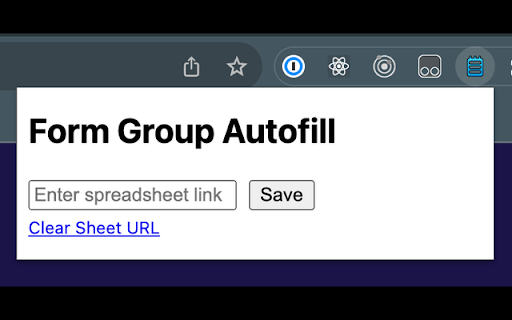

If you have a CSV file with a list of Postcodes and ID numbers, this extension can read those from a remote file and autofill those details into a form on the page.

Dr_RKC Autofill
Easily autofill student name and register numbers using data from a CSV file. Perfect for repetitive data entry tasks. Dr RKC Autofill is a productivity tool designed to save you time and effort by automating the process of filling out web forms. Simply upload a CSV file with your data, and this extension will populate the corresponding fields on the webpage in seconds. Supports forms with dynamic field IDs (e.g., roll_no_1, student_name_1, mark_det_1). Quick and easy CSV upload directly from the extension popup. Automatically matches CSV headers with form field IDs for seamless autofill. Lightweight, fast, and simple to use. Lecturers entering student data into online forms. Professionals handling repetitive form submissions. Anyone who wants to reduce manual data entry errors and save time. Open the webpage containing the form you want to fill out. Click on the extension icon in your browser toolbar. Upload your CSV file with headers matching the form field prefixes (e.g., roll_no, student_name, mark_det). Click the "Autofill" button, and the form will be filled automatically. Privacy: Your data stays local and is never transmitted or stored. Save time and eliminate errors with Dr RKC Autofill!

QuickForm - Autofill & Form Filler
QuickForm is a free form auto fill Chrome extension and form filler that lets you fill out any online form in one click. Unlike browser autofill or other auto fill extensions, QuickForm works on complex web apps: React, Angular, Vue, dynamic SPAs, internal tools, staging environments, and enterprise portals. 1. Activate Record Mode on any web form 2. Fill it out naturally - QuickForm saves every field automatically 3. One click to autofill that form anytime, instantly and accurately, every time ☁️ Sync Across Devices — Your profiles are securely stored and available on every Chrome instance you use. Switch machines, keep your forms. 🔥 Record Mode - Automatically detect and capture form fields. No manual configuration needed. 🤖 Smart Field Recognition - Recognize and fill new forms automatically across sites, even without recording them first. Opt out anytime in Settings. 🖱️ Auto-Click - Automate clicks between form steps, buttons, and navigation. ⏳ Smart Delays - Set timed pauses for pages with loading states or dynamic content. ✅ All Field Types - Input, textarea, checkbox, radio buttons, select dropdowns, date pickers, and more. 🏎️ Multiple Profiles - Create different profiles for different forms or environments. 📄 Duplicate Profiles - Clone and modify profiles for similar forms. 🔗 URL-Specific Profiles - Link profiles to specific websites for automatic form filling. 📥📤 Import/Export - Backup, share, and transfer profiles between devices. 🎨 Autofill Animation - Customize the speed of form filling. ⚡ Fast Access - Fill forms from the toolbar icon or right-click context menu. 🎯 Built For: - QA engineers and testers running the same test forms hundreds of times across staging, dev, and production - Developers working with admin panels, staging forms, internal tools and environment-specific forms. - Job seekers tired of retyping the same details across every application portal - Data entry teams who need fast, accurate, repeatable form filling and repeatable submissions at scale. - Anyone who's tired of typing the same information into forms - Works where others fail - Supports React, Angular, Vue, and dynamic web apps that break generic autofill tools. - Record Mode means zero setup - No CSS selectors, no field mapping, no technical knowledge needed. - 100% free - No premium tier, no paywalled features, no usage limits. - No account required - Install and start using immediately, no sign-up. Your profiles stay on your device — encrypted, synced privately across your Chromes, never sold or shared. To make autofill smarter over time, QuickForm can learn from form structure and on-screen content while the extension is active on a tab. Automate form filling in Chrome today. Download QuickForm, the fast, free, and private form filler and autofill extension trusted by 50,000+ users 🌟. Free forever.

File form filler
Extension to form filling by uploaded excel or csv file Simple form filler with excel, text or csv files. Prepare your file, upload it to an extension and inputs will be filled in. New: The extension now supports header fields placed either in the first row or in the first column If you have any requests to modify the data formatting in the file, don’t hesitate to contact me. The File form filler extension is a tool that allows you to quickly and easily fill in input fields on websites using data stored in an Excel, CSV or TXT file. Once you have uploaded the file to the extension, then extension automatically fills in the fields with the corresponding values from the file, saving you time and effort in data entry. For example, let's say you have a CSV file that contains data for a contact form, with columns for "Name", "Email", "Phone", and "Message". With the File form filler extension, you can upload file and the extension will automatically fill in the data for you. This can be a great time-saver for tasks that require a lot of data entry or form filling. Complex form with radio buttons, checkboxes, dropdown... https://lukaskapps.github.io/screenTimeReminderPolicy/testing-forms/

Form Autofill Extension
Autofill forms with data from a backend service. Form Autofill Extension is a powerful tool designed to simplify your online form-filling process. By leveraging data stored in your backend service, this extension automatically detects forms on web pages and populates them with relevant information, saving you time and effort. Key Features: Automatic Form Detection: The extension seamlessly detects forms on any webpage. Data Autofill: Automatically fills out forms with data retrieved from your backend service. Secure Authentication: Ensures your data remains secure by requiring authentication. Password Visibility Toggle: Easily toggle the visibility of your password when logging in. User-Friendly Interface: Modern and intuitive design for a seamless user experience. How It Works: Start Detection & Autofill: Click the "Start Detection & Autofill" button to begin. Automatic Form Population: The extension identifies and populates forms with your stored data. Secure Login: If unauthorized, enter your email and password to log in securely. Password Visibility Toggle: Click the eye icon to show or hide your password while typing. This extension is perfect for anyone who regularly fills out forms online and wants to streamline the process. Whether you're a job seeker, a business professional, or just an everyday user, Form Autofill Extension can save you valuable time and reduce the hassle of manual data entry.
