
nnihokkideclbjconjpkjmlebcfllghl

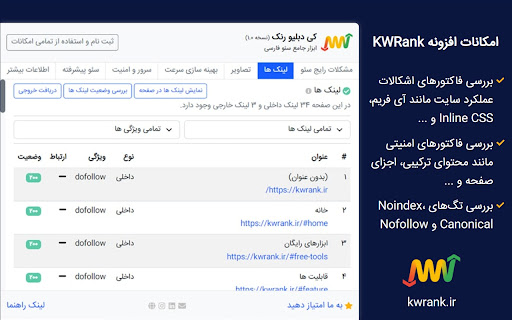

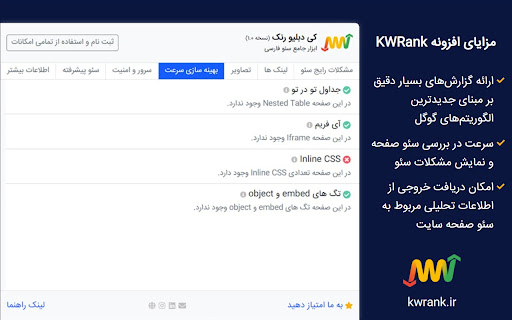
ابزار آنالیز سئو سایت، نمایش مشکلات سئو، بررسی وضعیت سایت رقبا، مشاهده لینک های شکسته افزونه کی دبلیو رنک ابزار قدرتمند آنالیز سئو سایت است که با نمایش مشکلات و خطاهای تمام صفحات و راهکار حل هر یک از مشکلات، به شما در بهبود وضعیت وب سایت و قرار گرفتن در رتبه های بالاتر گوگل کمک می کند. کی دبلیو رنک با بررسی مهم ترین فاکتورهای سئو صفحات، بررسی فاکتورهای بهینه سازی و سرعت، بررسی موارد امنیتی، اطلاعات جامعی از وضعیت وب سایت در اختیار شما قرار داده و به شما کمک می کند در جایگاه بالاتر از رقبای خود دیده شوید. افزونه کی دبلیو رنک به عنوان ابزار رایگان سئو فارسی، با آنالیز فاکتورهای زیر به شما در بهبود وضعیت صفحات کمک می کند: مشکلات رایج سئو در این قسمت، با بررسی متاهای صفحه، کلمات کلیدی، سر تیترها و ... تمامی فاکتورهای داخل صفحه، آنالیز و با استانداردهای گوگل مقایسه می شوند. بدین ترتیب تمامی مشکلات داخل صفحه، شناسایی و راهکار رفع هر یک اعلام می گردد. امکان نمایش تمامی سر تیترها در صفحه و به صورت نشانه گذاری شده نیز فراهم می باشد. در ضمن امکان دریافت خروجی از تمامی سر تیترهای صفحه در کنار نوع هر یک، در قالب فایل اکسل فراهم می باشد. لینک ها در این قسمت، تمامی لینک های موجود در صفحه بررسی و بر مبنای نوع (داخلی، خارجی)، ویژگی (dofollow، nofollow) و ارتباط (noopener، noreferrer و ...) تفکیک می گردند. همچنین با نمایش کد وضعیت تمامی لینک های صفحه، می توانید لینک های شکسته موجود در صفحه را شناسایی و آنها را اصلاح و یا حذف نمایید. امکان نمایش تمامی لینک ها در صفحه و به صورت نشانه گذاری شده نیز فراهم می باشد. در ضمن امکان دریافت خروجی از تمامی لینک های صفحه در کنار عنوان هر یک و به همراه تمامی اطلاعات و جزئیات آنها، در قالب فایل اکسل فراهم می باشد. تصاویر در این قسمت، لینک تمامی تصاویر موجود در صفحه به همراه ویژگی آلت، عنوان و پیش نمایش آنها موجود می باشد. امکان فیلتر کردن لیست تصاویر بر مبنای حالات مختلف ویژگی آلت نیز فراهم می باشد. در ضمن امکان دریافت خروجی از تمامی تصاویر موجود در صفحه در کنار عنوان هر یک و به همراه تمامی اطلاعات و جزئیات آنها، در قالب فایل اکسل فراهم می باشد. بهینه سازی سرعت در این قسمت، صفحه از نظر فاکتورهای عملکرد و سرعت بررسی می گردد و لیست اشکالاتی که می تواند منجر به کندی صفحه و ایجاد اختلال در عملکرد بهینه صفحه گردد، نمایش داده شده و راهکار رفع هر یک از مشکلات اعلام می گردد. سرور و امینت در این قسمت، صفحه از نظر موارد امنیتی و وضعیت سرور میزبان سایت، بررسی شده و راهکارهایی جهت بهبود موارد امنیتی صفحه وب سایت و سرور ارائه می گردد. سئو پیشرفته در این قسمت، وجود تگ های noindex، canonical و nofollow در صفحه وب سایت بررسی می گردد. اطلاعات بیشتر در این قسمت، لینک به صفحه آنالیز شده سایت در ابزارهای معتبر بین المللی بررسی عملکرد، ساختار، امنیت و همچنین بررسی وضعیت دامنه موجود می باشد. بررسی اطلاعات فوق همچون یک مشاور مجازی سئو، به شما در درک وضعیت فعلی وب سایت کمک کرده و بدین ترتیب می توانید با صرف حداقل زمان و بدون پرداخت هزینه، از اقدامات مورد نیاز در جهت بهبود وضعیت وب سایت آگاهی پیدا نمایید و تمرکز خود را بر روی اجرای اصلاحات لازم بگذارید. این افزونه مرتبا در حال بهبود امکانات و افزایش تعداد قابلیت ها می باشد. امکانات این ابزار بر اساس بازخورد کاربران اضافه می گردد. اگر قابلیت جدیدی در افزونه کی دبلیو رنک نیاز دارید، لطفاً به آدرس info@kwrank.ir ایمیل ارسال نموده و پیشنهادات خود را با ما در میان بگذارید. آدرس سایت: kwrank.ir آدرس اینستاگرام: www.instagram.com/kwrank آدرس لینکدین: www.linkedin.com/company/kwrank

GSC Guardian
Stay on top of your website's health. Check for incidents in your Google Search Console data with a simple graph. GSC Guardian 2.10 - Enhanced Google Search Console with Visual Algorithm Tracking 🔒 Security Verified: This extension has been independently reviewed for security to ensure that your data is not being uploaded to any unauthorized third parties: https://manus.im/share/VTfoAgDalRZmVeBU7ePuX2?replay=1 New: Bulk CSV Import - Upload historical annotations and migrate data efficiently ⭐ Trusted by 15,000+ SEO professionals worldwide 🏆 US Search Awards - Best Search Software Finalist ⭐ Please support us with a rating if GSC Guardian helps your workflow! ⭐ SECURITY ENHANCEMENTS • Complete security audit and code review completed • Enhanced security measures with independent verification • Public security transparency implemented for all future releases • Streamlined codebase for improved performance and reliability BULK ANNOTATION IMPORT • Upload CSV files containing hundreds of annotations at once • Preview annotations before importing to ensure accuracy • Download our CSV template to get started immediately • Ideal for migrating historical data or team handovers ENHANCED USER EXPERIENCE • Status messages now auto-hide for a cleaner interface • Annotations are filtered by Search Console property • New "Show All Resources" option for multi-property views • Improved visual hierarchy with dashed annotation lines JULY 2025 STABILITY UPDATE • Fixed compatibility issues with recent Google Search Console changes • Resolved date range switching bugs • Improved annotation property association ALGORITHM UPDATE VISUALIZATION See Google's algorithm updates as visual overlays on your traffic graphs. Instantly understand if traffic changes correlate with known updates. COMPREHENSIVE ANNOTATION SYSTEM • Add context to traffic changes with timestamped notes • Import/export annotations for team collaboration • Search and filter annotations by date or keyword • Maintain historical records of site changes and optimizations DARK MODE Reduce eye strain during extended analysis sessions with a carefully designed dark theme. MULTI-LANGUAGE SUPPORT Available in 9 languages: English, Spanish, Dutch, French, Portuguese, German, Italian, Japanese, and Russian. DATA PORTABILITY Export all annotations and incidents to CSV or Google Sheets for reporting, backup, or migration purposes. FOR SEO & MARMETING AGENCIES • Track client site changes across multiple properties • Document optimization efforts with timestamped annotations • Export visual reports showing algorithm impacts • Onboard new team members with historical context via CSV import FOR IN-HOUSE SEO & MARKETING TEAMS • Correlate development releases with traffic changes • Maintain audit trails of SEO implementations • Share insights across departments with exportable data • Track seasonal patterns with historical annotations FOR WEBSITE OWNERS • Understand traffic fluctuations in context • Document when content was published or updated • Track marketing campaign launches against organic performance • Build institutional knowledge about site performance FOR SEO CONSULTANTS • Quickly assess algorithm impact during site audits • Import client annotations for comprehensive analysis • Generate visual reports for client presentations • Maintain detailed records across multiple client projects 1. Install the extension from Chrome Web Store 5. Use import/export features for bulk operations IMPROVE ANALYSIS • See patterns between updates and performance • Maintain comprehensive historical context • Make data-driven decisions with complete information PROFESSIONAL REPORTING • Export annotated data for client presentations • Create visual timelines of SEO efforts • Document ROI of optimization work • API integrations with project management tools • Automated annotation rules • Multi-account management dashboard • Advanced filtering and analytics • Actively maintained with regular updates • Responsive support team • Your data remains within Google's ecosystem • No external servers or data collection • Independent security verification with public audit available • Open to feature requests from the community Install GSC Guardian to add powerful visualization and annotation capabilities to Google Search Console. Questions or feedback? We're here to help make your SEO workflow more efficient.

Google Search Console Report Launcher
Access the Google Search Console performance reports with fewer than three clicks for your target webpage. For SEOs and digital marketers, it's a common practice to check a URL's performance to see its current traffic or compare it to previous traffic in Google Search Console (GSC). ✨ The Google Search Console Report Launcher is here to assist you! No matter which page you're on, simply click on the extension, choose your preferred report, and watch the magic unfold. Additionally, you can easily copy any table data from GSC and paste it into GSheets or MS Excel. Plus, you can export the "Page indexing" report URLs with just a click!

SEO Search Simulator by Nightwatch
Simulate search engine queries from any location on Google and easily check and track your website or your competitor's rankings. Simulate unbiased search engine queries from any location on Google and effortlessly check the rankings of your website or your competitors'. Nightwatch's search simulator is an indispensable tool for SEO professionals seeking a straightforward and effective solution for rank tracking, enabling you to monitor website positions in SERPs (search engine results pages). For those conducting numerous searches, encountering rate limits or captchas can be a challenge. For a more robust solution that surpasses browser and extension limitations, explore the Nightwatch app (https://nightwatch.io).

FatRank - SEO Rank Checker
Check your website's ranking position in Google search results across different countries * Please Note: This extension will use your Google local search settings and will include local listings as a rank position. To stop this make sure your location in Google search settings is set to your country i.e 'United States'. * Fat Rank is a FREE lightweight in browser keyword rank checker tool. Simply visit a website, click the Fat Rank icon, type in your keyword and it will tell you where that website ranks in Google and which page URL ranks. It is very practical and usable for both competitor research, prospecting and even simple quick ranking reports for your clients. Visit a website, click on the extension icon and type a keyword or key phrase and the extension will return the current Google ranking position for that domain and also provide you with the url of the page the keyword ranks for. It will search down to a ranking depth of 100. If the domain doesn't rank for a keyword within the top 100 positions, it will simply display 'Not found'. You can make multiple keyword / key phrase checks and these will all store within your session history tab where you can export via a CSV as report for your client. Beautifully simple, usable and practical tool designed for SEO's by SEO's. * Fat Rank is counting local results how do I stop this and check country wide? This extension will use your Google local search settings and will include local listings as a rank position. To stop this make sure your location in Google search settings is set to your country i.e 'United States'. * What does 'Not Found in Top 100 Results' mean? This means the website you are viewing does not rank within the top 100 results for the keyword you entered. We only check up to the 100th result for speed. * What does 'Try Again Later, Google is Blocking Searches' mean? Fat Rank uses your browser behind scenes to check a keyword ranking position. If you do too many keyword checks within a short period of time Google temporarily block search results. We recomend to leave the extension for a while and try again later.
