
nnenhoeepnpecmgfkakifapcidnmbcog
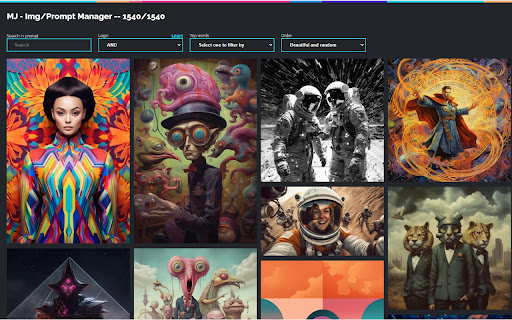


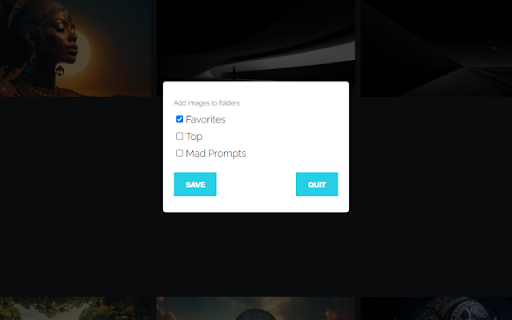
Extension to help you manage your Midjourney Images/Prompts Library locally for quicker/better management & search The Midjourney Gallery extension is designed to help you manage your Midjourney Images/Prompts Library locally for quicker and enhanced management and searching. This tool enhances your experience with Midjourney by providing a dedicated space to view, organize, and search your generated images using the text prompts. You can create folder to organize images. With the use of 'and/or' logic in search, finding the right image has never been easier. The extension also highlights the top 40 most-used words in all prompts for quick filtering. The extension captures information from your Midjourney account page, storing it locally in your browser's localStorage. This allows it to use this data without delay and provides a better interface with added features like sorting by specific criteria or viewing the top words used in prompts.

MidJourney Characters : by Talento DEV
Colection of prompts to create Art for books, vídeos, T-Shirt, logo, Stickers!

PromptPal
The ultimate idea generator for your Midjourney photos! Introducing PromptPal, the ultimate idea generator for your Midjourney photos! PromptPal can be used to train your image prompt writing skills. By extracting descriptions that were used to train Midjourney's text-to-image model, you can gain valuable insights into the process of creating vivid and compelling descriptions that evoke specific images in the mind of the reader. 👉 Step 1: Install the PromptPal extension from the Chrome Web Store. 👉 Step 2: Once installed, activate the extension by clicking on the PromptPal icon in your Chrome toolbar. 👉 Step 3: This will open the PromptPal panel, where you can browse through the collection of images. 👉 Step 4: Browse through the collection of images until you find one that you like. 👉 Step 5: Click on the image to copy the description to your clipboard. 👉 Step 6: Now, head over to Midjourney and start generating photos based on the description you copied from PromptPal. 📷🎨🌅 👉 Step 7: PromptPal is a great tool for anyone who needs inspiration or a little push to get started with Midjourney. 💡✨🚀 👉 Step 8: So, whether you're a photographer or just someone who enjoys generating photos, give PromptPal a try and see how it can help you come up with new and exciting ideas for your Midjourney projects. 📝📸💭 With PromptPal, upgrading your prompt writing skills has never been easier. Not only can you extracting descriptions that were used to train Midjourney's text-to-image model, but you can also use these descriptions as a guide to improve your own writing. By analyzing the language and structure of the descriptions, you can gain a deeper understanding of what makes a compelling and effective writing prompt. Whether you're a professional writer or just looking to hone your skills, PromptPal is the perfect tool to take your writing to the next level. 💪🏼👨🏻💻👩🏼💻

MyPrompts
Easily save, manage, and share your artificial intelligence prompts from any website with MyPrompts. How It Works: - Right click on any image you want to save and choose "Save my Prompt" - Your image, prompt and all the settings will be saved. - Open the extension popup in order to see all of your assets What's New: - Allowing you to save any image online and connect prompts to it. - See all your saved settings to replicate the asset What's nexts: - Save you history for 24 hours in case you forgot to save - Get access from any device to your saved assets. - Add collections to organise multiple assets under one subject - Filter and sort your assets - Allow saving not only images but all AI generated assets For more information or feature requests, join our Discord channel: https://discord.gg/SEVHwZ4n

AI Images & Prompts Directory
Organize and search your AI-generated images and prompts across multiple platforms with ease. AI Images & Prompts Directory is your comprehensive solution for managing a library of AI-generated visuals and their corresponding prompts. Designed for enthusiasts and professionals alike, this extension supports popular AI platforms like Midjourney, Leonardo, Firefly and ChatGPT. Key Features: - Unified Library: Centralize your images and prompts from various AI services in one accessible location. - Advanced Search: Quickly locate your images using intuitive 'and/or' search logic and text-based queries. - Effortless Organization: Create and manage folders to categorize your content for efficient retrieval. - Instant Access: All data is stored locally in your browser's storage, ensuring rapid access and enhanced privacy. - User-Friendly Interface: Enjoy a clean and responsive design that makes navigation and management a breeze. With AI Images & Prompts Directory, streamline your workflow by keeping track of all your AI-generated assets in a structured and efficient manner. Whether you're a digital artist, a designer, or just experimenting with AI imagery, our tool enhances your creative process by providing an organized, searchable, and instantly accessible repository. Install AI Images & Prompts Directory today and transform the way you interact with your AI-generated creations!
