
nmjdgpcenalkgdfombfmnailikpofakd
A simple handy tool to calculate position size when trading A simple handy tool to calculate position size when trading

RiskX — Topstep Position Size & Risk Calculator
Position size calculator for TopstepX. Auto-calculates contracts based on risk %, stop loss, and account balance. Stop guessing your size. Protect your funded account with precise, automated risk management. RiskX is the essential companion for TopstepX traders. It removes the mental math so you never violate the Scaling Plan or blow an account over a calculation error. Stay Compliant - Auto-detects your account size (50K / 100K / 150K) and profit level via the TopstepX API - Enforces max contract limits in real-time based on the official Scaling Plan — flashes red when you'd exceed them - Reads your live balance and selected instrument directly from the TopstepX interface Fast Execution - Enter your stop loss (ticks) and risk % — get the exact contract size instantly for 40+ instruments - 1-click or Ctrl+Enter to copy the result and auto-fill the TopstepX order field - Customizable preset buttons for your most-used SL ticks and risk percentages — long-press any preset to edit it Trade Planning - Enter a price to see calculated SL and TP levels before you execute - Instant R:R ratio and dollar risk/reward for every setup - Toggle sections on or off to keep the widget minimal Built for Your Workflow - Draggable, minimizable widget that remembers its position - All settings persist across sessions - Right-click menu to toggle sections or reset position Supported Instruments Indices: ES, MES, NQ, MNQ, YM, MYM, RTY, M2K Energy: CL, MCL, NG, QG, HO, RB Metals: GC, MGC, SI, SIL, HG, MHG, PL FX: 6E, 6B, 6J, 6A, 6C, 6S + micros Treasuries: ZB, ZN, ZF, ZT, UB, TN Grains: ZC, ZS, ZW, ZL, ZM Crypto: BTC, MBT, MET ...and more Disclaimer: RiskX is an independent third-party tool, not affiliated with or endorsed by Topstep. Always verify calculations and trade responsibly.

Trading Lots Calculator
Calculates lot sizes in TradingView. Requires a license key (obtained via subscription) for full symbol access. Free for EURUSD. Trading Lots Calculator for TradingView. The Forex Lots Calculator you've been waiting for. Protect your account with our Chrome extension that prevents costly mistakes - seamlessly integrated with TradingView. Our position calculator ensures you're always risking exactly what you intend. It works on all Forex pairs, Metals and Indices. Take full control of your risk management—directly inside TradingView. The Lot Tool Calculator Extension for TradingView eliminates guesswork and manual steps by instantly calculating precise lot sizes based on your trade setup. Forget switching between apps or doing mental math. With this tool, you can automate your position sizing, streamline your process, and make smart, risk-adjusted decisions—fast. Whether you're trading standard or mini lots, this extension ensures your risk is always aligned with your plan, so you can focus on execution and stay in control of your capital. 💡 Why This Calculator Matters Consistent profitability starts with effective risk management—and this extension makes it effortless. Instead of jumping between calculators, spreadsheets, or external tools, you can: Visually plan trades with the built-in position tool. Enter your account balance and desired risk % or fixed amount. Get instant lot sizes tailored to your account type and strategy. It’s everything you need to manage risk like a pro, built right into the platform you already use. ✅ Instant lot size calculation for every trade ✅ Supports standard and mini lot sizing ✅ Works with the TradingView long/short position tool ✅ Customize with your account balance and risk level ✅ Works with every symbol.

Position Sizing Calculator
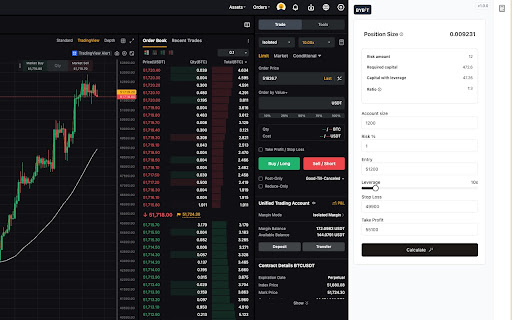
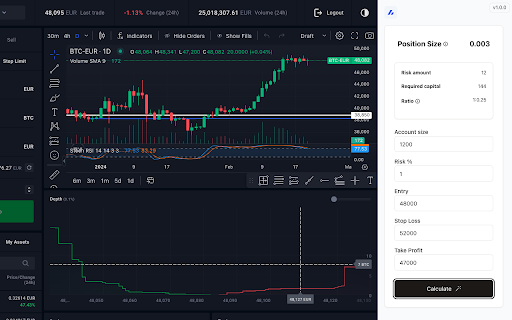
Protect and preserve your principal. Position Sizing Calculator is a user-friendly Chrome extension that helps traders calculate the ideal position size based on their risk tolerance. Perfect for managing trades efficiently and ensuring consistent risk management in any trading strategy.

Stock Average Calculator
Easily calculate the average price of your stock purchases with our user-friendly Stock Average Calculator extension. Perfect for investors who buy the same stock multiple times and want to keep track of their average share cost. Whether you're a seasoned investor or just starting out, this tool helps you make informed decisions about your portfolio. - Calculate average stock prices for two purchases - Support for multiple currencies (USD, INR, EUR and more) - Instant calculations as you type - Clean, intuitive interface - Extremely lightweight How It Helps You: - Smart Averaging: Bought shares at different prices? Quickly find your average cost per share. - Target Planning: Set a goal price and discover how many more shares to buy to reach it. - Loss Recovery: If your stock dips, calculate how many shares to buy to recover a specific percentage of your investment. - Multi-Stock Management: Handle calculations for various stocks in your portfolio. - Profit/Loss Insights: Easily see your potential gains or losses before making a trade. Simply enter the number of units and price per share for two separate stock purchases. The calculator instantly shows you: Let's say you bought 100 shares of Stargazer at $50 each, and later purchased another 100 shares at $60 when the price rose. Our calculator will quickly show you: This instant calculation helps you understand your position and make informed decisions about future trades or when to sell for a profit. Whether you're averaging down, aiming for a target price, or planning your next move, the Stock Average Calculator is your go-to tool for smarter stock investing. Add it to chrome now and take control of your portfolio!
