
nmidkjogcjnnlfimjcedenagjfacpobb
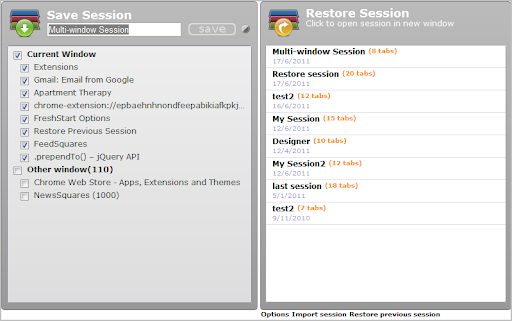


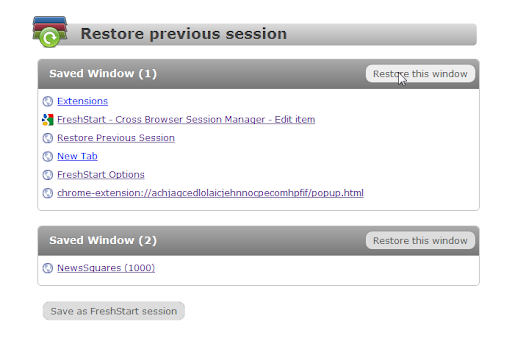
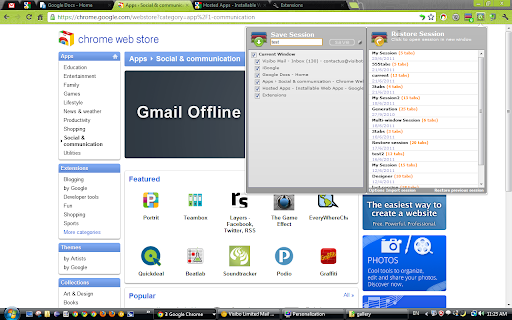
Need simple session management? Several users on the same Chrome? FreshStart is a simple cross browser session manager. Manage your browsing session easily with FreshStart! If you have different sets of websites that matter to you at work, at home or at different times, or if you have multiple users, you should give this a try! Features ************************************** - New 1.7, update to Manifest V3 - Release notes here https://www.visibotech.com/search/label/FreshStart ************************************** - Save multiple windows into a single session - Save all open tabs to a new session, or hand select what to be saved - Sessions are saved in the "FreshStart Sessions" folder in bookmarks, allowing you to synchronize it with other computers - Crash recovery - autosave your windows every few minutes - Restore a session in a new window or merge it with the current window by middle mouse click. - Session editing and easily merge new tabs into existing sessions - Export and import sessions If you like FreshStart, check out our other extensions here https://chromewebstore.google.com/search/visibo?hl=en

TabHamster
Session manager and tabs saver. With sync ► Save opened tabs in the group. ✓ Tab Groups are stored in the sync Chrome storage. Sign in to the browser to get them on other PC. ✓ Assign a group name. ✓ Edit, add new tabs, delete, move the group from the list. ► Session Manager provides quick and convenient access to the latest browser sessions. ✓ Access to the currently open (and earlier) browser session. ✓ Recover any session in one click. ✓ !!! Sessions are not synchronized. ☀ Tips: ● To quickly save all open tabs in a group, open the extension window and press "ENTER." Later you can edit the name of the group. ● "Ctrl + click" on group name (or session) - open tabs in a new window.

TabMate
TabMate helps you manage the tab clutter. Easily switch between tabs, save & restore set of tabs or windows, and more. TabMate helps you manage tab clutter and be more productive. Stash a set of tab/windows that you want to save for later and easily restore them when needed. Use quick switcher to search among open tabs and stashes and switch to them. Drag and drop the tabs to rearrange them with in windows or stashes. Name stashes so you can easily remember the purpose for each set of tabs. Easily send tabs to named stashes through right click context menu. Common usages: - Quickly search and switch between all the open tabs and stashes - Save the pages you've visited during your research session and restore all of them later. - Logically group all the pages you visit often and load each group when needed. - Easily manage existing open tabs by saving unnecessary tabs as a session.

TabXpert - session and tab manager
Auto-saved browser sessions. Tab groups support. Sync with the cloud. - Session manager: auto-saved sessions, single- and multi-window modes, tag-based session management. - Tab manager: tab groups, vertical tabs, bookmarks, drag and drop, and powerful search. - Cloud sync: sync sessions across devices and profiles (optional). - Privacy-first: no content access, no data collected; local-first data storage. - Customizable interface: pop-up, tab, window, and side panel interfaces to your choice. - New tab page: most visited and recent tabs, history, bookmarks, and sessions. - Import from: OneTab, Session Buddy, Workona, Toby and other extensions. - And more: cloud backups, browser integration, keyboard shortcuts, tab suspending.

Save Tab Groups for Tab Session Manager
Additional extension for saving tab groups in Tab Session Manager An extension for Tab Session Manager to support tab groups. Please install the Tab Session Manager and enable the "Save Tab Groups" option. https://chrome.google.com/webstore/detail/tab-session-manager/iaiomicjabeggjcfkbimgmglanimpnae January 11, 2026 Starting with Tab Session Manager version 7.2.0, tab groups can be saved without this extension. You do not need to install it. Please remove it from your browser.
