
nmhjblhloefhbhgbfkdgdpjabaocnhha

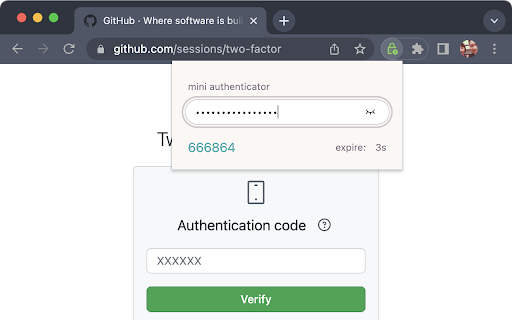
minimal open source authenticator that never store your secret keys - no special permission need: we don't read / write your web pages - simple, single-purpose: just paste your key and we generate the time-base onetime password(TOTP) for two factor aurthentication(2FA) - secure: we do **NOT** store your keys in any places (cookies, chrome storage, cloud ... etc) - offline: no sensitive data transmitted over the internet - open source: everyone can check the source code integrity 1. click on the extension button 2. paste your secret key 3. get your 2FA passcode 🎉 I've used authenticators that are packed with features. They allow you to save your secret keys, sync them across different devices through the internet, also import/export the keys by QRCode. If you are looking for tools like that, I recommend https://authenticator.cc , it's handy, open source and well documented 👍 However, password managers such as Bitwarden, Apple Keychain ... etc already did a very good job in storing and syncing keys across devices. I want to rely on them in secret key management, and let the authenticator extension do only one thing - generate TOTP for 2FA, nothing more. This is where Mini Authenticator comes in. It designed with a "less is more" philosophy in mind. I cut all functionalities that already handled by password managers, and only perform the pure mathematical calculation of TOTP. So it doesn't require storage, read/write your web pages, internet access, special permissions... etc. And most importantly, it's open source, so everyone can inspect and help improving it in future. I agree that this extension is not for everyone, but only those already using password mangers to manage their secret keys, also those who concern about chrome extension permissions and abilities. Visit the project repository: for technicial details. You may also open issues in the project repo, or ping me on Twitter https://twitter.com/hoishing

Nithra Authenticator
Browser extension for Nithra Authenticator Nithra Authenticator generates two-factor authentication codes in your browser for your Nithra, NithraJobs and NithraMatrimonyLogin.

TOTP Authenticator
Get 2FA OTP instantly from your mobile. Works with TOTP Authenticator mobile app. This extension empowers you to easily transfer and access the 2-factor authentication codes from your mobile to your browser. No need to manually type in the codes ever again! Now available with push notification support, send code request straight to your phone through the extension (current support only for Android devices). 2-factor authentication adds an extra layer of security to your accounts. In 2FA, apart from your email and password, you also have to enter a security code to log in. This temporary code is generated by a secure algorithm. Enabling 2FA can prevent you from upto 80% of the cyber attacks. 2FA is supported by majority of the online services including: Google, Facebook, Github, Epic Games, Evernote, etc. The extension only acts as a supplement to the TOTP Authenticator mobile app. To use this extension, please install and setup the Chrome Extension feature of the app. Read the complete setup guide: https://www.binaryboot.com/totp-authenticator/guide/android/chrome-extension

2FA Authenticator
Free 2FA Authenticator app, Chrome extension alternative to Google Authenticator. 2FA Authenticator is a powerful extension designed to enhance your online security by generating time-based one-time passwords (TOTP) for two-factor authentication (2FA). With 2FA Authenticator, you can easily manage your 2FA codes for various websites and services directly within your browser. No more switching between apps or devices—this extension keeps all your 2FA tokens conveniently in one place, making your online accounts more secure and access more efficient. Simply scan QR codes, enter your secrets, and start protecting your accounts with ease. 🔥 Securely store and manage your 2FA codes. 🔥 Automatically generate one-time passwords for quick login. 🔥 Simple and easy-to-use interface for hassle-free setup. 🔥 Compatible with a wide range of websites and services. Stay safe online with 2FA Authenticator—your trusted companion for enhanced security.

Web2FA - Authenticator
Add 2FA security to your accounts and generate codes in Chrome with Web2FA Authenticator Tired of taking out your phone when you sign in? Dead Phone? Web2FA lets you easily add 2FA (two factor authentication) security to your accounts without compromising on convenience, all within your browser 📝 How to use: 1. Scan QR codes to add accounts 2. Copy codes when needed 📱 Works just like your phone - Supports all accounts - Twitter, Instagram, Google + more - Import from other authenticator apps 🌐 Accessible anywhere, anytime - Works offline - no sign-in required - Automatically syncs with your Chrome profile 😌 Have peace of mind - Unlimited accounts - Tiny footprint
