
nmfjdabgefhlciidgpbfebbbmfligboj
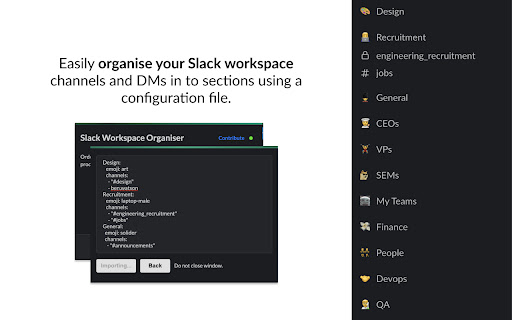


Organise your Slack sidebar by using a yaml file Organise your Slack workspace channels and DMs in to sections using a simple yaml configuration file. Ordering your sidebar helps with productivity and makes it easier to find the right person, team or topic. Share your sidebar layout with colleagues and create multiple sidebar layout flavours which can be applied instantly. Exporting your current Slack sidebar is easy and importing is as simple as copy and pasting a configuration file shared with you in to the extension. The extension will automatically organise DMs and channels in to sections for you and it will even create the sections for you if they don't exist already!

Open Slack in Browser, not App
Slack Browser Redirect Extension Use Slack directly in your Chrome browser without installing the desktop app. This extension automatically redirects Slack links to your browser, eliminating annoying prompts like "Opening link in Slack..." and "Download Slack for Desktop." Save system resources and stay productive by keeping all your Slack activities within Chrome. Simply install the extension and enjoy a seamless Slack experience without extra downloads. スラックのリンクをブラウザで開くとappを開こうとしてきます。 このextensionはappを開くことなくブラウザのままリンクに飛ぶようにするだけのシンプルな拡張機能です。

Slack Channels Group Color
Set background color for Slack channel names by group. Groups correspond to hyphen (-) and underscore (_) separators. - prefix-name - prefix_name

GitHub File Diff
View diffs of files and directories on GitHub. To use this extension, go to a file or directory in GitHub and click the **History** button. Then, click on any commit. The extension will override the click to show the diffs of only the relevant files instead of GitHub's default behavior of showing the entire commit's diff. This is especially helpful when a commit is very large and GitHub only shows a partial diff or none at all. To get the regular view, simply refresh the page.

LazyWords
Learn a new language on autopilot. Practice new vocabulary while you browse the web. Busy people use LazyWords to build up their vocabulary and practice on autopilot. You should too. Learn Spanish, English, Portuguese, Italian, and over 40 other languages. LazyWords is a Google Chrome extension that helps you learn and practice a new language while you read your favorite blogs or news. You can also get LazyWords for iPhone and Android on our web. - "I've been using LazyWords for a while now and love it. It's helped me reinforce some words I only recently learned and introduced me to some new ones. It's a nice, easy way to supplement everything else I do to learn Hebrew. I highly recommend it!" - "Really cool app; I'll share it with my students."
