
nliaibmjpfjcgakjadohoaicfkohkogc
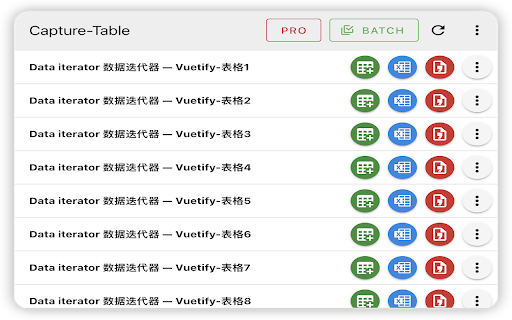

The Ultimate Web Table Extraction Tool – Compatible with 99% of Websites and UI Frameworks! The Ultimate Web Table Extraction Tool – Compatible with 99% of Websites and UI Frameworks! Effortlessly extract tables from any website and take control of your data with our powerful web table extraction software. Perfect for developers, analysts, and professionals alike, this tool ensures seamless compatibility with 99% of websites and front-end UI frameworks. Say goodbye to manual table extraction and streamline your workflow with one-click simplicity. - One-click Extraction of All Tables: Extract every table on a web page instantly with a single click, saving you valuable time. - Unmatched Compatibility: Easily extract tables from 99% of websites and front-end frameworks, even those with complex layouts and dynamic forms. - Export to Google Sheets: Directly export your extracted tables to Google Sheets for quick and easy collaboration. - Batch Export to Clipboard, Excel, and Google Sheets: Extract and export multiple tables at once, reducing repetitive tasks. - Capture Multi-page and Scrolling Tables: Automatically extract tables that span multiple pages or load dynamically as you scroll. - Copy to Clipboard as Markdown: Easily copy tables in Markdown format for use in code documentation or text editors. - Screenshot Tables (PNG Format): Instantly capture and save tables as high-quality PNG images, ideal for reports and presentations. - Export to Office 365: Seamlessly transfer tables to Office 365 for editing, analysis, and presentation. - Flexible Export Options: Download your tables in Excel, CSV, or HTML format, giving you maximum flexibility for data management. - Customizable Table Selection: Fine-tune the selection of tables and data ranges to extract exactly what you need. - Excel-ready Adaptations: Automatically adapt tables for easy use in Excel, eliminating formatting issues and simplifying data manipulation. - Handles Complex Table Structures: Capable of extracting even the most intricate table layouts and structures, making sure no data is left behind. Take the hassle out of data extraction and boost your productivity with our feature-rich table extraction tool. Whether it's for data analysis, reporting, or presentations, we’ve got you covered! Let me know if there’s anything else you’d like to add or modify!

Gentables: AI Sheets for Unstructured Data
Gentables: AI Sheets for Unstructured Data ⚡ Gentables AI Sheets for transforming unstructured data into tables. Easily generate tables from prompts or files, extract them from any document or image, and streamline your workflow—no coding required. Empower your team to uncover insights from unstructured data using the power of LLMs. With the Gentables Chrome extension, you can automatically extract or generate tables from any webpage in one click. It's a simple, powerful way to transform raw online content into structured data and actionable insights—right from your browser. 🎯 Who Can Benefit from Gentables - Non-technical users: Easily extract or verify information from webpages, documents, or images—no coding required. - Professionals: Leverage LLMs to turn unstructured content into structured data and actionable insights. - Anyone: Save time, boost productivity, and simplify data extraction from complex sources. ⭐ Key Features of Gentables Chrome Extension - Extract Table Automatically extract tables from any active webpage. View, edit, and export the extracted tables with ease. - Screenshot to Table: Capture any part of the webpage and extract tables directly from the image. - Select Text to Table: Highlight text on a webpage and convert it into a structured key-value table. - Select Image to Table: Click on any image in the browser to extract tabular data from it. - Upload and Extract: Upload files (up to 100 MB each) and extract tables automatically. Supports PDF, DOC, XLSX, PPT, TXT, images, and 20+ file types. - Convert Forms Automatically detect forms from any active PDF and HTML webpage. View, edit, and export the forms with ease. - Create a Table Type a prompt and let AI generate a structured table using content from the current webpage. 🚀 Discover More Features at https://www.gentables.com AI Sheets for Unstructured Data, a powerful tool to create, auto-fill, and extract tables from any file—turn messy content into structured insights in seconds. - Intelligent Table Generation Draft new table, fulfill existing table, or transform tables from your files—organize anything into tables using AI. - Automatic Table Extraction Extract tables from PDFs, spreadsheets, images, or links—no code needed. Automatically capture titles, sources, and key metadata. Supports 20+ file types. - Automated Workflows Set up workflows with built-in templates, track metrics or charts, and turn unstructured data into actionable insights—effortlessly. - GPT-Powered Copilot Ask AI Copilot to clean, edit, merge, calculate, or generate insights—like having a personalized ChatGPT, fine-tuned for your spreadsheets. - Smart Table Search Search table within your files or from trusted sources like Arxiv, SEC, Wikipedia, and more. Get clean, structured data—no noise. 💪 About Gentables Gentables was born from a simple but powerful idea: make it effortless to turn unstructured content into structured data—one of the most practical and transformative uses of AI today. While many tools offer document extraction, most require technical expertise or custom development, putting them out of reach for non-technical users. Existing solutions often focus on preparing data for LLMs (ETL), rather than using LLMs to unlock data directly. We set out to change that—with an LLM-powered Copilot that’s fast, intuitive, and accessible to everyone. Whether you're a data professional or a casual user, Gentables helps you extract, generate, and work with tables like never before.

Folk Extractor by Table Capture
Allows you to extract data from a shared Folk database to Excel (XLSX) or CSV. FYI - if you find the extension doesn't work the first time, just try again on the same Folk dataset in a new tab. I've found that usually fixes things. And if that doesn't work - email me! How it works: • Just right-click to download in your desired format • You get 5 free exports, afterwards you can purchase a 10-pack of exports

Simple Web Data Extractor
Advanced data extraction with multiple formats, filtering, and batch processing Simple Web Data Extractor lets you pull structured data from any webpage in seconds — no coding required. WHAT YOU CAN EXTRACT: • All text content from any page • Links with URL, title, and anchor text • Images with source, alt text, and dimensions • Tables with headers and row data • Forms with field names, types, and values • Page metadata — title, description, Open Graph, JSON-LD • Media — video, audio, and embedded iframes • Email addresses found on the page • Phone numbers found on the page • Custom elements using CSS selectors or XPath Visual Element Picker — Don't know CSS selectors? No problem. Click the Visual Selector button, hover over any element on the page, and click to capture it. The extension generates the selector for you. Filtering — After extraction, filter your results by text content, regular expressions, text length, or remove duplicates. Extraction History — Every extraction is saved (up to 100 entries). Restore previous results, export your full history, or clear it anytime. Batch Extraction — Extract data from all your open tabs at once and download everything as a single JSON file. Context Menu — Right-click to quickly extract selected text, links, or images without opening the popup. Keyboard Shortcuts — Ctrl+Shift+E for quick extraction, Ctrl+Shift+S to toggle the visual selector. Customize shortcuts at chrome://extensions/shortcuts. Dark Mode — Switch between light and dark themes manually, or let it follow your system preference. Configurable Settings — Set max items to extract, extraction timeout, default export format, notification preferences, and more. WHAT'S NEW IN v2.0: • Completely rewritten for reliability and performance • Added Markdown and HTML Report export formats • Added email and phone number extraction • Added XPath support • Added visual element selector • Added extraction filtering • Added batch extraction across all tabs • Added scheduled periodic extraction • Added context menu integration • Added keyboard shortcuts • Added dark mode • Improved settings page with full sync across popup and options • Fixed security issues with data handling • Better error messages and extraction feedback PERMISSIONS: This extension requests only the permissions it needs. It does not collect, store, or transmit your data to any server. All extracted data stays in your browser. Works on any http:// or https:// website. Cannot run on Chrome system pages or the Chrome Web Store (browser restriction).

TableXport
Extension for extracting tables from webpages and exporting them in various file formats. TableXport - The Ultimate Table Exporter TableXport is a powerful Chrome extension that lets you effortlessly extract and export tables from any webpage in multiple formats. Whether you need to save tables in various formats, or even copy them directly to your Google Sheets, TableXport makes it quick and hassle-free. Why Install TableXport? ✅ One-Click Exports – Convert tables into various file formats instantly. ✅ Multiple Export Options – Choose from various export formats. ✅ Export to Google Sheets – Quickly transfer data to your Google spreadsheets. ✅ Seamless UI – Select a table with ease, hover to highlight, and export in seconds. Perfect for researchers, data analysts, students, and professionals who frequently work with web data. Install now and simplify your workflow! 🚀
