
nlhgchhigkpbiefockjkoocnjgbdmpkl
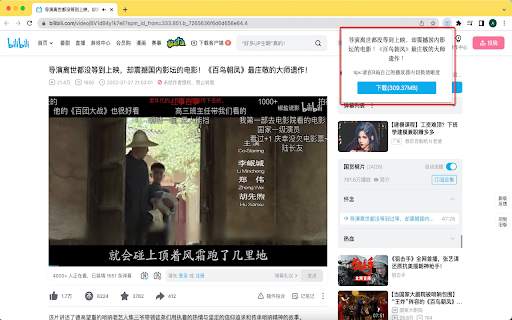
【精选推荐】哔哩哔哩视频下载神器,版权受限的番剧也能轻松下载,支持各种清晰度。 【精选推荐】专业的哔哩哔哩视频下载神器,轻松实现b站视频下载,并且版权受限的番剧也能轻松下载,支持各种清晰度。 b站视频怎么下载到电脑上?只需要安装b站视频下载助手,一键轻松实现b站下载视频,包括版权受限(能看不能缓存)的番剧视频。同时,支持各种清晰度视频的下载。 特点: 1. 操作界面简单,自动嗅探视频;下载清晰度不受限制;支持各种视频下载。 2. 免费的bilibili视频下载工具,一键下载下载bilibili视频 操作说明: 1. 安装本扩展,并打开你要播放的视频页面。 2. 通过调整播放器清晰度,确认下载视频的清晰度。 3. 点击插件图标,即可下载。 其他附件功能: 推广AI助手扩展,欢迎使用!

Video downloader that works! Save online videos
Download video now, watch it later. Fast, light and reliable video downloader Video Downloader is a free video downloader browser extension that lets you save videos from Facebook, Instagram, Twitter, and hundreds of other websites directly to your device. Free Video Downloader – Download videos from Facebook, Instagram, Twitter, and more at no cost. Fast Downloads – Consistent and reliable download speeds across all supported websites. One-Click Download – Detect and download any video with a single click directly from your browser. Multiple Formats – Save videos in MP4 and other popular formats compatible with any device. Auto Video Detection – Automatically detects downloadable videos on Facebook, Instagram, Twitter, and any webpage you visit. Unlimited Downloads – No caps on the number of videos you can save from any website. Lightweight – Designed to be resource-efficient so it doesn't slow down your browser. Easy to Use – Simple, clean design that's easy for anyone to use. Quick Support – Friendly and responsive support team available anytime. Save Facebook Videos – Download any public Facebook video directly to your device for offline viewing. Download Instagram Videos – Save Instagram videos, reels, and stories before they disappear. Download Twitter Videos – Capture and save Twitter videos and GIFs instantly with one click. Download Videos from Any Website – Save streaming videos, tutorials, and clips from hundreds of websites. Offline Viewing – Keep your favourite videos saved locally so you can watch them anywhere without internet.

Wistia Video Downloader
Easily download Wistia videos from any webpage! Supports captions, multiple resolutions and bulk downloads. This extension helps you detect and download embedded Wistia videos from any webpage with minimal effort and high reliability. Features: - Detect Wistia videos on any webpage - Allow you to download any available resolution (224p, 540p, 720p, 1080p, 4k, Original) - Download captions for any language provided - Download password-protected Wistia videos (as long as you know the password) - Download all videos from the page at once. You can do it from the context menu or from the popup. - Set default caption language and resolution for download - You can open the extension either in the popup or in the side panel, depending on your convenience. How to download a Wistia video? 1. Go to a webpage that contains the Wistia video you want to download. 2. Click the extension icon in your browser toolbar. 3. Wait a short time while the video(s) are detected and listed in the popup. 4. Choose your preferred resolution from the dropdown menu. (optional) 5. Click the Download button for the video or caption you want to save. If the video is protected by a password, enter the password in the input field which appears in the popup. We are not affiliated with Wistia the company.

Telegram Video Downloader - TVDownloader
Telegram Content downloader: Restricted videos/images with a single click. (Telegram Movie Downloader) Telegram Video Downloader fully supports one-click downloads of Telegram videos (movies, audio) and more. You can watch saved Telegram videos (movies) offline anytime, anywhere on your PC or mobile device. 🚀 Key Features: 1. One-Click Download: With just one step, TG Video Downloader automatically downloads Telegram videos, images, or audio 2. High-Speed Download: Supports high-speed, unlimited downloads of content from Telegram public channels and private groups 3. Original File Titles: Preserves original file titles, making it easy for you to identify downloaded media content 4. Multi-Format Support: Compatible with various media formats supported by web.telegram.org/a and web.telegram.org/k, including MP4, MKV, FLV, and more 5. Restricted Content: Suitable for downloading restricted videos, series, , audio, photos, etc. on Telegram 6. Privacy Protection: No data collection, no password required, ensuring your privacy and security 7. Cross-Platform Support: Supports all operating systems 8. Instant Download: No need to search or input video links, or download bot, supports instant downloading 9. Free to Use: Free to use after installing the TG Video Downloader plugin 10.Batch Download: Upcoming feature for easy downloading of multiple files (Stay tuned!) 📥User Guide: How to Download Telegram Videos/Images/Audio? 1. Activate: For first-time use, please activate the plugin's download function. You can turn it off when not in use 2. Download: Simply click the download icon at the bottom right of the video/image message to complete the automatic download 3. View: Click on the download history in the upper right corner of the browser to view the downloaded video content 🔒Disclaimer: All features are developed and maintained by independent third-party developers. We strongly recommend that you comply with legal requirements and use the tool responsibly. Use TVD Telegram Video Downloader to make downloading Telegram videos easier and more efficient than ever. Download now and experience it for yourself!

YouTube Subtitle Downloader
Youtube Subtitle Downloader: download subtitles from YouTube easily. Extract, copy or download with the youtube subtitle downloader YouTube Subtitle Downloader makes it easy to download subtitles from YouTube. Before downloading or copying, the extension lets you customize how subs look: show timestamps, set line length, and choose between TXT, SRT, or VTT formats. 🚀 Quick Start Tips 1. Install extension by button “Add to Chrome” 2. Open any youtube video 3. Click button on panel of Video (green button) 4. Download youtube subtitles Features 📁 Formats: SRT, VTT, TXT. Download subs as SRT, VTT, TXT file. 📥 Download YouTube subtitles 📋 Copy YouTube caption to clipboard 🔠 Dual subtitles support 🌍 Translating into 150+ languages 📏 Adjust caption line length ⏱️ Toggle timestamps. Show or hide timecodes. 🔃 Auto-scroll with playback: Subtitles follow the video and highlight line. 🖱️ Click to jump: Click any subtitle block to skip to that moment in the video. 🌓 Light and dark theme Who Is It For? 🎥 Creators. Download subtitles from youtube, translate them, and re-upload to your own videos for global reach. 🌐 Translators. Use dual-subtitle mode and translation to work faster with accurate source context. 🧠 Language Learners. Compare original and translated subtitles in real time while watching. 🎓 Students & Educators. Extract transcripts for lectures, educational videos, and study materials — perfect for test prep, note-taking, and research. Formats for downloading YouTube subs: ▪️ SRT — Subtitle file with timestamps ▪️ TXT — Flexible plain text format ▪️ VTT — WebVTT format for online video players 📌 How to get a transcript of a YouTube video? 💡 With Youtube Subtitle Downloader, you can easily generate a full YouTube video transcript in just one click. Open any video, activate the extension, and export the transcript as a TXT or SRT file. Perfect for studying, quoting, or saving key insights. 📌 How to download subtitles from YouTube? 💡 Simply install the extension, open a video, and click the “Subs” button. You’ll be able to download subtitles from YouTube in either SRT or plain text format. Great for anyone looking for a fast, easy YouTube subtitles download tool. 📌 How to get YouTube video script? 💡 This extension acts as a powerful video script extractor. It converts subs into clean text that can be copied, edited, or reused as a full script for content creation, translation, or study. 📌 How to download transcript from YouTube? 💡 Use the extension to download transcript files with or without timestamps. It's a fast and accurate transcript downloader that works directly on the video page. 📌 How to download captions from YouTube? 💡 With this tool, you can download captions — whether they're auto-generated or manually added — and save them in the format you prefer. It also works as a YouTube caption downloader for multilingual transcripts and translations. 📌 Is the extension free to use? 💡 Yes, extension is available as a free Chrome extension. 📌 Is my privacy secure with this extension? 💡 The extension collects only a generated identifier using the FingerprintJS library and your email. This data is not shared with anyone and is only stored on the server for identification. Technical Details: 🆙 Use Chrome version 70 or higher to ensure the extension plays clips without any issues. 🔒 Youtube Subtitle Downloader is built on Manifest V3, providing maximum security, privacy, and performance for you. 🏆 It follows all Chrome Web Store guidelines to be high-quality, trustworthy, and safe. The Feature badge from Google confirms this. 👨💻 The extension is developed and maintained by professional developer Anton Khoteev with over 10 years of experience in web development. We follow three key principles: be safe, be honest, and be useful. You can contact developer via: - email aahoteev@gmail.com - Telegram @antonkhoteev
