
nlgmibhjpijpmbdafdiajkdpigmnmdch
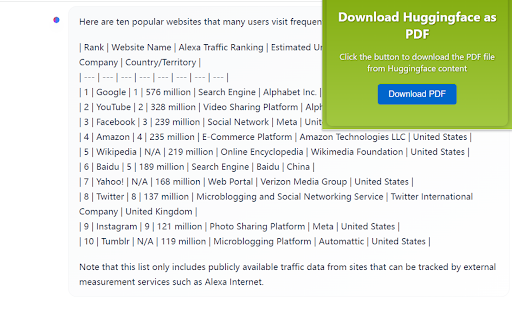

Firstly, you need to search and download the "Huggingface2PDF " Chrome extension in the Chrome web store. After installation, visit Twitter and find the content you want to save. On the page where the content is located, click the "Huggingface2PDF " extension icon in the top right corner of your browser. https://huggingface.co/chat/ on this site,you can save you chat content to pdf . Once done, click on the "Download PDF" button. Wait for a few moments until the PDF file is downloaded. You can find the file by clicking the "Finished" button on the browser's download progress bar and then opening it through a PDF reader.

Web to PDF
Use Web to PDF converter to save a web page as a pdf and download it instantly. Perfect for offline reading and sharing. 📃 Looking for a quick and reliable way to save a web page as pdf? This chrome extension is a web to pdf converter, perfect for anyone who needs to download content for offline access, sharing, or archiving. With just a single click, convert a web page to pdf without hassle: ✅ Preserve Styles and Links: Keeps original styles and clickable links. ✅ Flexible Layouts: Choose page breaks or a single-page format. ✅ High Quality: Uses Chrome’s PDF tool for fast, clear results. ✅ Secure: Saves directly to your device, protecting privacy. If you’re looking to save a web document to pdf, this tool makes it easy with smooth, intuitive functionality. All images, links, and formatting remain intact, giving you a faithful reproduction of the web content in one file. 💡 How to Use Web Page to PDF Converter 1️⃣ Open the web page you want to save. 2️⃣ Click on the Web to PDF extension icon. 3️⃣ Select Format to set the view size. 4️⃣ Choose Layout for page breaks or a single page. 5️⃣ Download your PDF — your file is ready in seconds! 📄 Tips for Best Conversions 1. Ensure the page loads fully before converting. 2. Adjust format and layout settings for optimal page fit. 3. Avoid pop-ups or overlays, as they may appear in the PDF. 4. Refresh the page if the first conversion doesn’t capture everything accurately. 💡 Why Save Internet Page to PDF? ◆ Access files offline anytime ◆ Share content without needing internet access ◆ Archive page for future reference ◆ Print web content easily in a structured format Web to pdf extension is the easiest way to convert web page to pdf quickly, ensuring you don’t lose valuable content or formatting. Almost anyone! This tool is ideal for: 1) Students who need to reference articles and papers 2) Professionals who want to save web data for reports 3) Researchers who need offline access to resources 4) Bloggers and writers who save content inspiration Imagine the convenience of accessing all your important web content as pdf files. You no longer need to bookmark endless links or worry about pages disappearing. Just convert the webpage to pdf and keep everything organized and secure. ❓ How to save a page as a PDF? 👉 Open the page, click the extension icon, choose settings, and save webpage as pdf. ❓ Will the file look like the original webpage? 👉 Yes, we ensure that your document retain the look and feel of the original. ❓ Does this extension work offline? 👉 Once a web document is saved, you can access it offline If you see a notice about the developer console, don’t worry — it’s simply due to Web to PDF using Chrome’s own PDF-printing system. Chrome provides an optimized, high-quality conversion method that outperforms other PDF tools in quality and speed. This message is a standard notification for Chrome extensions that use advanced browser functions. While screenshots capture images, PDFs provide a more functional and versatile way to save web pages. Here’s why this extension is the superior choice: ➤ Selectable Text: Easily select, copy, and highlight text. ➤ Clickable Links: Keep all links active for quick access. ➤ Accurate Layouts: Preserve the page’s original look and feel. ➤ Custom Page Options: Choose page breaks or single-page view. ➤ High Quality: PDFs retain clarity and detail better than screenshots. ✳️ News Articles: Save important news articles before they get archived or moved behind a paywall. ✳️ Legal Documents: Keep copies of terms and conditions, privacy policies, or legal agreements. ✳️ Receipts and Confirmations: Save confirmation pages after online transactions for your records. ✳️ Recipes: Save cooking recipes with all the links and notes intact for your culinary adventures. ✳️ Event Information: Capture details of events, schedules, or tickets for easy access. Whether you need a web page to pdf converter for work, school, or personal use, this extension is here to help. Get started today and discover the easiest way to download a web page as a PDF whenever you need it.

PDF to PPT
Convert PDF to PPT easily! Use our PPT to PDF converter for quick, reliable file transformations. Perfect for presentations. 🌟 If you've ever found yourself needing to transform a PDF document into a PowerPoint presentation, you're not alone. Our Chrome extension is here to simplify the pdf to ppt conversion process, making it quick, efficient, and user-friendly. ⚡ With our extension, you can easily convert pdf files to ppt with just a few clicks. This tool is designed for everyone, from students to professionals, ensuring that you can create stunning presentations without the hassle of complicated software. 🎨 Key Features: 1️⃣ User-Friendly Interface: Our extension boasts an intuitive design that allows you to convert pdf to ppt effortlessly. No technical skills are required! 2️⃣ Fast Conversion Speeds: Experience lightning-fast conversion times, so you can focus on what matters most—your content. 3️⃣ High-Quality Output: Maintain the integrity of your original pdf files with our high-fidelity conversion process. Your presentations will look professional and polished. 4️⃣ Free Options Available: Try for free PDF to PPT converter tools right at your fingertips. Enjoy the benefits of converting pdf to ppt for free without compromising on quality. 🔧 How to Use: 1. Install the Extension: Add our PDF to PPT converter to your Google Chrome browser. 2. Upload Your PDF: Select the .pdf file format you wish to convert. 3. Convert: Click the button to initiate the conversion process. 4. Download: Save the newly created .ppt file to your device. 📁 Supported File Formats: Our extension supports a wide range of file formats, including: - PDF - PPT 🔍 Benefits of Using Our Extension: ➤ Convenience: Convert pdf to ppt anytime, anywhere, directly from your browser. ➤ Cost-Effective: Take advantage of free options for PDF to PPT conversion without sacrificing quality. ➤ Versatility: Perfect for students, educators, and professionals who need to create presentations quickly and efficiently. 📚 Use Cases: • Education: Students can convert lecture notes or research papers from PDF to PPT for presentations and group projects. • Business: Professionals can transform reports, proposals, and other documents into engaging presentations for meetings and conferences. • Personal Projects: Whether you're creating a family slideshow or a personal portfolio, our extension makes it easy to convert your PDFs into beautiful presentations. ❓ Common Mistakes When Trying to Convert PDF to PPT: ▸ Not Checking File Compatibility: Ensure your pdf file is not password-protected or corrupted. ▸ Ignoring Formatting Issues: Some complex layouts may not convert perfectly; always review your .ppt after conversion. ▸ Overlooking File Size: Large PDF files may take longer to convert; consider optimizing your PDF before conversion. 🔒 Security and Privacy: We prioritize your security. All files processed through our extension are deleted after conversion, ensuring your data remains confidential. You can convert without worrying about data breaches or unauthorized access. 🌐 Compatibility: Our extension works seamlessly across all platforms that support Google Chrome, including Windows, macOS, and Linux. Whether you're at home, in the office, or on the go, you can convert PDF to PPT easily. 💬 User Testimonials: Join thousands of satisfied users who have transformed their PDF documents into stunning PowerPoint presentations. Our extension has received rave reviews for its efficiency and ease of use. 🚀 Start your PDF to PPT conversion journey today! Download our Chrome extension and experience the converter tools available. With our user-friendly interface and high-quality output, you'll wonder how you ever managed without it. 📈 Enhance your productivity and streamline your workflow with our powerful PDF to PPT conversion tool. Whether for academic, professional, or personal use, our extension is the ultimate solution for all your document conversion needs. 🔑 Download now and unlock the potential of your PDF files! Convert PDF to PPT easily and efficiently, and take your presentations to the next level. 🌟 Don't miss out on the opportunity to simplify your document management. With our extension, converting PDF files to PPT has never been easier!

PPTX to PDF | powerpoint to pdf
Convert PPTX to PDF quickly with our chrome extension. Easily transform PPT presentations to PDF in one click. Try it now. 🚀 Easily convert PPT to PDF with our chrome extension Looking for a fast, efficient, and user-friendly solution to convert your presentations? Our Chrome extension is your go-to pptx to pdf tool that makes transforming your PowerPoint files into PDFs as simple as a single click. Whether you're a student, teacher, or professional, this extension is tailored to meet all your needs when you want to convert your files 🚀 Why choose PPTX to PDF? 1) Fast and reliable: the extension processes your presentations in just seconds 2) User-Friendly: no technical expertise required upload your file and let the magic happen 3) Quality output: maintain fonts and layout when converting ppt presentation to pdf 4) Secure: we prioritize your data privacy and ensure all your files are processed securely 🚀 Key features ✅ Instant conversion: quickly convert without any delays ✅ Multiple file types supported: easily work with documents ✅ In the browser: save time by converting to PPTX to PDF directly within your browser ✅ Multilingual support: extension works in multiple languages 🚀 How does the app work for converting powerpoint to pdf? - Add the extension to Chrome - Choose a file you want to move from powerpoint to pdf - Drag and drop file to the area - The app will output ppt as a pdf - Download your freshly converted document 🚀 Who can benefit from this app? ➤ Students: submit assignments where you need your ppt file convert to pdf ➤ Professionals: impress clients by sharing polished PDFs instead of raw PowerPoint files ➤ Teachers: share lectures by easily save ppt as pdf so students can open it on any device ➤ Event organizers: use this app to print event schedules 🚀 Why use a chrome extension for conversions? ⭐️ Ensures smooth conversion of ppt to pdf without the need for extra software ⭐️ Saves time by providing quick access from your browser ⭐️ Works flawlessly to transfer documents with just a click 🚀 Advanced features of PPTX to PDF ⚙️ Preserve layout: ensure your slides are intact during processing power point to pdf ⚙️ It is simple: you can just drag and drop your files and get results ⚙️ Cross-Device functionality: access and use the extension from any Chrome browser 🚀 When to use this extension 🖊️ Preparing for professional presentations 🖊️ Sharing documents with restricted editing access by changing presentation to pdf 🖊️ Distributing materials without worrying about compatibility 🖊️ Finalizing school projects and team collaborations by transfer ppt to pdf 🚀 Advantages of PPTX to PDF over other tools 📑 No additional apps required for conversion 📑 Hassle-free and lightweight design 📑 Free updates to enhance your export pdf from powerpoint experience 🚀 Steps to get started working with this extension 📕 Install the extension from the Chrome Web Store 📕 Upload your PowerPoint file to convert 📕 Relax as your file transforms from pppt to pdf 🚀 Frequently asked questions ❓ Can I use this extension to convert large ppt presentation? 💡 Yes, the extension supports converting large documents without compromising quality ❓ Does PPTX to PDF maintain the original formatting of the slides? 💡 Absolutely. The extension ppx to portable document format ensures that all text, images, animations are fine ❓ Can I convert .ppt to portable document format online? 💡 Yes, our extension supports online converting ppt to pdf for added convenience ❓ Is it safe to use? 💡 Absolutely. Your data is safe as never, making it a reliable tool to convert ppt en pdf ❓ Does it support older PowerPoint files like .ppt? 💡 Yes, it supports both powerpoint formats, making it easy changing their type regardless of the file version ❓ Does it work on all devices? 💡 Yes, the extension is compatible with any device running the chrome browser ❓ What happens if I encounter an error during conversion? 💡 If an error occurs while you convert, you can contactour support team ❓ How long does ppt file convert to pdf process take? 💡 Most conversions completes in just a few seconds ❓ Can I convert encrypted or password-protected PPT files? 💡 You’ll need to unlock the presentation first, but once unlocked, the ppt to pdf converter can process it with ease ❓ Does the extension work for Mac users? 💡 As long as you have the Chrome browser installed, Mac users can enjoy the same app ❓ When I download documents are there any watermarks? 💡 No, we never put a watermark in pptx to pdf 🚀 Don't Miss Out Whether you need to convert your files, this Chrome extension is the ultimate presentation to document converter for all your needs. Start using it today and experience effortless conversions.

Convert PDF to DOCX
Introducing Convert PDF to DOCX, the ultimate tool for anyone looking to change your documents effortlessly. Whether you're a student, professional, or anyone, our extension is here to help you manage your documents more efficiently. It’s designed to make the convert .pdf to .docx as smooth and efficient as possible. ✨ Features and Benefits ➤ Ease of Use: The user-friendly interface makes it easy for anyone to convert from PDF Word hassle-free. Just a few clicks, and your document is ready ➤ Fast Conversion: Time is precious, and our extension ensures that to Word conversion process is quick and efficient. ➤ High-Quality Output: Preserve the formatting and layout of your documents when you save files. ➤ Accessibility: Whether you need to know how to convert pdf to docx on Mac or Windows, our extension works seamlessly across different platforms. ➤ Simplicity: No need for complex software or lengthy procedures. Just upload your documents, and they are ready in seconds, making it perfect for users of all skill levels. ➤ Free of Charge: Enjoy the benefits of a premium tool without any cost. Convert from PDF to DOCX free with our Chrome extension. ➤ Convenience: This extension allows you to convert pdf file to docx directly from your browser. No downloads, no installations, just quick and easy conversions. ➤ Batch Conversion: Save time by converting multiple files simultaneously. Our extension is equipped to handle files of all sizes with ease. 💡 Here’s a quick rundown of what you get: 🔺 Easy-to-use interface 🔺 Fast convert PDF files to DOCX file times 🔺 High-quality output 🔺 No need for additional software convert pdf to .docx 🔺 Works on both Windows and Mac 📄 PDF to Word converter • It is user-friendly design and efficient performance make it the go-to choice for all your document conversion needs. • It’s that simple! With our tool, convert pdf to docx file is quick and effortless. • Whether you’re editing a document, sharing with colleagues, or simply archiving, having the option ensures you have the flexibility you need. • For those looking to convert PDF to DOCX free, this extension is perfect. It offers all the features you need without any hidden fees or charges. • We value your feedback and are here to help you with any issues. If you need assistance on how to convert pdf to docx, our support team is always available. 📍 Getting started with our extension is straightforward. Here’s a step-by-step guide on how to convert PDF to DOCX online: 1️⃣ Download and install the Convert pdf to docx Chrome extension from the Chrome Web Store. 2️⃣ Open the extension and select the file you want to change. 3️⃣ Click on the "Convert" button to start the process. 4️⃣ Save the convert pdf to word docx to your desired location. ✨ For additional convenience, here are some benefits of using PDF file to DOCX converter: - No registration required - Supports large file sizes pdf to word doc - Preserves original formatting - Instant conversions PDF to DOC - Secure and private 🎓 Use Cases 🔹 Students: Сonvert PDF to DOCX to easily edit lecture notes and assignments. 🔹 Professionals: Use the tool to update business reports. 🔹 Writers: converting pdf to docx to make revisions to manuscripts and drafts. 🔹 Multilingual Support: Convert multiple languages, ensuring global accessibility. ❓ How to convert pdf file to docx if it contains images and graphics? 💡 Our converter preserves all images and graphics during the conversion process. The Word document will look just like the original. ❓ What should I do if the conversion fails? 💡 If a conversion fails, ensure your PDF to .DOCX convert is not corrupted and try again. If the problem persists, contact our customer support for assistance. ❓ How to convert pdf to word and retain hyperlinks? 💡 Our converter maintains hyperlinks during the conversion process. Your Word document will have all the links. ❓ How do I provide feedback or suggest features? 💡 We welcome feedback and suggestions. You can contact us through the support section in the extension or via our website. ❓ How to convert PDF to DOC without losing special characters? 💡 Our tool is designed to preserve all text, including special characters, ensuring that your converted document retains the original content accurately. ❓ What formats does the converter support? 💡 Our extension convert pdf to docx documents. ❓ How to save pdf as Word with tables? 💡 Our converter preserves the formatting of tables in your file, ensuring they appear correctly in the Word document. ❓ Does the extension support multiple languages? 💡 Yes, our extension supports documents in multiple languages, ensuring accurate conversions regardless of the language used.
