
nlejafdphaoialgmeabdbjhmbifdompb
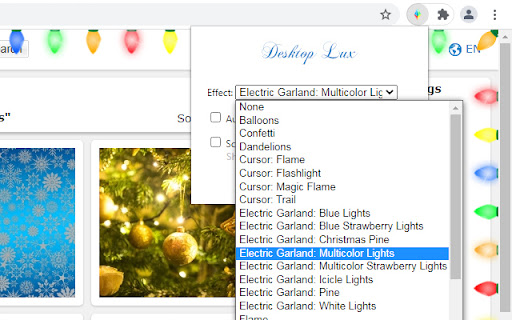


Customize your Web with stunning animations and effects. Desktop Lux: Effects is a one-of-a-kind browser extension that lets you super charge your web-surfing experience. It allows you to add various visual effects to any web page. Also, it can be used as a screen saver. Currently available effects, such as rain, leaf fall, snow, lightning, flame, smoke, electric garlands, confetti, fireworks, balloons, cursor effects and others. This extension is available free of charge, provided that it is periodically activated using a key, which you can always get (free of charge) on our website.

Laser Cat
Shoot laser at things you want to remove from the internet This extension adds a laser cat to your internet. Use the laser to zap things you want to remove! If you like cats and lasers you are going to LOVE this extension. == Here's how to use the extension == 🌍 Step 1: Go to a website 😺 Step 2: Click on the activate button 🌈 Step 3: Click on the page to shoot laser! This permission is needed for adding a laser cat to the website. Laser Cat **DOES NOT** collect any of your data or your browsing activity on any websites. As a privacy advocate myself, I prioritise your privacy above all. If you want to read the privacy policy and terms of service you can find it at my website https://lasercat.app#privacy == Feedback and bug reports == If you find a bug or are having issues please don't post your bug report here - contact me directly at hello@lasercat.app so I can fix it asap. If you like Laser Cat, please help spread the word by giving it a 5 star rating here or share it with your friends 😄 If you are not fully satisfied, please contact me at hello@lasercat.app and I'll make sure to help. I'm currently in the process of creating brand new characters. The long term idea is to create a lot of cute/funny characters with unique looks and feels. You can unlock all characters with a one-tome support or alternatively unlock them with points based on how long time you have used the extension. If you have some good ideas for new characters, feel free to throw me a message! If you want to learn more about my extension you can go to my website https://lasercat.app. Here you can read the privacy policy, terms of service and FAQ. I will keep improving Laser Cat! Stay tuned for updates in the future 👍

MemeBoard
Some lit clean memes in your browser! By installing MemeBoard, you will have access to over 200 awesome clean memes! Not only that, but MemeBoard comes with built in tools to spice it up, like speed, looping, favoriting and queueing capabilities. Updated every few weeks with great memes, MemeBoard is the clean meme sound board for you!

Instant Games
★★★★★ Access to some of the best casual games on 1 app 🎮 Play the latest games from top developers on a single app 🎯 no need to install each game individually 💻 Play over +100 HTMl5 games from a wide range of developers for FREE 🎲 We keep adding more/better games that you can play on your desktop/laptop computer 🎰 Join thousands of other players worwide and see your position in the rankings 💊 No need to install or clutter the computer with garbage, easy and clean 🏅 FEATURES ★ Only games that dont need WiFi – online games are now offline games 🎮 ★ Carefully selected – all games below 2MB 💻 ✔ Curated content – some of the best casual games 📰 ✔ Largest pool of casual games – 100+ games 🥊 ✔ New games each week – play without installing 🏈 💎 Building Apps and Extensions for Google Chrome and Android 🔥📣 📔 Available on the product page: https://jitt.wwevents.fun/project/instant-games/#changelog Instant Games is a partnership between WWEvents and Gamezop. All the content/games are responsability of Gamezop. This is an independent project developed by WWEvents and has no relationship to Gamezop. By installing this product you agree to our privacy policy & terms of service: https://jitt.wwevents.fun/privacy-policy/ You may consult the list of permissions and the reason why they are required on the product page: https://jitt.wwevents.fun/project/instant-games/#permissions “notifications” – Used to send desktop notification. For example when a new message arrive or App is updated. “contextMenus” – Allow to add more settings when right click in the App icon in the browser toolbar and browser context menu. “storage” – Used to save settings on your local computer. “scripting” – Used to be able to insert JS or CSS on the required host/domains. “system.display” – Used to detect the display size and position the Extension window. “unlimitedStorage” – Storage is limited to 5MB of data that may not be enough to store all configs. “host_permissions” – Permission to access to some hosts/domains that we must modify in order to provide the desired functionality detailed in the functionality. It also allows that you can share content (links or text) from other pages directly to inside the App and send it as a Chat message to a friend for example. Also used to allow intercommunication with other WWEvents Apps (i.e. Emojis). “activeTab” – Permission to access the window that the extension is running and is show to the user. “all_urls” – Permission required for users be able to take screenshots of the current window – captureVisibleTab. This information is also available inside the App: Options -> About

Explode the Web!
A browser extension that explodes web pages with third party trackers. Reload the page to reset it. See it in action here https://youtu.be/hZuIVJTz8N0
