
nlagohiloniblnbphoemmcogjbmdhdbh
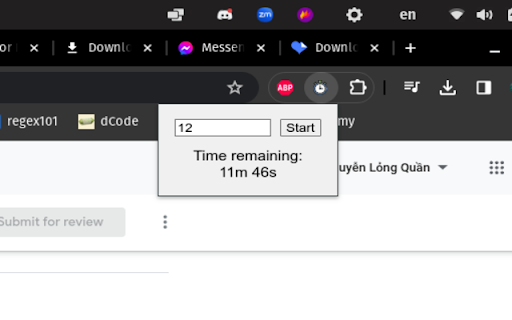
This is a simple timer tool. It allows users to set a timer for a specified number of minutes. The remaining time is displayed and… This is a simple timer tool. It allows users to set a timer for a specified number of minutes. The remaining time is displayed and updated every second in the popup window of the extension. When the timer reaches zero, a notification is displayed to the user.

Timer App
A Chrome Extension named Timer App - a versatile time clock app with a timer function, ideal for efficient time management. Introducing a versatile and efficient Google Chrome extension that revolutionizes time management and productivity - the ultimate companion for anyone seeking to enhance their daily routines. 🕒 👍 Our innovative Google Chrome extension - the ultimate solution for all your timing needs! Key Features: 1️⃣ Versatile Options: From workout sessions to study intervals, this extension covers all your timing needs seamlessly. 2️⃣ Customizable Settings: Tailor the timer app to suit your preferences with adjustable intervals and sounds. 3️⃣ Pomodoro Technique Integration: Boost your productivity using the renowned Pomodoro method effortlessly. 4️⃣ Time Tracking Tools: Effortlessly monitor your tasks and time usage for improved efficiency. How It Works: Simply add this extension to your Chrome browser and unlock a world of precise timing tools at your fingertips. Whether you need a countdown timer app for workouts, a study timer for focused learning sessions, or a pomodoro timer for enhanced productivity, this extension has you covered. 🧘♂️ Versatility at Its Best: ❶ Need to time your workout routines? This app offers a dedicated workout stopwatch feature to keep you on track with your fitness goals. ❷ Studying for exams? Utilize the study timer function to break down your study sessions into manageable blocks of time. ❸ Enhance your work efficiency with the Pomodoro technique integrated into this app, allowing you to work in focused intervals. Seamless Functionality: ➤ Set a timer for 25 minutes with just a click, following the Pomodoro technique effortlessly. ➤ Easily start, stop, or pause countdown with intuitive controls for a hassle-free experience. ➤ Access an online stopwatch feature for quick timing needs without any distractions. Time Management Made Easy: This extension isn't just about timepiece; it's about empowering you to take control of your time effectively. With features like clock countdowns, interval timers, and stopwatches, managing your day becomes simpler and structured. ⏳ Embrace Productivity: 1️⃣ Dive into deep work sessions using the focus timer feature that eliminates distractions and keeps you on track. 2️⃣ Seamlessly transition between tasks with the help of this app's efficient time tracking tools. Stay Organized: Utilize the contraction timer feature for specialized timing needs in various scenarios. Explore the chess timer functionality for strategic gameplay or competitive matches. Enhance Your Routine: 1. Incorporate the app's interval timer into your workouts for optimized training sessions. 2. Embrace the pomofocus technique to boost your concentration levels during work or study sessions. Conclusion: This is not just another app with an alarm clock; it's a comprehensive tool designed to elevate your timemanagement skills and boost productivity across various aspects of your life. Stay focused with this all-in-one time management solution. 💡 🕒 Whether you're looking for a versatile timer app, an app with timer functionalities, or specifically a countdown timer app, our extension has got you covered. With a sleek design and user-friendly interface, this tool is a must-have for professionals and enthusiasts alike. 💥 Featuring a variety of countdown options, from a workout timer app perfect for gym sessions to an interval timer app ideal for HIIT workouts, this extension caters to a wide range of activities. Need to track contractions during labor? Look no further - our contraction timer app functionality ensures you stay on top of important timings. 📌 The versatility of our app timer extension is unmatched, allowing to customize countdown to suit your specific needs. Stay organized and efficient in tasks with this handy tool at your fingertips. 📌 Stay motivated and on track with our intuitive interface that makes setting up reminders a breeze. Whether you're managing your workout routines, work intervals, or simply timing tasks throughout the day, our extension simplifies the process and enhances productivity. 📌 Never miss a beat with our reliable timer app that ensures precision timing. Say goodbye to manual tracking and let our extension handle the timing for you. Focus on your activities without worrying about keeping track of time - our app has got it all under control. 📌 Enhance your productivity and efficiency with the help of our feature-packed stopwatch extension. Utilize the countdown timer app function to create a sense of urgency and boost your workflow.

Simple Timer
Simple Timer provides a simple and intuitive way to allocate your time wisely. The Simple Timer is more than just a timer; it's a minimalist work of art that elegantly enhances your productivity without any pesky bugs to interrupt your flow. Designed with your visual comfort in mind, its eye-pleasing interface soothes as it counts down, ensuring you stay on track with tasks while enjoying the experience. Embrace the elegance of simplicity and elevate your work routine with the Simple Timer..

Visual Timer
A visual timer to help you focus on your current task. This timer is designed to help you be more productive by keeping your fingers on the keyboard. Click the extension icon from your browser to pop a new timer (or bring the existing one into the foreground). Then just type the number of minutes you want the timer to run for and hit Enter. The timer will start as a countdown, filling up as the timer runs so you'll know roughly how much time you have left without breaking your concentration. Once the timer completes, it begins flashing so you know it's complete. If you need to pause the timer, just select the timer popup and hit Space. Space again to resume. If you want to reset the timer (for the previously selected duration) just select the timer popup and hit "R" and it will start over. Cheatsheet for keyboard shortcuts: - 1-999 : Start a timer for that many minutes - R : Reset the timer - Space : Pause/resume the timer - ? : Toggle config mode (where you can set the background color, toggle the "ding") - T : Toggle task mode where you can list your tasks and start a timer for each - > (right angle bracket) : Mark current task done (delete it) and begin next task New in this version (1.5.0): * Removed default timer controls that show on hover (you can still toggle these back on) * Improved styling on settings and tasks view New in version 1.4.0 (Sep 12, 2025): * Gamification! Under settings you can opt in to setting a target number of minutes working on tasks (timers must be started from the tasks list) and track your streak. Feel the productivity points as you make a daily habit for spending at least an hour working on tasks. * More icons for those that aren't used to keyboard shortcuts: start/pause toggle icon, restart icon, task list icon Thanks to everyone who has commented on the Youtube instructional video to provide feedback and request new features!

Timer
It's a timer which starts it's countdown from 3 minutes default, else you can change the value by pausing the timer and clicking on the digits and enter the value of your choice. This application was built with the help Colt Steele's course The Modern Javascript Bootcamp Course (2022). This extension needs improvements which will be added over the time. Your feedback is highly appreciated. Thanks for reading!!
