
nkooglllfhhddiilbcefcfibeidecfei
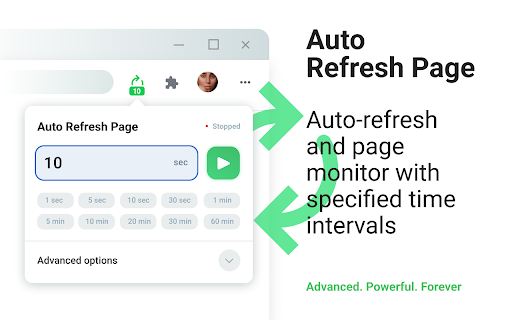


Refresh web pages automatically. Auto-refresh and page monitor with specified time intervals. Auto Refresh Page is a convenient and powerful auto refresh chrome extension, specifically designed to automatically refresh and reload any web page or tab after a specified time interval. Simply enter the desired number of seconds for auto refresh chrome and click "Start." This auto refresh extension is perfect for users who need to automate page refreshes based on fully customizable settings. - Timed Refresh: Pages reload at a specified time interval. - Randomized Intervals: Pages reload using a random time interval. - Scheduled Reloads: Pages refresh at specific, set times (e.g., 09:00, 18:20, 9:30pm). - Bulk Tab Refresh: Refresh all open browser tabs at once. - List Updating: URLs are updated automatically based on a predefined list. - Domain-Wide Reload: Common domain name pages refresh automatically. - Keyword Detection: Search for keywords or regular expressions when using the auto refresh extension. - Action Automation: Auto-clicking buttons or links during a refresh extension cycle. - Script Execution: Run script — execute custom JavaScript code when pages refresh to perform custom actions. 1) Enter the desired time interval in seconds or choose from preset options, then click "Start." 2) To stop the refresh, click the "Stop" button. 3) For additional settings, open the "Advanced options" dropdown, select your preferences, and click "Start." - Clear cache on every automatic page refresh - Search for text on automatically updated pages - Display notifications - Saving the selected parameters on the page - Automatic clicking on a button or link during a refresh extension - Display of update counter, time of last and next update - Run script — execute custom JavaScript code on auto refresh chrome extension We do not collect, store, or share any personal data from our users. Auto Refresh Page operates entirely locally on your device, ensuring your privacy and data security. All our practices are in full compliance with webstore policies, offering you a safe and reliable browsing experience.

Auto Refresh & Page Monitor
Refresh pages automatically. Auto refresh and page monitor with specified time intervals. Reload all tabs. Auto Refresh is a browser extension that automatically refreshes and reloads any page or tab after a specified number of seconds. Just enter the number of seconds between page refreshes and click the "Start" button. The best thing about this page renovate extension is that there is no setup required - it is easy and simple to use, install it and let your idle pages be auto reloaded. Just choose the time you want Page refresh will do its magic. Save unlimited manual preferences per domain or web page. Default time intervals in 5 Sec, 10 Sec, 15 Sec, 5 Min, 10 Min, and 15 Min. Set auto refresh in seconds, minutes, and hours. Single click anywhere on the webpage to stop auto-reload. Display a visual timer on the webpage. Hard refresh to clear cache & cookies Advanced options for automatic page refresh: - Clear cache on every automatic page refresh - Search for text on automatically updated pages - Display notifications - Saving the selected parameters on the page - Automatic clicking on a button or link on page refresh - Display of update counter, time of last and next update Auto Refresh Page Plus comes in handy to any user who needs to perform automatic web page refresh at certain times efficiently. It also provides content detection support, which is useful when monitoring content included in a dynamic web page. Page Monitor This powerful feature allows you to monitor a webpage and look for any changes in it. You can monitor your changes in the web page's visual or source code. You can monitor website changes in three ways. Why are you need this refresh page? - In time interval, there are two types current and manual. Both types work the same. You can add multiple web pages in the manual and allow all features. - You can select the time by simply clicking the timer's checkbox and manually setting the hour, minute, or second to auto-refresh any pages. - If you want to stop the auto-refresh after X numbers like 05, 10, or 15 refreshes, you can do this with the Auto Refresh extension. - Check the visual time when your web page will refresh by setting a visual timer for any web page. - A hard refresh clears your webpage cache data. The Auto refresh list shows all webpages list you have set for the Tab Auto Refresh. Also, you can pause or start any webpage refresh directly through auto refresh list features. If what you want an extension that automatically reloads and refreshes web pages in the simplest way, this is what you need.

Auto Refresh
Auto Reload Chrome – Effortless Tab & Page Auto Refresh Extension Tired of constantly hitting the F5 key to catch an update, a price drop, or a live score? Manually refreshing pages is a tedious task that breaks your focus and wastes valuable time. It's time to automate the mundane and let technology work for you. Welcome to auto refresh, the simple, reliable, and efficient solution for keeping your web pages current without lifting a finger. The auto refresh chrome extension is designed with a single purpose in mind: to provide a seamless and customizable page refresh experience. Whether you're monitoring a fast-changing stock market page, waiting for a product to come back in stock, or keeping an eye on a live news feed, our tool ensures you have the latest information exactly when you need it. Set your desired time interval, and let our extension handle the rest. This powerful auto refresher is built to be lightweight and unobtrusive, running quietly in the background without slowing down your browsing experience. We believe that powerful tools should also be easy to use. That's why we've focused on creating an incredibly simple user interface that lets you start or stop the refresh automatic process with just a couple of clicks. No complex menus, no confusing settings—just straightforward functionality. Key Features You'll Appreciate Our extension is packed with features designed for convenience and control. We've listened to users and built a tool that addresses the core needs of anyone who requires an easy auto refresh solution. ✅ Precise Countdown Timers Set any custom refresh interval, from a few seconds to several hours. You have complete control over how often a page will automatically refresh. ✅ Simple Start/Stop Interface A clean, intuitive popup menu allows you to set your timer and start the countdown in seconds. Stopping the process is just as easy. ✅ Visual Timer on Tab Icon Quickly see the remaining time until the next refresh directly on the extension's icon in your toolbar. No need to open the tab to know when it will reload. ✅ Works on Any Website From dynamic social media feeds to static monitoring dashboards, auto refresh is compatible with virtually any web page you need to keep updated. 🎯Unlock Your Productivity: Popular Use Cases Wondering how a tab auto reloader can fit into your workflow? Here are just a few ways our users are leveraging its power: 📈 Live Monitoring: Keep a close watch on stock prices, cryptocurrency markets, sports scores, and breaking news feeds without manual intervention. 📰 Online Shopping & Auctions: Gain an edge during flash sales, limited-edition product drops, or online auctions by ensuring the page is always current. 💻 Web Development: Instantly see the results of your CSS or JS changes without having to switch tabs and manually reload the page. 📊 Online Queues & Appointments: Hold your spot in a virtual waiting room for concert tickets, government services, or appointments without worrying about the page timing out. 🎟️ Data Monitoring: Perfect for dashboards from Google Analytics, social media platforms, or any other service where you need to track metrics in real-time. - Navigate to the browser tab you want to automatically reload. - Click the auto refresh icon in your Chrome toolbar to open the control panel. - Enter your desired refresh interval (in seconds) and click the "Start" button. - That's it! The extension will now begin the countdown and reload the page at your specified interval. The icon will display the time remaining, and you can stop the process at any time by clicking "Stop" in the same menu. 🤔 Frequently Asked Questions (FAQ) We've compiled answers to some common questions to help you get the most out of this smart auto refresh tool. Q: Can I set different refresh timers for different tabs? A: Absolutely. Each chrome page auto refresh setting is managed independently per tab, giving you the flexibility to run multiple timers at once. Q: Does the extension work if the tab is in the background? A: Yes, it works perfectly on both active and background tabs, so you can continue your work in other tabs with confidence. Q: Will this auto reload chrome extension slow down my computer? A: We have meticulously engineered auto refresh to be extremely lightweight and efficient. It consumes minimal system resources, ensuring your browsing remains fast and smooth. Your Privacy Matters Your trust is our priority. The auto refresh extension is designed to respect your privacy completely. 🔒It does not track your browsing history. It does not collect or store any personal data. It operates entirely within your browser locally. The extension only requires the basic permissions needed to perform its core function: reloading a page on your command. Nothing more. Ready to Stop Hitting F5? Reclaim your time and streamline your online activities. Stop worrying about missing critical updates and let our extension do the heavy lifting. Whether for work, shopping, or staying informed, this is the auto reload tool you can count on. Install auto refresh today and experience a smarter, more efficient way to browse the web. We are committed to continuous improvement and welcome your feedback to make the tool even better.

Page Auto Refresh
Page Auto Refresh: Auto-refresh and auto-reload pages after any number of seconds Auto-Refresh and Auto-Reload Pages After a Set Time Interval Automatically refresh web pages after a specified number of seconds. Key Features: - Refresh pages at customizable intervals. - Set unique refresh delays for each page or tab. - Save preferences individually for each web page URL. - Retain your web page’s scroll position across reloads. - Simply input the number of seconds between reloads and click "Start." You can set different refresh intervals per tab. Preferences are saved automatically based on the web page’s URL. The countdown pauses while you're typing. To stop auto-refresh, simply click "Stop." Premium Features (Unlock with Page Auto Refresh Registration): - Save settings per individual web page URL or website domain. - Enable random countdown intervals. - Schedule refreshes for specific times of the day. - Reload all open tabs within the window simultaneously. - Automatically click buttons, links, or elements on the page. - Navigate to a URL from a predefined list at each refresh interval. - Receive notifications and play sounds when specific text is found on the page. - Display the time of the last and next scheduled refresh. - Option to clear browser cache. - Access to future updates and feature enhancements. ----------- Let me know if you'd like to adjust anything further!

Auto Refresh Plus
Auto Refresh Plus automatically refresh and reload any page or tab after a specified number of seconds Auto Refresh Chrome Extension: This browser extension allows users to refresh a webpage automatically at specified intervals. It helps to save time and stay updated with dynamic content without manual intervention. The user can set the refresh frequency and customize the extension as per their requirements. The extension has a user-friendly interface and is easy to use. It can help improve productivity and efficiency while browsing the web. Enhance your workflow and increase productivity with this top-ranked, easy-to-use Auto Refresh Extension for Google Chrome. Improve your web browsing experience and stay up to date with dynamic content without the need for manual intervention. How it Works: 1. Open the popup and enter the time interval, at which the page has to refresh. 2. Then start the auto refresh. 3. Now the page refreshes at the entered time interval, until you stop or close the page. **We only collect the bare minimum of data required to give you the best user experience. Your data will be only used for optimizing functionality and will not be shared with third parties. Checkout our privacy policy to learn more. IMPORTANT: We do not collect any personally identifiable information**
