
nkjjeflhoklnjfhaigjimdcmapdkhmkf
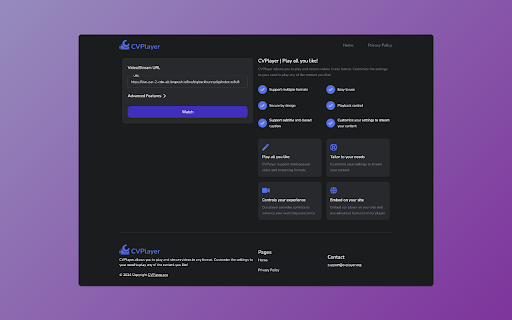

CVPlayer is a robust and flexible Chrome extension that allows you to play a variety of online video formats, including HLS, MPEG-DASH, MP4, M3U8, and others. Developed using Plyr, this player offers features like speed and volume control, picture-in-picture mode, and full-screen mode. The extension comes with a host of advanced features that allow you to enjoy content from any source. These include the ability to add or set request and response headers, and the use of our thoroughly tested templates to build request/response headers. You can also embed our web player, available at our website, into your own sites to enjoy all the advanced features, provided the extension is installed. CVPlayer enhances your online video viewing experience, allowing you to watch videos in any format from any website seamlessly. For more information, visit our website.

M3U8 Auto Player
This extensions helps the user to play the .m3u8 files and data. It handles redirects as well. 1.0.3 -- Fixed the non .ts redirects

Mi Video - Video Player
A simple video player extension inspired by Mi Video Player Mi Video - Video Player for Chrome Mi Video is a sleek, intuitive video player extension for Chrome that brings the popular Mi Video Player experience directly to your browser. This lightweight extension allows you to enjoy your favorite videos with a familiar and user-friendly interface inspired by the popular mobile app. Experience Your Videos Anywhere Mi Video for Chrome transforms how you watch videos on your computer. With its elegant orange-themed interface and intuitive controls, you can easily manage and enjoy your personal video collection right from your browser. Features That Delight Beautiful, Intuitive Interface - Enjoy the same clean design and smooth experience that made the Mi Video app popular on millions of devices Smart Organization - Browse your collection through convenient tabs: All, Recent, and Favorites Quick Navigation - Find exactly what you want with the built-in search functionality Playback Controls - Enjoy a full-featured video player with all the controls you need Favorites System - Mark videos you love for easy access later Fast Performance - Lightweight design ensures smooth playback without slowing down your browser Why Choose Mi Video? Unlike other video players, Mi Video combines beautiful design with powerful functionality. The familiar interface makes it easy to pick up and use right away, while powerful features ensure you get the most from your video collection. Whether you're watching tutorials, home videos, or entertainment content, Mi Video provides the perfect viewing experience right in your browser. Get Started in Seconds Simply click the Mi Video icon in your Chrome toolbar, add your videos, and start enjoying a premium video experience today. No complicated setup or technical knowledge required!

MOE:Viewer - Manifest Redirect
MOE:Viewer redirect and prefill for any paths with 'M3U8' - including query params. Click the extension badge to toggle modes. This extension will redirect any URL that contains 'M3U8' - including query params- into MOE:Viewer and prefills the original URL to be loaded and tested. Click the extension badge to toggle OFF/ON/AUTO/QURY. AUTO will automatically load the target URL in MOE:Viewer without further user input. QURY can be used if you have query strings and want to ignore them - it currently requires the url/string has a '?' in it (this will be improved in the future). MOE:Viewer will be loaded with either HTTP or HTTPS based on the M3U8 protocol.

OUI9 HLS PLAYER M3U8
The OUI9 HLS Player M3U8 is a versatile Chrome extension designed to enhance your online video streaming experience. OUI9 HLS Player M3U8 – Advanced Player with Custom Headers Struggling to play HLS (m3u8) video links? Need a powerful tool to test and debug video streams? OUI9 HLS Player M3U8 is the ultimate solution. Designed to deliver smooth, reliable video playback directly in your Chrome browser, this extension offers unique features for developers and advanced users. Universal HLS Playback: Play any .m3u8 link effortlessly, even if your browser doesn’t natively support it. The extension automatically detects HLS links and opens them in a built-in video player. ✨ Custom HTTP Headers (NEW!): Set custom HTTP headers (Referer, User-Agent, Origin, Cookie, Authorization) for each video individually. How it works: Append headers to the video link like this: video_link#referer=...#ua=... Why it’s useful: Perfect for bypassing header-based restrictions, testing stream security, and accessing content that requires special authentication—without affecting your regular browsing. Automatic CORS Handling: Automatically adjusts CORS headers to allow videos from any domain, resolving common playback issues caused by the Same-Origin Policy. Isolated & Secure Playback: Each video runs in its own tab with its custom headers applied, ensuring no interference with other tabs and protecting your privacy. Simple & Intuitive Interface: Focus on smooth video playback with a clean, user-friendly design. Who is it for? Developers & QA testers: Debug HLS streams and test server configurations. Advanced users: Gain full control over video requests and access restricted content. Install OUI9 HLS Player M3U8 today and take complete control of your video streaming experience!
