
nkhniebockeoppojmcbcgphpmpdladgo


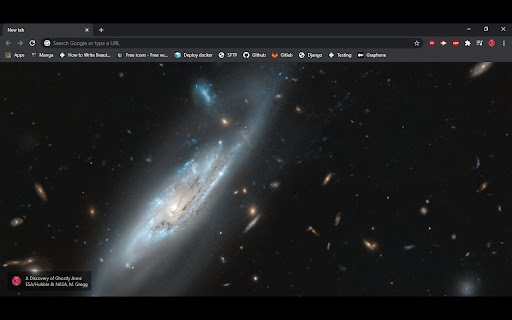

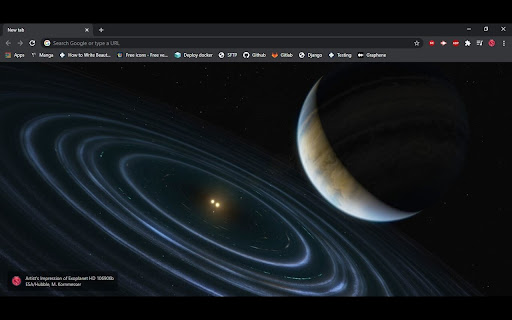
Enjoy the beautiful images from the ESA/Hubble Space Telescope Top 100 images collection. This extension takes a random image from our collection of 100 best images and renders it when the user opens a new browser tab. In the lower left corner the logo of our official site is displayed next to the title and image credit.

NASA Picture of the Day - New Tab
Replace new tab with a random NASA Astronomy Picture of the Day Open a new tab and see a random NASA picture of the day! When you open a new tab, you will be greeted with a picture from NASA's Picture of the day archive on a randomly chosen date. The title of the image along with the date it was chosen as the Picture of the Day will appear in the top left and a description provided by NASA will be in the bottom right. You can also choose to view the HD version of the image by clicking the "Open HD Image" in the top left. Versions: 0.2: - Added icons 0.2.1: - Added copyright to image if image isn't public domain - Fixed Small tile image and added Large tile image - Added more screenshots 0.2.2 - Updated Screenshots - WIP: adding download button for the HD image

MalExt Sentry - Malicious Extension Scanner
Scans your extensions against a live malicious extension database and flags dangerous permissions - with explanations. MalExt Sentry - Malicious Extension Scanner Your personal guard against harmful Chrome extensions. MalExt Sentry automatically scans every extension installed in your browser against a continuously updated, open-source database of known malicious and removed extensions. If a threat is detected, you get an instant alert with a one-click uninstall. What it checks for: Known malicious extensions - cross-references your installed extensions against a live database of extensions that have been flagged or removed from the Chrome Web Store for harmful behavior. The database is actively maintained and pulled directly from GitHub. Dangerous permissions - flags extensions that hold unusually powerful permissions, with plain-English explanations of what each one actually means. Permissions it watches for include: Script injection (can run code on any page you visit) Cookie access (can read your login sessions) Clipboard reading (can silently read what you copy) Full page control, traffic interception, system access, and more Permission changes - alerts you if an extension silently gains new dangerous permissions after an update, so you are never caught off-guard by a trusted tool going rogue. Scans against a live, open-source threat database hosted on GitHub Automatic background scan every 6 hours - Instant alert when a newly installed extension matches a known threat - Permission explanations with no technical jargon - Trust system: mark any extension as trusted to permanently silence alerts for it - Auto re-flags trusted extensions if their permissions change after an update - Export scan report to clipboard for sharing or logging - Manual rescan with one click - Privacy first Runs entirely on your device. The only network request is a one-way download of the public threat database from GitHub. No data about you, your extensions, or your browsing is ever collected, transmitted, or stored outside your own browser. Open source and actively maintained. Built for security-conscious users who want to know exactly what is running in their browser. Note on the "management" permission: MalExt Sentry requires this permission solely to read your list of installed extensions. It cannot install, modify, or remove extensions without your explicit confirmation.

NASA Acronyms
Select a NASA acronym to expand it. This is a tool containing over 10,000 acronyms. Joel Malissa & Logan Stafman

Spatium
Beautiful space images and information of your current sky map location on every new tab. 🌌 Space Images. 🌌 • Get a breathtaking space image every day. Stars, planets, nebulae, galaxies, and more—beautiful and distraction-free. • Top quality, carefully curated visuals that look great on any screen. 📜 Inspire Yourself Daily. 📜 • One short quote each day to keep you clear-headed and motivated. ☀️ Sun Widget. ☀️ • Sunrise, sunset, first and last light at your location. Plus clear countdowns to your next event. 🌙 Moon Widget. 🌙 • Live moon phase, illumination %, and countdowns to New Moon, First Quarter, Full Moon, and Last Quarter. 🧩 Customizable Interface. 🧩 • Choose which widgets you see and how they appear. Your new tab, your way. • Toggle details on/off to keep the focus you want. ℹ️ Rich Image Details & Feedback. ℹ️ • See titles, sources, and context for each image. • Like or dislike images to help surface the best of space for everyone. ⏱️ Pomodoro Timer. ⏱️ • Focus in short, sticky sessions with quick breaks—built right into your new tab. 🖼️ Update Background Anytime. 🖼️ • Pick fresh daily images on demand to keep your workspace inspiring. ⏭️ Skip Any Image. ⏭️ • Don’t love today’s view? Skip it instantly for a new one. ✨ Always Getting Better. ✨ • New features roll out as soon as they’re ready. Your Spatium keeps improving on its own. 📍 Location. 📍 • Used only to automatically calculate accurate sun and moon times at your location. 📌 Most Visited Sites (optional). 📌 • If enabled, tiles are generated locally. We never collect your browsing history. We respect your privacy.
