
nkedbnokglppcmiencngilkkhhnpcfjb
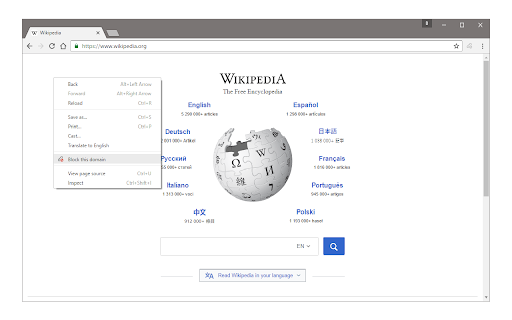

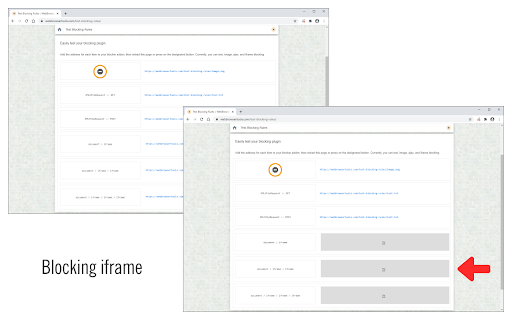

Easily block websites of your choice! Block Site is a browser extension to help you block desired websites (domains). To work with this addon, simply right-click on any webpage and then click on the "Block this website" via the context-menu item. The website's domain address will be added to the block list (see options page). Please note, the whole domain will be added to the block list, not just a URL. To change this list, open the options page, remove the desired item, or add a new one. For any blocked domain, you can add a redirect URL on the options page. To do so, please first add a domain to the blocked list, and then add a redirect URL in the second column (as shown in the last screenshot). Now, instead of blocking a domain, the website will be redirected to the redirect URL. There is also an option to block desired iframes. To do so, please add the URL (for the iframe) in the designated area on the options page (top section). To report bugs, please visit the addon's homepage (https://mybrowseraddon.com/block-site.html) and fill out the bug report form.

Web Blocker
Block unlimited website for free Boost productivity and performance by blocking distracting websites. Update / Bug fixed: Nov. 16, 2022 (v2.1.1) - Fixed bug sites are not blocking after clearing all the blocked sites. For questions and suggestions please email us web.blocker.business@gmail.com

FocusShield Site Blocker
Site Blocker for Productivity, Parental Control, and Addiction Management: Protect Your Online Access with FocusShield FocusShield is a powerful browser extension that helps you take control of your online access and boost your productivity. With its password-protect feature, you can easily block access to distracting websites, inappropriate content, and time-wasting online services, making it an ideal tool for: - Parents who want to protect their children from harmful online content - Employers who want to maximize their employees' productivity by blocking distracting websites during work hours - Students who want to minimize distractions and focus on their studies - Individuals who struggle with online addiction and want to limit their access to certain websites - Privacy-conscious users who want to protect their sensitive data from prying eyes Some of the key features of FocusShield include: - Password-protect: Set up a password (PIN code) to block access to specific websites or online services, ensuring that only authorized users can access them. - The flexible timetable feature of FocusShield allows you to set a schedule for when access to certain websites or online services is password-protected. This feature is useful for employers, parents, and students who want to customize their level of protection based on specific time periods. Overall, FocusShield is a versatile and easy-to-use site blocker that can help you achieve your goals and take control of your online habits. Whether you're a parent, employer, student, or individual user, it's a valuable tool for managing your online access and staying focused and productive.

Block Site Ex
Block Site Ex - website blocker. Set up a PIN code and flexible schedule. Block Site Ex allows you to set up scheduled browser-wide site blocking. Features: 🔺 Block web site with a four-digit numeric PIN code 🔺 Flexible Schedule 🔺 The settings are also protected by a PIN code Note: only for personal use. Any tech-savvy person can easily "hack" the tool. How to use: You can enable blocking on a website via the toolbar icon. Find the "Block Site Ex" toolbar icon under the puzzle icon in the browser toolbar.

URL Block
This extension is open source on Github: https://github.com/ygweric/chrome-url-block 2024-4-15: Support regular expressions (Regex) 2024-3-25: Can pause blocking for a while 2024-3-08: New UI and more feature, you can block web by domain or the URL address ------------- Block URLs you don't want to open. For example, you can't stop to open some webs like "facebook.com", "twitter.com" while you are working. You want to concentrate on work, but those webs are really so interesting. "URL Block" is a really good choice for you. I have the same trouble, so I create this extension. Hope it is good for you too. Plz let me know if you have some trouble or advice.
