
nkdicobabedjmonjeejijjekbgakknea
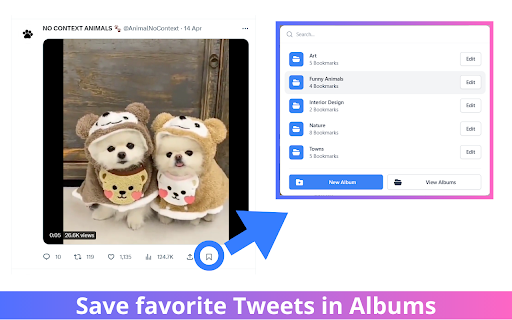
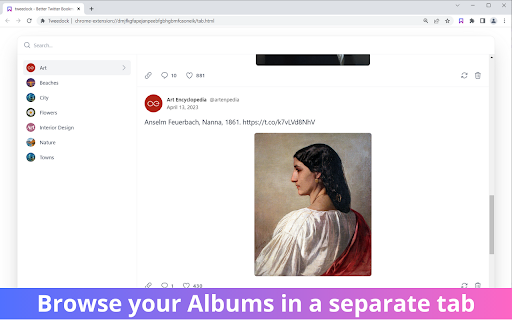

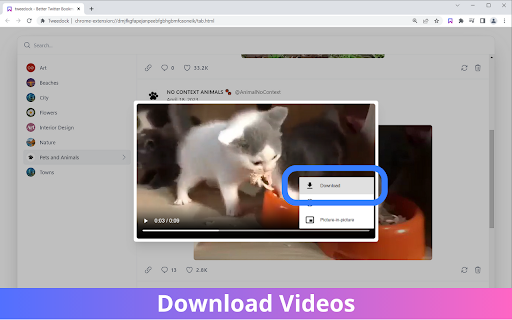
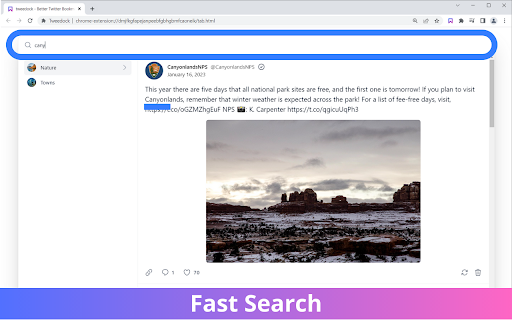
It may be possible to fix Tweedock, but we are waiting for things to settle, as over the last 6 months, whenever we'd fix something it would be broken again in a few days. We will provide more updates here. Thanks for your patience. # Changelog * v2.2: tweets failing data fetch are now shown as such. Hitting refresh may help restoring data * v2.1: fixed button to show again after the latest changes to Twitter * NEW in v2.0: you can now publish and share your albums! * v1.2: several improvements to the tab page * v1.0: initial release # Description Welcome to Tweedock, the ultimate tool for bookmarking tweets on Twitter! Are you tired of losing track of the tweets you want to save for later? Our extension makes it easy to bookmark and organize your favorite tweets, so you never have to scroll endlessly through your feed again. • Quick and easy to use: Our extension adds a bookmark icon to each tweet, so you can save it with just one click without leaving the Twitter platform. • Albums: Our extension allows you to create albums to organize and save your favorite tweets. • Media downloads: You can download media such as videos from tweets directly to your device with just one click. • Fast search: Our extension includes a powerful search feature, so you can quickly find any bookmarked tweet using keywords, tags, or other filters. • Free to use: The application is free to download and use, with no hidden fees or subscriptions required. Our extension is perfect for anyone who wants to save and organize tweets for later reading, research, or inspiration. It's great for students, researchers, journalists, social media managers, and anyone else who spends time on Twitter. So why wait? Try our extension today and take your Twitter bookmarking game to the next level!

BBBookmarks
Transform how you manage your X (formerly Twitter) bookmarks with this powerful Chrome extension. Export your bookmarked tweets… Transform how you manage your X (formerly Twitter) bookmarks with this powerful Chrome extension. Export your bookmarked tweets directly to bbbookmarks.com, where you can organize, categorize, and access them more effectively. Key Features Automatic sync between X and bbbookmarks.com Automatic bookmark categorization Custom tagging system Full text search across your bookmarked tweets Offline access to your saved content Bulk import/export capabilities Smart folders and collections Cross-platform synchronization Install the extension Check that you are already logged in or if necessary log in on X (formerly Twitter) Sign in to your bbbookmarks.com account Your bookmarks will sync automatically Use our search engine or just take a look at our new visual approach to find those missing boookmarks Perfect For No data stored on our servers Direct sync between X and bbbookmarks.com Secure OAuth authentication Your bookmarks remain private and secure Support Need help? Contact us at support@bbbookmarks.com or visit our help center for guides and troubleshooting. Store Keywords twitter bookmarks, x bookmarks, bookmark manager, social media organizer, tweet saver, digital curation, bookmark sync, twitter tools, social media tools, productivity

Export Twitter Bookmarks
1-Click export for ALL your twitter bookmarks Ever needed to export all your Twitter bookmarks for backup, research, or to share them with someone else? OneClick Twitter Bookmarks Exporter is the perfect Chrome extension for you! With just a single click, our extension allows you to conveniently export all your Twitter bookmarks [1] into a user-friendly format. No more manual copying or time-consuming processes. It's simple, efficient, and perfect for Twitter power users, researchers, and anyone who wants a quick and easy way to save their favorite Twitter content. 1-Click Export: With a simple click, export all your Twitter bookmarks instantly. Save time and effort with our streamlined process. User-Friendly Format: Your bookmarks are exported in a format that is easy to read, share, and use for further analysis or archiving. Easy to Use: Just install and you're good to go! Experience a new level of convenience when managing your Twitter bookmarks with OneClick Twitter Bookmarks Exporter! Notice: - [1] A paid upgrade might be required if the exported amount exceed a certain limit

Twitter Bookmarks Search Pro
Search ALL your twitter / X.com bookmarks with ease. You've bookmarked all the stuff on X.com / Twitter but failed to find it? We've provided a simple solution for you. With a single click, we will download all your bookmarks locally to allow you to do full text search within your twitter bookmarks.

X-mark Manager
A Chrome extension to manage X (twitter) bookmarks with categories and tags. # Chrome Bookmark Extension The Chrome Bookmark Extension is a simple yet powerful tool designed to help users manage their bookmarks efficiently. With features that allow users to organize bookmarks into folders and tags, this extension enhances the bookmarking experience in Google Chrome. Whether you're a casual browser or a power user, this extension provides a streamlined way to keep your bookmarks organized and easily accessible. - **Bookmark Management**: Easily add, edit, and delete bookmarks. - **Tagging System**: Organize bookmarks using tags for better categorization. - **Shortcut Support**: Use keyboard shortcuts to quickly bookmark the current page. 1. **Adding a Bookmark**: - Use the keyboard shortcut (default: `Command+E` on Mac or `Ctrl+E` on Windows) to open the bookmark dialog. - Fill in the details such as title, URL, author, and tags. - Click "Save" to add the bookmark to your collection. 2. **Managing Bookmarks**: - Access your bookmarks through the extension's popup. - Edit or delete bookmarks as needed. - Organize bookmarks into categories and apply tags for easy retrieval. 3. **Deleting a Bookmark**: - In the bookmarks list, click the delete icon next to the bookmark you wish to remove.
