
njpjlabehnoepgbbnnkokeadmcgmeoif
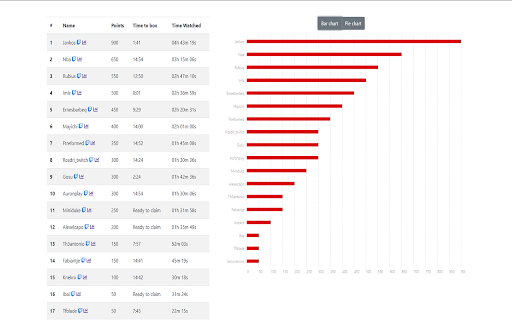

An extension who clicks on every twitch loot and gets you reports about it It's simple, whenever a twitch lootbox is avaliable this extension will click it for you. 🚀 Stats page ⭐️ Points colected with the extension ⭐️ Time left to the next loot box to be avaliable ⭐️ Time spent watching a specific streamer ⭐️ Reset the stats everytime you want ⭐️ Bar chart ⭐️ Pie chart

Twitch Channel Points Auto Clicker
Auto clicks the Channel Points bonus chest for you, so you can watch streams in peace. Auto clicks the Channel Points bonus chest for you, so you can watch streams in peace. Make sure to refresh Twitch after installing the extension.

Twitch Live Extension
A browser extension that lists your live followed streamers and sends notifications when they start a new stream To start using it, open it, log in with your Twitch account so that the extension has access only to your public information and your follows, and, every time you click on the extension icon, you will see the streamers that you follow that are live. This extension supports *Just Went Live* notifications. If you want to enable them, open the extension, go to *Settings* and enable the Just Went Live notifications. There's also a button to log out from your Twitch account. Special thanks to everyone that helped test this extension: https://github.com/PedroS11/twitch-live-extension#contribution

Twitch gift auto clicker
Auto click to claim +50 bonus channel points. The dotted stroke and an eyes emoji in the corner of the block with channel points indicates that the extension has started tracking points and will automatically click on a gift when it appears. Source code and bug tracker https://github.com/NekitCorp/twitch-gift-auto-clicker

Twitch Auto Points
Automatically finds the bonus point button on the website and clicks it for you. - NEW: the extension icon now shows the amount of points it collected for the channel you opened in your tab - Works in multiple tabs and windows at the same time. - Optimised for performance - Only works on twitch websites and gets automatically disabled on other websites - No data collection whatsoever - Works in moderator view - Updated to work with the new twitch UI
