
njnnbglfjjljakkacbhjnhbdajpaiiad
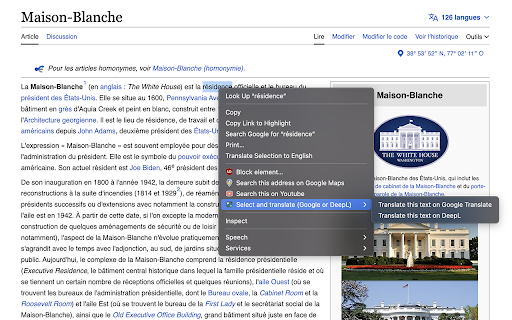
Select a text, right click and translate it on Google Translate or DeepL. Directly translate text found on a website with 2 clicks. This extension will add a button when you select and right click on a text. This button will ask if you want to translate on Google Translate or DeepL the text you selected. No need to copy/paste and waste time.

Translator - translation of selected text
Translate selected text with Google Translate Translate selected text with Google Translate on any webpage. - Select-and-translate: highlight text and click the button to get a translation - Quick pop-up translation via keyboard shortcut or browser-bar button - Support for 100+ languages and alternative translations - Dictionary: definitions and examples for single words or phrases - One-click reverse translation, plus history with quick navigation - Text-to-speech with selectable voices (if supported by browser) - Light and dark themes

DeepL Переводчик
An Assistant to Translate Selected Texts with DeepL Translator DeepL is an assistant extension for DeepL. Features: 1. One click translation. 2. Option to disable the icon popup. 3. Only EN-RU and RU-EN (full support). 4. All language -> Russia The extension requires access to all sites in order to present the icon inside every webpage. You can disable this feature from the settings. * This extension or the developer is not affiliated with DeepL. I wanted to make this mainly for myself.

DeepL Box: Translation history management
Save previous translations, show index, compare one by one, search by keyword, copy to clipboard and provide keyboard shortcut. This extension provides the translation history management which saves all of the previous translations, shows index of the translations, compares the source and translation sentences one by one, searches by keyword, copies to clipboard and prepares keyboard shortcut `Command-b` (macOS) or `Alt-b` (other OS) to translate. - Select text by mouse or keyboard. - Press `Command-b` (macOS) or `Alt-b` (other OS). - Or right click to open context menu and choose `DeepL Translate`. − Translation window will open. - Open extensions setting page `chrome://extensions`. - Open menu by clicking `hamburger button` "☰" (triple bar icon) on the left of `Extensions`. - Click `Keyboard shortcuts`. - Click the pencil icon on the right of `Open DeepL page and send selected text`. - Input key stroke. Default is `Command-b` (macOS) or `Alt-b` (other OS). You can change source/translation language and split on punctuation option by extension popup dialog. - Click the DeepL Box icon `D` (if you "pinned" icon). - Change settings by selections and buttons. - `Source Language` specify the language of the text to be translated. > **_Note:_** in most cases, DeepL automatically detects source language. - `Target Language` specify the language into which the text should be translated. - `Splits on punctuation` may improve the readability of long text without newlines, such as PDF. - Keyboard shortcut does not work for local PDF files. In that case, use context menu instead. - When you use context menu, Chrome removes newlines from selected text because `info.selectionText` removes newlines. See [Linebreaks/newlines missing from chrome.contextMenus selectionText](https://bugs.chromium.org/p/chromium/issues/detail?id=116429) - Support keyboard shortcut for local PDF files.

Translator - Select to Translate
Translator Web - translation of selected text or any words on a web page with use Google Translate. Translator, Dictionary, Voice Break Down Language Barriers with Instant Translation Transform your browsing experience with Translator for Chrome – the essential extension that makes any webpage accessible in your preferred language. Say goodbye to language confusion and hello to seamless communication. Key Features Instant Text Translation: Simply right-click any word, phrase, or sentence and select "Translate" for immediate results Read Without Limits: Never skip articles, emails, or websites again – understand everything in context Write with Confidence: Translate your own messages, posts, and emails as you type them Context-Aware Translation: Get accurate translations that understand the meaning, not just individual words Perfect for Everyone Whether you're a student studying foreign languages, a professional working with international clients, or simply someone who loves exploring global content, this extension is your reliable translation companion. How It Works Highlight any text on any webpage Right-click and select "Translate" View instant, accurate translations Continue browsing without interruption Lightning-fast translation speed Works on any website No need to leave your current page Simple, intuitive interface Completely free to use Download Translator for Chrome today and unlock the entire internet in your language! Disclaimer: This extension is independently developed and has no affiliation with Google Translate or Google Inc. All trademarks belong to their respective owners.
